Shared Subgraphs
Shared Subgraphs keep one definition of a lighting effect or processing chain inside your project. Add an instance to several graphs and give each instance its own parameters. Editing the shared definition updates every use immediately.
Create a reusable definition
Open Node Graphs → Subgraphs → New Subgraph, enter a name and choose Create. The editor opens with Group Inputs and Group Outputs.
You can also select nodes in an existing graph and choose Create Shared Subgraph. Connections crossing the selection become exposed inputs and outputs, and an instance replaces the selection. To reuse an existing local Group, choose Make Shared on its card. Existing local groups remain independent until you convert them.
Inside the definition:
- Use Group Inputs to add named parameters. Choose Number, Sequence, Number or Sequence, or Audio.
- Set a default value for each numeric or sequence parameter. Numeric parameters also support minimum, maximum and step settings. Enter sequence defaults as JSON arrays of up to 64 numbers, such as
[0, 0.5, 1]. - Connect the exposed inputs to your processing nodes, then connect the results to Group Outputs.
- Rename and reorder ports in their settings. Their connections remain attached to the same ports.
For reusable audio processing, pass the calling graph's Audio FFT signal through an exposed Audio input. This shares capture while keeping each instance's processing state separate.
The shared source has no independent playback switch. Opening it does not start fixture output or acquire audio capture. Its priority is shown as From calling graph.
Add instances and set parameters
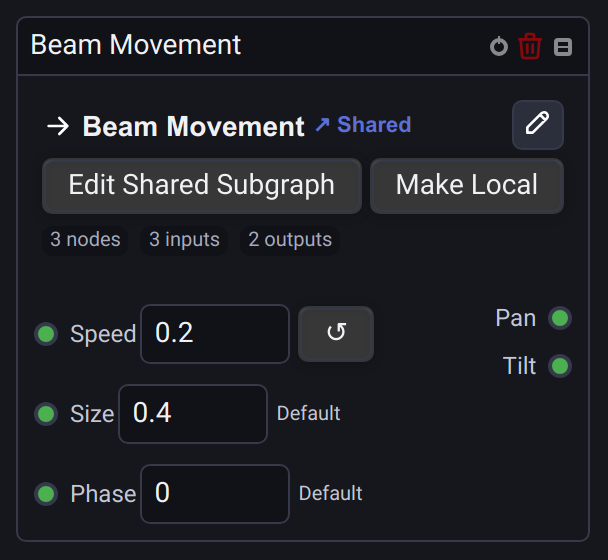
In any graph, choose Add Node → Project Subgraphs, or search for the definition by name and press Enter. Each card is marked Shared.
An unconnected input uses its shared default until you enter an instance value. Reset to default restores inheritance, including future changes to that default. Connecting a wire disables manual editing of that input. Disconnecting it restores the instance value or inherited default.
Each instance has independent runtime state, including oscillator phases and delay history. Changes to an instance's parameters affect that instance. Changes inside the shared definition affect all its instances. Moving or renaming source nodes preserves runtime state; changing the wiring can change or reset the affected processing.
Selecting an option on a Value node in the shared source updates its instances, including Buttons and Dropdown modes, without resetting the selection to the first option.
Choose Edit Shared Subgraph to open the common source. The Shared · Used in … graphs button lists its callers. Back returns to the graph from which you opened it.
Choose Make Local to detach one instance into an ordinary local group while preserving its current parameters, contents and connections. Detaching a nested reference inside the shared source also preserves signal flow in the existing callers.
When converting a local group with Make Shared, its working instance retains ownership of any Shared Values it writes, including writers inside nested groups. The source editor does not acquire ownership or write those values.
Shared Values inputs remain visible in the source while a caller owns the variable; each runtime keeps its own available writer ports. Removing a writer's input connection releases its ownership and restores the variable's default, allowing another writer to use it. This also applies when a shared output is deleted or its type becomes incompatible with that connection.
A Delay node in Updates mode receives one sample per input update through a group, including repeated requests with the same value. It does not sample the previous output while the group's internal signal is still being processed. When one input feeds several exposed outputs, the group publishes their completed values together after the internal pass.
Prepare buttons in the Function Widget
For example, create a shared Beam Movement with Speed, Size and Phase inputs and Pan / Tilt outputs. In the Subgraphs library, Create Graph creates an ordinary graph containing one instance.
| Calling graph | Speed | Size |
|---|---|---|
| Slow Sweep | 0.2 | 0.4 |
| Wide Sweep | 0.5 | 1.0 |
| Fast Sweep | 1.5 | 0.6 |
In Sequence mode, the Movement node can infer its fixture count through subgraph boundaries from the tagged Device output in each calling graph.
Connect each instance to the desired Device Output, then assign the ordinary graphs to separate Function Widget buttons. The movement logic remains in one shared definition.
Device outputs and priorities
Device nodes may also live inside the shared definition. All instances then use the same saved fixture or tag assignments. Place Device nodes in the calling graphs when each variation needs different fixtures.
An inherited Device priority comes from the outermost calling graph, including its Function Widget playback override. A definition's stored graph priority does not override its callers. Custom priority on the Device node remains explicit and takes precedence over inheritance.
For example, a graph saved at priority 300 and launched with widget override 500 gives inherited outputs inside Beam Movement priority 500. A Device with Custom priority 200 still uses 200.
Instances own separate fixture controls. Stopping one caller releases its controls while other callers keep theirs. If several instances affect the same fixture parameter, higher priority wins; equal priorities use the existing latest-update precedence.
When editing a running definition, removing a Device output releases its fixture controls immediately. Converting a nested local group with Make Shared replaces its outputs with those of the linked instance; stopping the caller also releases those outputs.
Dependencies and project transfer
Definitions may contain other shared subgraphs. References that would create a direct or indirect cycle are excluded from insertion. Missing or recursive references show an error on the instance and have no internal output.
Deleting a connected port or making its type incompatible with a wire asks for confirmation and lists the affected graphs before disconnecting those wires. Compatible type changes preserve connections. A definition cannot be deleted while it is used; remove its instances or use Make Local first.
Duplicating or copying within the same project preserves shared links. Import from Project and clipboard transfer include the required shared definitions and nested dependencies. Importing into another project creates independent definitions; future edits do not cross project boundaries.
See local Groups and their interface and the Node Graphs guide.