While simple step chases can be toggled with a single button press on a Function Widget, complex multi-track keyframe curves—such as sweeping moving head ballyhoos, intricate color gradient morphs, or programmed musical intros—demand fine-grained transport control during live performances.
The Keyframe Animation Widget (keyframe-animation) brings a dedicated, tactile transport control desk for any timeline animation directly onto your Live Dashboard.
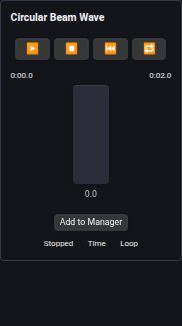
⏱️ Transport Controls & Scrubbing
The widget provides full linear playback control:
- Transport Deck:
▶ Play: Starts timeline playback from the current playhead position.⏸ Pause: Freezes the animation at its exact millisecond or beat offset, preserving physical fixture positions on stage.⏹ Stop: Stops playback, releases parameter overrides, and resets the playhead to the beginning (0:00.0).|◂ Rewind / Reset: Snaps the playhead back to zero without interrupting playback.
- Position Scrubbing (Fader): A smooth interactive scrub track lets you manually slide forward and backward through the animation. Perfect for matching a theatrical actor's walk speed or manually tracking an unexpected musical intro.
- Timecode & Progress Readout: Displays high-precision elapsed time and total duration (
0:01.4 / 0:04.0) or musical bar subdivisions (Bar 2.1 / 4.0).
⚡ Real-Time Modifiers & Musical Sync
In live concert environments, bands rarely perform at an exact metronomic speed. The widget provides live playback modifiers:
1. Speed Multipliers (bpmMultiplier)
Quick-access multiplier buttons allow operators to scale animation playback speed on the fly:
0.5x: Half-time speed for breakdown verses and ambient bridges.1.0x: Standard programmed speed.2.0x,4.0x&8.0x: Double-time through eight-times speed for high-energy drops, drum solos, and finales.
2. Synchronization to Master BPM
When the animation is set to Beats Mode in the timeline editor, the widget automatically synchronizes its progress to Unilighter's central master clock. If the master tempo changes via the header TAP button or a BpmNode, the widget proportionally scales playback without stuttering or jumping. Read more in the Time Synchronization Guide.
3. Continuous Loop Toggle
Toggle between Loop Mode (continuous cycling for background sweeps) and One-Shot Mode (executes once and stops, ideal for entrance stingers or theatrical accents).
🎮 Hardware MIDI Transport Mapping
Operators can map physical hardware transport controls to the widget using Assign Mode:
- Map hardware
PLAYandPAUSEbuttons to trigger the animation. - Assign an endless rotary encoder or motorized jog wheel to the scrub fader for manual scrubbing during rehearsals.
Read more in the Keyframe Animations Manual and the Live Dashboard Guide.