Lesson 1.4: DMX Interfaces: Connecting Hardware to Unilighter
Computers communicate using high-speed USB, Ethernet, and Wi-Fi networks. Stage lighting fixtures communicate using the RS-485 balanced serial standard.
To bridge the gap between your computer and physical stage luminaires, you need a DMX Interface (often called a DMX dongle or gateway).
This lesson explains how USB DMX hardware works using the popular uDMX interface as our baseline, why Unilighter Desktop provides the most powerful production environment, and how to operate across Web and Mobile setups.
1. How a USB DMX Interface Works
A USB DMX interface translates digital universe values calculated in Unilighter into high-speed electrical pulses (\(250\,\text{kHz}\)) transmitted down the XLR line.
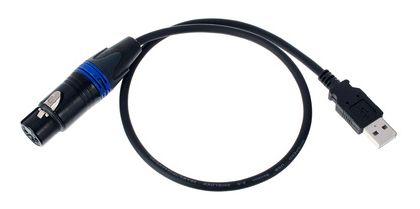
The Hardware Baseline: uDMX & FTDI Dongles
Throughout this guide, we use the widespread uDMX architecture as our reference standard.
- uDMX Interfaces: Feature an onboard ATmega microprocessor that handles USB packets and generates stable DMX512 frames.
- FTDI / Open DMX Interfaces: Use an FTDI USB-to-serial chip where DMX timing pulses are streamed directly across serial lines.
- Universal Workflow: Whether your physical dongle is a uDMX unit, an FTDI interface, or a third-party USB-DMX adapter, the connection procedure in Unilighter is identical. Unilighter auto-detects the chipset and establishes communication without requiring manual driver tweaks.
For an exhaustive matrix of tested dongles and chips, see the Hardware Compatibility Guide.
2. Choosing Your Production Environment
Unilighter runs across three distinct platforms depending on your venue setup, mobility requirements, and production scale:
| Environment | Primary Role | Key Advantage |
|---|---|---|
| Unilighter Desktop | Workstation for live concerts, tours, and permanent installs | Native drivers, zero sandbox, multi-universe routing, ultra-low latency |
| Unilighter Web | In-browser control via WebUSB | Instant zero-installation access from any computer running Chrome or Edge |
| Unilighter Mobile | Handheld control on Android via USB OTG | Agile stage-floor focusing, portable DJ setups, and field redundancy |
2.1 Unilighter Desktop: The Recommended Workstation
For live concerts, club residencies, and complex theatrical productions, Unilighter Desktop is the primary, recommended choice:
- Direct Native Hardware Access: Communicates directly with operating system USB and network sockets with zero browser sandbox overhead, delivering rock-solid sub-millisecond DMX output latency.
- Multi-Universe Routing: Drives multiple physical USB dongles and network Ethernet streams simultaneously across independent universes.
- Offline Reliability: Completely independent of internet access or browser updates during a live performance.
- Automatic Device Discovery: Plug in your uDMX or FTDI cable, launch Unilighter Desktop, and the interface connects instantly.
2.2 Unilighter Web: Zero Installation via WebUSB
Need to program a show on a borrowed laptop, or control lights from an office workstation without installing software?
- Open Google Chrome, Microsoft Edge, or Opera and navigate to console.unilighter.cc.
- Plug your uDMX dongle into the computer.
- Open Settings (or click the DMX Status icon in the navigation bar) and choose USB DMX.
- Click Connect Interface. A browser dialog prompts you to select your USB device. Select your uDMX adapter and click Connect.
- The DMX indicator turns solid green. Your web browser is now streaming live 44 Hz DMX512 directly into the XLR line!
2.3 Unilighter Mobile: Handheld Stage Control via Android OTG
Unilighter is not restricted to laptops. On Android devices, you can run a complete, fully functional lighting console directly from your smartphone or tablet:
- Connect your uDMX dongle to your phone using an inexpensive USB-C to USB-A (OTG) adapter.
- Open Google Chrome on your phone and open console.unilighter.cc.
- Tap Connect USB DMX and grant browser permission to the connected USB accessory.
Why Mobile Control Is Powerful:
- Walk-Around Stage Focusing: Stand on the stage floor right next to a performer or fixture, adjust focus and angles on your phone, and see the exact real-world results without shouting instructions back to a control booth.
- Agile DJ & Pop-Up Sets: Bring an entire lighting control system to a backyard event, pop-up lounge, or mobile DJ booth inside your pocket—no bulky laptop stand required.
- Field Redundancy: If a main show computer suffers an unexpected hardware failure, plugging the USB dongle into a phone gets your stage back under control in thirty seconds.
3. Scaling to Multi-Universe Networks: Art-Net & sACN
A single USB DMX dongle outputs 1 universe (512 channels). A modern festival rig with 16 moving heads and 10 pixel bars can easily require 1,500 to 2,000 channels (3 to 4 universes).
Running three or four separate 100-meter XLR cables from Front-of-House (FOH) to the stage is cumbersome, heavy, and susceptible to signal degradation.
Instead, professional productions run a single lightweight Cat6 network cable to an Ethernet DMX Node placed on stage:

- How It Works: Unilighter packages multiple universes into standard network broadcast/multicast packets (Art-Net 4 or sACN E1.31).
- On-Stage Distribution: The Ethernet node decodes the network stream and provides physical XLR outputs for each independent universe (e.g. Port 1 \(\to\) Truss Left, Port 2 \(\to\) Truss Right, Port 3 \(\to\) Floor Pixels).
- In Unilighter Desktop, multi-universe Art-Net and sACN network streaming are built directly into the core engine with zero third-party drivers.
📝 Self-Assessment Quiz
Think through these practical situations:
-
Scenario A: You are setting up a concert tour with 32 automated fixtures requiring low-latency synchronization and multiple universes. Why is Unilighter Desktop recommended over running the console inside a web browser?
-
Scenario B: You purchase a generic USB DMX cable online that uses an FTDI FT232R chip instead of a uDMX chip. How does the connection procedure inside Unilighter change compared to the uDMX instructions?
-
Scenario C: You are walking around a 500-seat theater auditorium aiming front wash lights and verifying beam positions on the stage. How can you use Unilighter Mobile with an Android phone and a USB OTG adapter to streamline this process?