The Device Node (DeviceNode) is the terminal execution component in a graph, routing processed procedural values directly into physical fixture DMX channels.
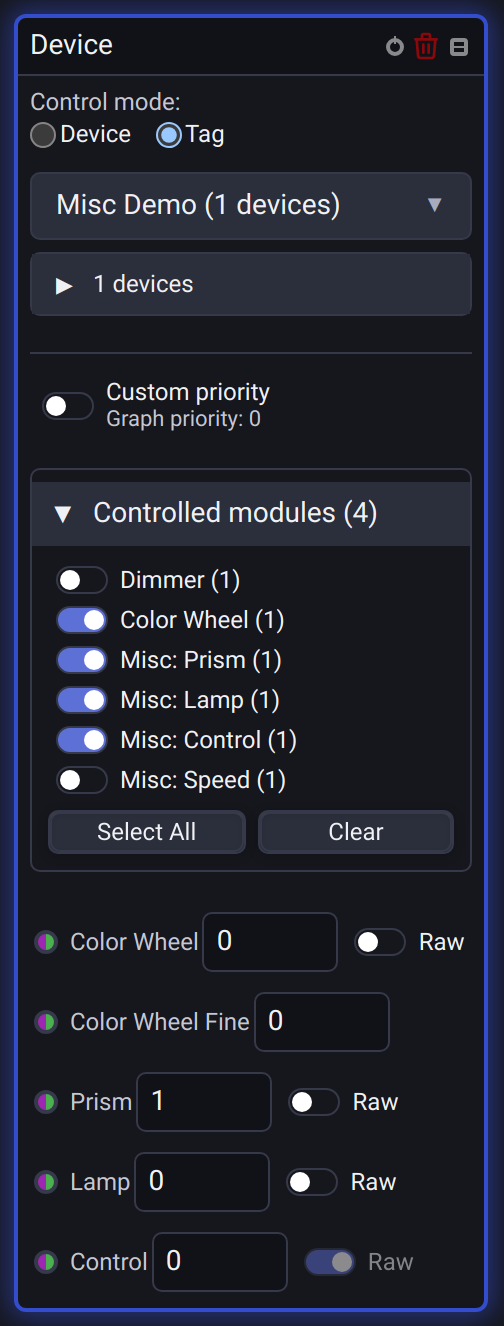
🏷️ Device vs Tag Target Modes
- Individual Device: Targets a specific physical fixture in the patch.
- Tag Mode (e.g.
#Beams,#Washes): Dynamically broadcasts socket values to all fixtures carrying the selected tag across all universes.
To start directly in Tag mode, search for tag in Add Node and press Enter on Device Tag. This creates the same Device node with Tag already selected.
Choose the controlled parameters
Selecting a fixture or tag starts with every parameter switched off. Expand Controlled modules and enable only the parameters this graph should control. Each Misc field has its own switch; enabling one field does not acquire control of the others. Select All enables all available entries and Clear releases them.
Changing the fixture or tag keeps the selected modules that the new target also supports. Misc fields match by their exact fixture name. Matching inputs retain their values, wires and Raw setting; newly available parameters remain off. Disabling a parameter releases this node's request without releasing other nodes or manual controls. Wires to disabled parameters do not make this node's branch inactive.
💡 Dynamic Socket Generation
When a fixture or tag is selected, the node dynamically inspects the profile and creates dedicated input sockets:
Dimmer(Intensity0.0 – 1.0)Pan/Tilt(Spatial coordinates)Color(RGB/HSL composite stream)Strobe/ShutterGobo/Prism/Focus/Zoom
Changing the selected fixture or tag rebuilds its input sockets and updates branch activity. A retained wire to a head or Misc socket that the new target does not expose does not keep that target inactive. If the socket becomes available again, its branch activity applies again too.
Priority
New Device nodes use the graph's Priority, set in the editor toolbar, with Custom priority off. The switch shows the inherited value below its label. This applies to individual fixtures and tags; inside nested Groups, the value comes from the outermost graph.
Enable Custom priority to edit an independent Priority for this node. The first time you enable it, the field starts at the graph's current priority. Turning it off resumes inheritance and remembers your custom value for the next time you enable it.
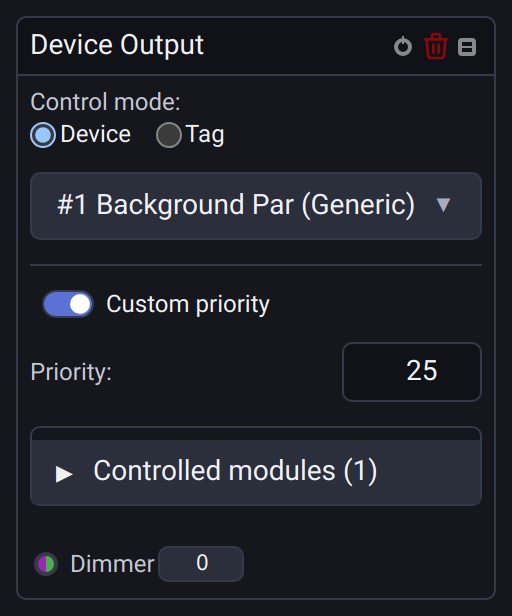
Changing the graph priority updates inheriting nodes while the graph is running, including constant inputs. If a Function Widget launched the graph with Override priority, inheriting nodes use that launch priority until the graph stops. Nodes with Custom priority enabled keep their own value in either case. Stopping, disabling, or deleting a Device node releases that node's control without releasing other sources at the same priority.
Existing projects: Device nodes saved before graph priority was introduced load with Custom priority enabled and retain their original priority, including 0. Turn the switch off explicitly to adopt the graph's priority. Saving, copying, and duplicating preserve your choice and remembered custom value.
Raw and preset priorities
Gobo Wheel and Color Wheel use independent Index and Raw controls. Across scenes, manual controls, and device graph outputs, the higher priority wins. At equal priority, a Raw DMX request wins over an Index request, even if the Index was updated more recently. A lower-priority Raw request never overrides a higher-priority preset.
Raw DMX zero is a valid physical output. Unassigned means no Raw request exists and is shown as a muted, interactive knob with a dash, not as a disabled control. Clicking or dragging it assigns a value, including zero; use the control's Release action or select a preset to stop the manual Raw override. Existing projects where Custom DMX zero meant Unassigned are adjusted when opened.
Priority changes take effect even when the numeric input stays the same. Scenes and animations preserve the winning wheel output independently of the graph, including zero and Fine values. See Device Control and existing-project animation behavior.
In a Device node, the Raw switch chooses whether the same numeric input controls the fixture's preset Index or its absolute DMX value. Switching mode releases this node's previous request while retaining its input and wires. Disabling the node, its parameter, or an inactive routing branch releases its output; there is no separate Release control on the node.
Misc and Enum controls use physical DMX values internally. In Index mode, the Device node resolves the selected option against each target fixture's profile before submitting its value. In Raw mode, it sends the input number without converting it. This preserves the exact physical DMX value in scenes and does not add interpretation flags to control priority metadata.
Typed Misc inputs and Raw
Misc inputs read their type from the selected fixture:
| Fixture field | Input with Raw off | Input with Raw on |
|---|---|---|
| Boolean | 0 off, 1 on |
Absolute DMX integer |
| Enum or Gobo Wheel | Option index starting at 0 |
Absolute DMX integer |
| Color Wheel port | Preset index starting at 0 |
Absolute DMX integer |
Discrete inputs use a step of 1. Their built-in number editor limits indices to available options and Boolean values to 0 or 1. With Raw enabled, its limits follow the parameter's DMX resolution. A raw value of 0 is transmitted as zero. Ordinary misc fields such as speed retain their existing 0–255 input range.
The Raw switch stays beside the socket when a wire is connected. It is also available for the separate Color Wheel and Gobo ports, including additional wheels and heads. Switching it changes how the current number is interpreted; it does not rewrite the input or disconnect its wire.
Turning Raw off with a number that is not a valid option index releases this node's previous request for that parameter. Other sources remain active. This also applies to changes made through MCP; fields without selectable options continue to use forced Raw.
Capturing the current look into a scene preserves Raw interpretation, including Boolean values, wheel indices used as literal DMX, zero and fine-channel resolution. The captured scene keeps this interpretation after saving and reopening, including when played with a fade. Older scenes without these settings retain their original interpretation.
If a discrete fixture field has no selectable options, Raw is switched on and disabled. Boolean always has its two built-in states, so it does not need an option list.
Fixture tags
A Device node targeting a tag exposes the fixtures' supported misc parameters as inputs, including channels such as Pan/Tilt Speed. Use these alongside Pan/Tilt sequences from Movement. An auxiliary speed channel remains a separate fixture parameter: Movement does not set it automatically.
An index is resolved against each fixture's own option list; DMX values may differ between profiles. Fixtures without the named parameter are skipped. The built-in editor uses the range shared by participating fixtures. Connected numbers and arrays are not clamped by this editor: indices are rounded, and an index absent from a particular fixture is not applied to that fixture. If any participating discrete parameter lacks options, the shared port requires Raw.
Existing projects and older versions
An existing enabled Misc module opens with all its fields selected. Historical misc Enum and Gobo Wheel inputs keep Raw on so their saved DMX numbers retain their meaning. Historical Boolean inputs show Raw off, preserving the previous off/on output. Separate Color Wheel and Gobo ports retain their index mode.
Historical separate Gobo inputs also keep their previous fallback: a valid option index selects that gobo; a number outside the option list is sent as literal DMX. This applies per fixture for tags and sequences, survives saving and reopening, and remains available when the target fixture is temporarily missing. Explicitly changing Raw adopts the selected mode for that port.
This historical fallback also applies to mixed tags where some fixtures have no gobo options. Each fixture with a matching option still uses its own index, even when the shared port shows forced Raw because another fixture has no options.
For a historical tag with the same field name used by both Boolean and Enum fixtures, each fixture keeps its original interpretation: 1 still turns the boolean fixture fully on while sending raw DMX 1 to the enum fixture. The Raw tooltip identifies this legacy boolean behavior. This compatibility setting survives saving and reopening; explicitly changing Raw, when editable, adopts one common mode for the port.
The migration adds settings without removing the legacy Misc flag, port identifiers, input values or wires. Opening and saving an otherwise unchanged historical graph keeps it readable by the previous version. Older versions cannot reproduce new individual selections or Raw modes: a selected misc subset appears there as the former whole Misc module. A target that is unavailable is kept intact until its fixture can be resolved.
Strobe speed, mode and Shutter are separate parameters and must be enabled independently; see Strobe & Shutter.
The Gobo wheel and a named misc Shake field can be controlled independently. Changing the wheel or disabling a neighboring misc field preserves the active Shake output.
When a separate Gobo control and a named misc field address the same channel, the request with higher priority wins. At equal priority, the most recent request wins, including a repeated request for the same value. Releasing the winner restores the remaining source.