Device Control Widget
The Device Control Widget (device-control) provides dedicated tactile mixing and parameter adjustments for physical lighting fixtures.
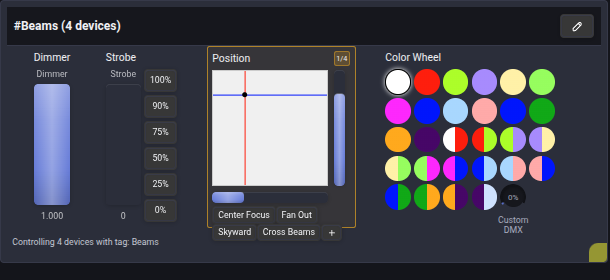
🏷️ Control Modes: Tags vs Individual Devices
The widget operates in two primary modes:
- Tag Mode (e.g.
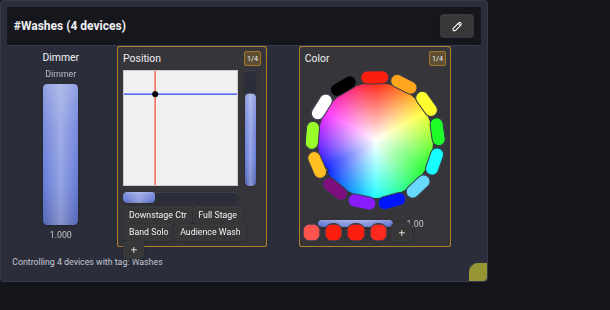
#Beams,#Washes,#Pars): Commands sent through the widget are broadcast to all fixtures sharing the tag simultaneously. - Device Mode: Dedicated individual control over a specific fixture head.
🎛️ Core Control Modules
The Device Control widget integrates specialized interactive UI Controls:
- Intensity (Fader): Smooth vertical fader for master dimmer adjustment.
- Strobe (Fader with Presets): Strobe shutter speed fader with quick-jump percentage buttons (
100%,90%,75%,50%,25%,0%). - 2D Position (XY Pad): Crosshair touch surface for Pan/Tilt targeting with saved position presets (Center Focus, Fan Out, Skyward, Cross Beams).
- Color Mixing (Color Picker): Full-spectrum RGB/HSL color wheel with white balance calibration and saved palette swatches.
- Motorized Gels (Color Wheel): 28-gel color swatch grid for fixtures with physical color wheels.
- Beam Optics (Rotary Knob): Independent Focus, Frost and Zoom controls when supported by the fixture.
Release beam controls
Focus, Frost and Zoom each have a Release button in their parameter header, both in this widget and on the fixture's Device page.
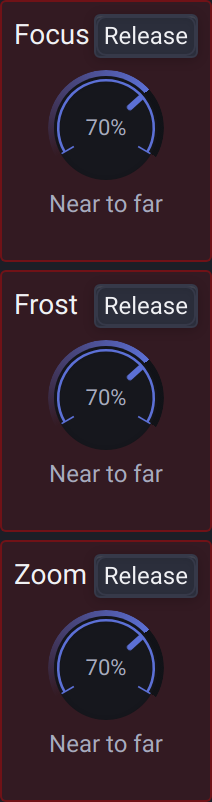
The button appears while that parameter has manual control. Click it to return the parameter to the next controlling scene, animation or node graph, or to its default when no other source remains. Other parameters and heads stay under their existing control.
In Tag Mode, the button appears if any member holds manual control of that parameter, even when the displayed fixture does not. Release clears the parameter for the selected head across the tag's current fixtures. Use Release All to release all manual controls for the selected fixture or group.
In Scene Editor, these headers show Reset instead. It removes the stored scene parameter without releasing live manual control.
🚨 Border Indicators & Priority Feedback
The widget provides real-time visual feedback reflecting the console's Priority System:
🔴 Red Border: Active Manual Control (has-control)
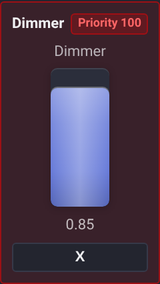
- Indicates that the operator currently holds manual control over this parameter at priority
100. - Click the Release (
X) button to release priority and return control to background scenes or node graphs.
🟡 Yellow Border: Inconsistent Tagged State (inconsistent-value)
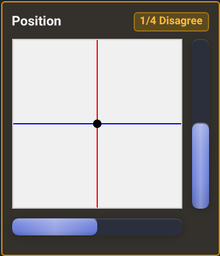
- Appears when fixtures belonging to this tag have differing values (e.g., individual lights were adjusted separately).
- Displays a badge indicating how many devices match the current control position (e.g.
1/4). Moving the control synchronizes all fixtures.
Head groups, misc visibility and shutter controls
Custom DMX and Unassigned
Color Wheel and alias-based Gobo controls have a Custom DMX knob. A muted dash means Unassigned: the knob remains interactive, and clicking it assigns zero. Zero is a real DMX value and stays assigned until you select a preset or use Release. Mouse-wheel and hardware assignments can also assign zero.
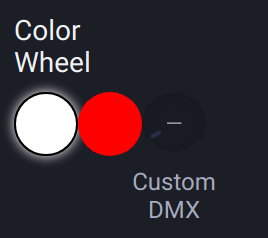
The highest-priority request wins. At equal priority, Raw wins over a preset index. Selecting a preset releases only this manual source's Raw request; it does not release another source. Release returns to the remaining requests or the fixture's saved state. Scene capture retains the effective Raw output, including zero and Fine values.
Manual wheel presets and Gobo settings restored from older projects retain their active border and Release action. Releasing them leaves requests from other sources intact.
Wheel and Gobo adjustments made through automation share the same manual controls as this widget. Choosing a preset replaces the manual Raw override, and the individual Release action leaves other sources intact. Release All remains available while wheel controls or other device controls hold manual priority.
Widgets include Misc controls by default when the fixture supplies them. In widget settings, hide individual misc parameters; the choices are grouped by device. Head-specific misc controls appear with their head, and the Shared frame is omitted when there are no heads.
Boolean parameters use their full physical DMX range. A parameter with a Fine channel ranges from 0 to 65535; full On is 65535, while 1 is literal DMX 1. The same range is available in Remote Control and automation.
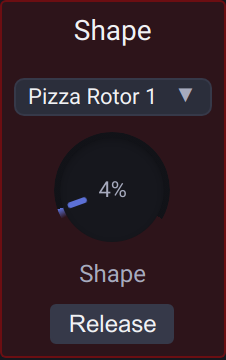
Gobo-wheel channels, including custom pattern selectors such as Shape, appear once under their channel name in Misc. Choose a named option or adjust the knob to send a specific DMX value, then use Release to return control to other sources. These channels do not add a duplicate Gobo block in the device view, Dashboard, scene editor or Remote Control. Hiding the parameter or disabling Misc in widget settings also hides its control.
For gobo and Misc selectors with more than five options, Assign Mode shows previous, next and random icons over the selector. Assign each action separately; previous and next wrap around the available options, and random chooses a different option when possible.
Fixtures with several color wheels expose each wheel. Channel names help distinguish Dimmer and Strobe; the current fixture can be opened in Fixture Editor. Speed, mode and Shutter have independent control/release actions; a single available strobe mode does not display an unnecessary selector. See Strobe & Shutter.