Local Group Node
A Group contains its own node graph and exposes named inputs and outputs on one card. Choose Make Shared when several graphs should reuse one common definition instead of maintaining separate contents.
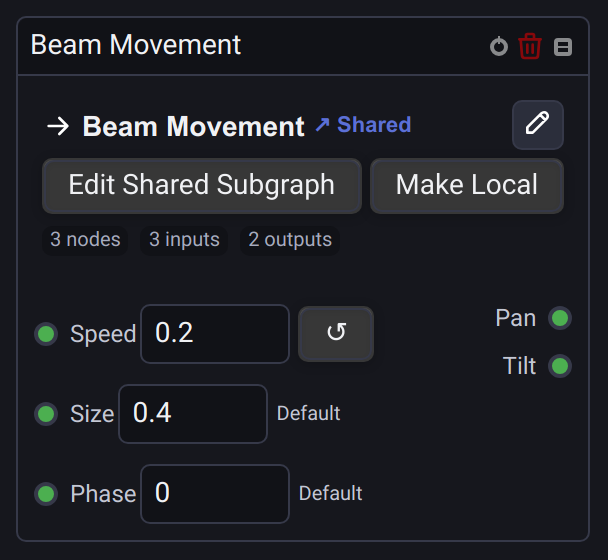
The linked version after Make Shared:
Edit local contents
Add a Group from Add Node → Process. Use its edit icon (Edit Group Contents) to open the internal graph.
The Group Inputs and Group Outputs nodes define its interface. Add named Number, Sequence, Number or Sequence or Audio ports and connect them to the internal processing nodes. Back in the calling graph, connect signals to the Group card or enter constant values for its unconnected numeric inputs. Expand the local card to manage its exposed interface.
A Device output inside a local Group inherits the outermost graph's playback priority unless Custom priority is enabled on that output. Internal graph editors show the inherited priority read-only. See Device output priorities.
Reuse one definition
Choose Make Shared on the local card to place its contents in the project's Subgraphs library. The existing card becomes a linked instance and keeps its values and connections. Add more instances through Add Node → Project Subgraphs.
Linked cards offer Edit Shared Subgraph to change all uses immediately, and Make Local to detach one instance. Read Shared Subgraphs for defaults, per-instance values, project transfer and examples with the Function Widget.
See also Group Inputs and Outputs and the Node Graphs guide.