Motorized Gel Color Wheel
The Motorized Gel Color Wheel selector is engineered for moving head beam fixtures, profile spots, and scanners that utilize physical rotating color filter discs.
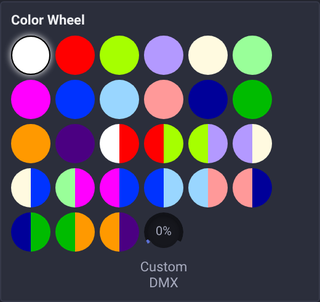
🎡 Features & Continuous Rotation
- Indexed Gel Swatches: Visual swatch buttons for the positions defined in the fixture profile, including solid colors and split two-tone filters. Each button sends its position's own DMX value.
- Active Filter Glow: Clearly indicates the currently engaged filter position.
- Custom DMX Dial: Fine-tune intermediate split-color positions between two adjacent gel filters.
- Continuous Motorized Spin: Rotate the DMX dial into the spin range to engage continuous motorized wheel rotation for strobe color chases.
A nonzero Custom DMX value overrides the selected swatch. Return the knob to 0 to use the selected swatch again. Clicking any swatch, including the already selected one, resets Custom DMX to 0 and applies that position. This also applies to tagged fixtures and swatches selected in the scene editor.
In Device Control, enable Assign Mode and click the Custom DMX knob to assign MIDI, keyboard, OSC, or Surface input. Absolute input spans the raw DMX range 0–255. Each wheel and head has its own assignment target.
- Tagged Fixture Broadcast: In a tag-based Device Control, both indexed presets and custom raw DMX dial positions are applied to every fixture in the tag.
Multiple wheels and undefined positions
Device Control exposes each color wheel when a fixture has more than one. A wheel without defined colors still opens: use its custom DMX knob to set a raw channel value, including 0. Tagged controls broadcast indexed presets and custom raw positions to all fixtures in the tag.