The Color Picker provides intuitive full-spectrum chromatic mixing with calibrated color temperature conversion for RGB, RGBW, RGBAW-UV, and CMY fixtures.
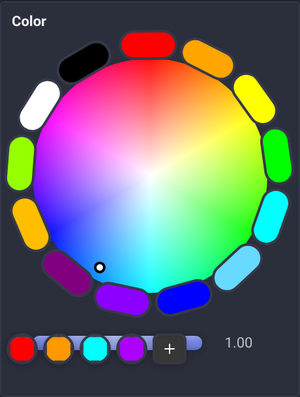
🎨 Color Mixing Architecture
- Full-Spectrum Color Wheel: Click or drag anywhere on the chromatic disc to select Hue and Saturation seamlessly. Touch dragging does not scroll the page, and other fingers may control separate faders at the same time.
- Center White Convergence: Clean radial gradient toward pure white at the center for pastel and tint mixing.
- Outer Saturation Ring: 13 quick-access primary, secondary, and tertiary gel buttons surrounding the wheel.
- Luminance Value Slider: High-resolution bottom slider to adjust brightness (
0.0–1.0). - Saved Color Palettes: Bar of quick-access swatches (Warm Tungsten, Deep Blue, Royal Purple, Vibrant Cyan). Click
+to store custom calibrated gel colors.
In Device Control and Node Graph widgets, click any of the 13 built-in buttons around the wheel or a saved color swatch in Assign Mode to assign it to a MIDI control, keyboard shortcut, OSC signal or Surface button. Clicking a preset in Assign Mode opens its assignment without changing the current color. Leave Assign Mode to recall the assigned color. Built-in buttons and saved swatches have independent assignments, even when they represent the same color. Deleting a saved color removes its assignment unless another older duplicate shares it.
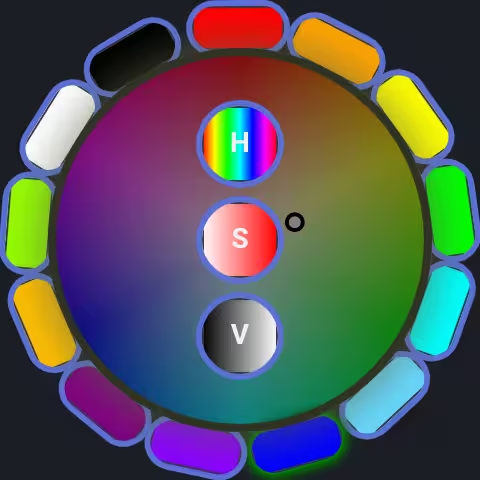
Diagonal movement adjusts Hue and Saturation together. With the pointer over the color disc, Ctrl + trackpad scrolling also updates both directions together.