The Shared Values Node (SharedValuesNode) allows independent node graphs across the same project to read global project variables without creating tangled wiring connections.
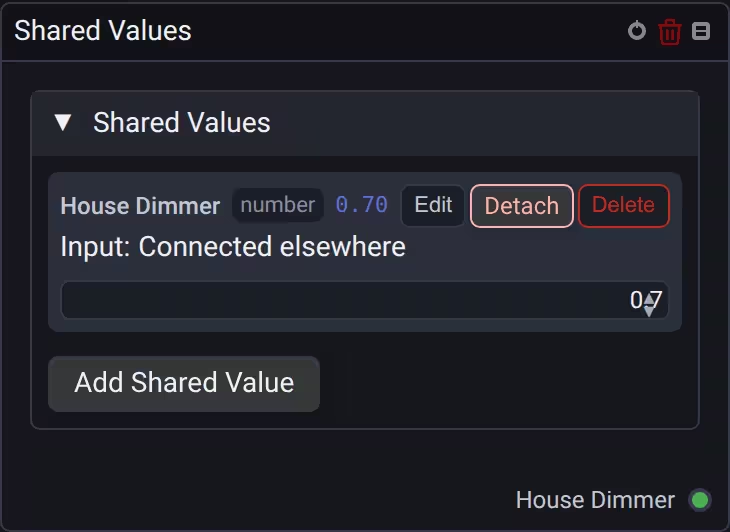
Activation and updates
When you add a Shared Values node, ports for existing project variables appear immediately, whether the graph is on or off. You do not need to restart the graph. Every variable has an output; an input is available only when the variable is not owned by another node. In a shared subgraph's source editor, inputs remain visible while a runtime instance owns the variable.
When you turn a graph on, its Shared Values nodes read the current project variables and immediately send them to connected nodes. This also happens when you turn the graph on again, even if the values have not changed.
For example, if another graph has already set a shared dimmer value to 0.46, enabling a graph that connects this variable to a Device node applies 0.46 without moving the source fader. Changes made while the receiving graph is off are applied the next time it is turned on. While it is running, subsequent changes continue to update connected nodes.
Disabled nodes and inactive branches retain their normal output restrictions. Reading a variable does not take ownership away from the node that sets it.
Detaching a writer
Expand Shared Values and choose Detach beside an occupied variable to make its input available again. Confirm the warning to remove the current writer's input connection or manual value and reset the variable to its default. This also clears an obsolete ownership record if the original writer no longer exists.
If the writer belongs to a shared subgraph, detaching its connection changes the shared definition and affects all its instances. Cancel the warning to leave the variable and its writer unchanged.
🌐 Global Project Architecture
- Project Scope: Shared variables are stored in the project container and can be driven from the Dashboard, Master Faders, or specific master graphs.
- Multiple Consumers: Hundreds of nodes across separate graphs can subscribe to the same shared variable simultaneously.
- Polymorphic Data Types: Shared values support:
- Number: Single scalar values (
0.0 – 1.0or raw values). - Sequence: Multi-element numerical arrays (up to 64 elements) for project-wide procedural patterns.
- Number or Sequence: Polymorphic slot that can dynamically store either a scalar number or an array sequence.
- Audio: Raw audio buffer or spectrum data.
- Color: RGB/HSL stage color values.
- Number: Single scalar values (
🔌 Sockets Reference
| Socket | Direction | Data Type | Description |
|---|---|---|---|
| Variable Name | Setting | String | Selects the global project variable to bind. |
| Value | Output | Number / Sequence / Color |
Live evaluated value of the shared global parameter. |