The Frequency Meter Node (FrequencyMeterNode) analyzes an Audio FFT stream and turns selected frequency energy into values that can drive fixtures, gates, colors, and animations.
🎚️ Analysis Modes
In Add Node, search for Frequency Meter to create a Parametric analyzer, or Frequency Split to create it in Fixed mode. Press Enter to add the first matching result, or click the desired variant. Both are the same Frequency Meter node, and you can change its analysis mode afterward. The unfiltered Frequency Meter entry continues to create a parametric analyzer.
- Parametric: Measures the range between Min Freq (Hz) and Max Freq (Hz) and returns one RMS value. Use this for a focused kick, vocal, bass, or effect range.
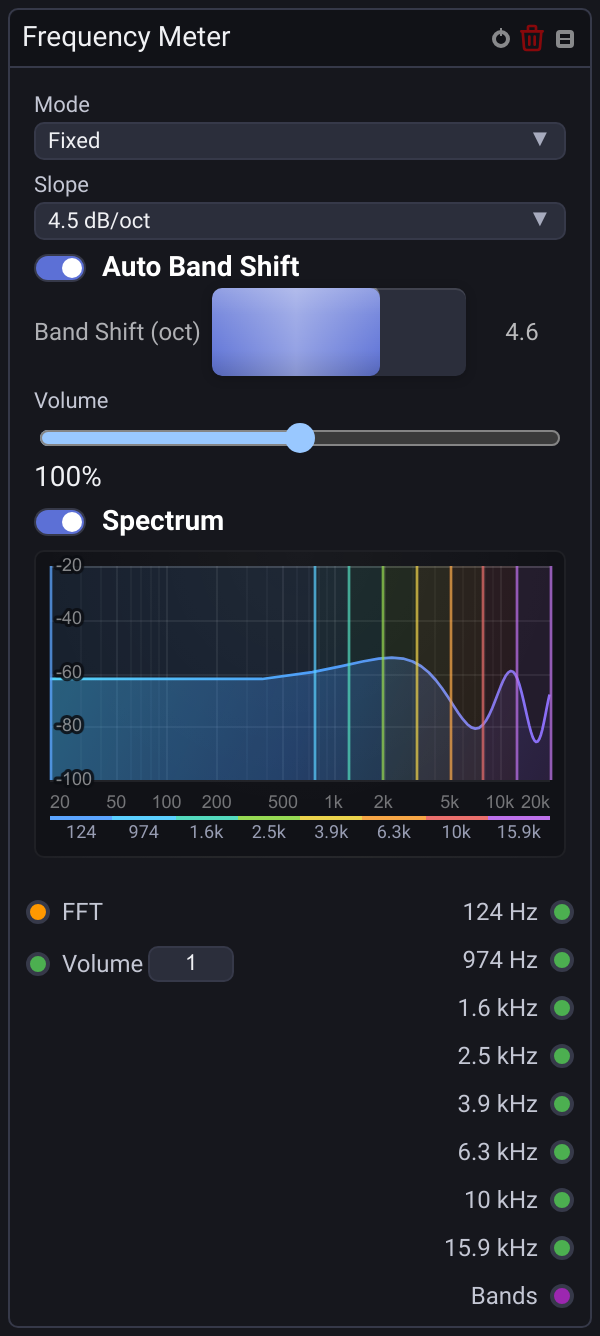
- Fixed: Measures eight bands with adjustable crossover frequencies. Use the individual band outputs or the complete Bands array.
The Volume input applies a 0–200% gain before the selected measurement is calculated. The Spectrum display can be enabled in either mode: parametric mode highlights the selected passband, while fixed mode marks all eight bands with a matching color legend. Output names and legend labels show the current band centers.
🎛️ Fixed-Band Settings
- Auto Band Shift: Enabled for newly created nodes. Adjusts the crossovers to the incoming audio's FFT Size and sample rate, and recalculates them when either changes. At small FFT sizes, the lowest band becomes wider so several outputs no longer repeat the same unresolved low-frequency measurement. At
48 kHz / 128, the automatic shift is4.6octaves; at48 kHz / 2048, it is0. - Band Shift (oct): Moves the internal crossovers together. Positive values widen the lowest band and redistribute the remaining bands higher; negative values move the crossovers lower. The shift tapers toward the upper edge so the bands remain contiguous. Adjusting the fader switches to manual mode. Turning off Auto Band Shift keeps its current shift; turn it back on to follow resolution changes again. Shifts are limited to keep the band edges in order. Shifted and automatic layouts stop at
20 kHzor the audio's Nyquist frequency, whichever is lower. - Slope: Choose
0,1.5,3,4.5, or6 dB/oct. The default remains4.5 dB/oct.0disables spectrum weighting; higher values give more weight to frequencies above1 kHzand less to frequencies below it. This changes measured levels, not crossover frequencies.
Older projects keep their original bands and slope until you change the settings. Enable Auto Band Shift on an existing fixed-mode node to use resolution-aware distribution. Socket identities and the low-to-high order of the Bands array stay unchanged when the displayed frequencies move.
Automatic distribution cannot recover frequency detail missing from a small FFT. For separate kick and sub-bass measurements, increase FFT Size in the Audio Input Node.
🔌 Sockets Reference
| Socket | Mode | Direction | Data Type | Description |
|---|---|---|---|---|
| FFT | Both | Input | Audio |
Raw FFT stream from an Audio Input Node. |
| Min Freq (Hz) | Parametric | Input | Number |
Lower edge of the measured range, from 20 to 20000 Hz. |
| Max Freq (Hz) | Parametric | Input | Number |
Upper edge of the measured range, from 20 to 20000 Hz. |
| Volume | Both | Input | Number |
Analysis gain from 0 to 2. |
| RMS | Parametric | Output | Number |
Energy level inside the selected range (0.0–1.0). |
| Eight frequency-labeled sockets | Fixed | Output | Number |
Band energy (0.0–1.0), from lowest to highest. Labels follow the current crossovers; the original unshifted centers are 32, 75, 180, 420, 1k, 2.4k, 5.6k, and 13k. |
| Bands | Fixed | Output | Number Array |
The eight fixed-band levels in low-to-high order. |
💡 Practical Stage Recipes
- Sub-Bass Flash: Use Parametric mode with
40–100 Hz, connect RMS to a Gate Node, and route the envelope to a strobe or dimmer. - Eight-Band Colorizer: Use Fixed mode, leave Auto Band Shift enabled, and connect individual band outputs to Math or Color logic for a multi-band effect. Adjust Band Shift (oct) if you want to tune the crossovers manually.
- Live Spectrum Debugging: Enable Spectrum while tuning the frequency range. The guides show where the passband sits against the live FFT curve.