The BPM Node provides the project clock and estimates musical tempo from a connected Audio Input Node. Enable Control tempo to let a confidently tracked audio beat gradually steer the master tempo and phase.
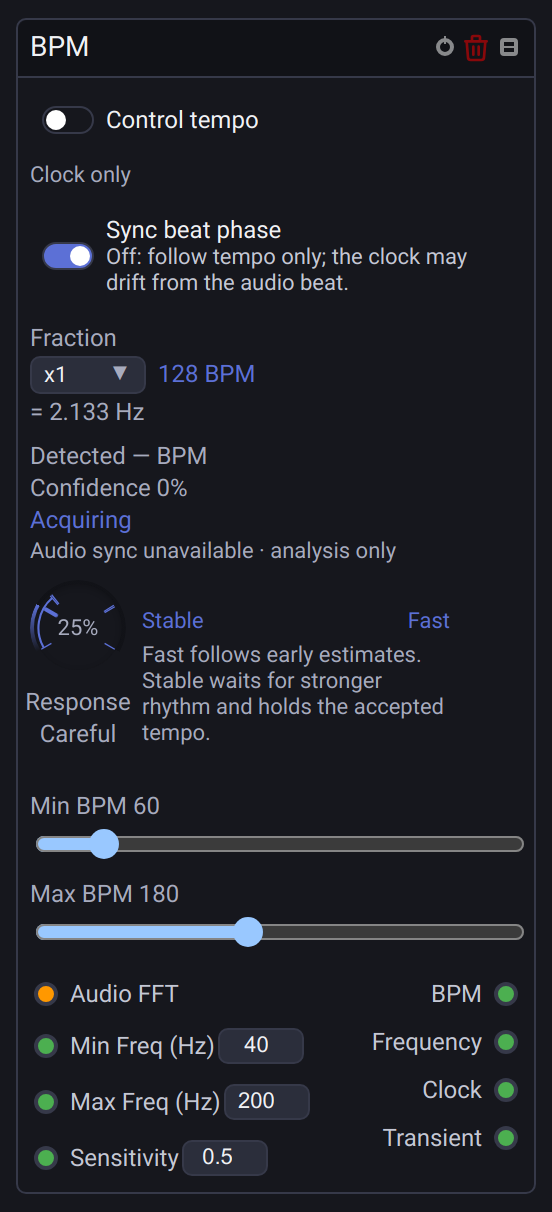
Connect and acquire
- Select the actual input device in Audio Input. For a virtual audio cable, choose that device explicitly rather than assuming the default microphone carries the music.
- Connect Audio FFT to the BPM node. The detector analyzes incoming audio even while Control tempo is off; the master clock remains unchanged.
- Start the graph and play music with a clear repeating beat. Begin with Min Freq
40 Hz, Max Freq200 Hz, Sensitivity0.5and tempo bounds60–180. - Observe Detected, Confidence and the tracking state. Enable Control tempo when this source should steer the show. Only one node can own tempo at a time.
The live audio analyzer runs independently of the graph frame rate, using a 2048-sample window and a 256-sample hop. It normally examines eight seconds of changing spectral energy, combining the selected attack band with rhythmic context from 40–4000 Hz. This helps when the bass contains extra notes or misses some beats. The selected band still determines the attacks reported by Transient. Half-time and double-time interpretations can both describe the same music; narrow the tempo bounds if you need one particular pulse level.
If Min BPM is below 60, history extends to eight beats at that minimum, up to 32 seconds at 15 BPM. Slow rhythms need more acquisition time to collect enough complete beats.
The detector uses subdivisions as supporting rhythm rather than requiring every attack to land on a master beat. Sustained tones and vibrato are suppressed so that pitch movement alone is less likely to suggest a clock. With dense attacks or wide tempo bounds, a full grid comparison can span several graph updates to keep lighting playback responsive; the previous reading remains visible until the next estimate is complete.
Several BPM nodes connected to the same Audio Input share one live capture analyzer. Each keeps its own frequency band, sensitivity, tempo bounds and tracking history.
FFT Size, Smoothing and Volume on Audio Input continue to affect its spectrum and RMS outputs. The dedicated tempo analyzer uses the captured audio before those display/analysis adjustments; its frequency band and sensitivity are set on the BPM node. Sensitivity adjusts individual attack picking; periodic quiet audio can still be tracked when no separate Transient pulses are detected. It does not lower the confidence required for tempo control.
Choose the response
Turn Response toward Fast for early estimates that can be corrected as more music arrives, or toward Stable to wait for stronger evidence and hold the accepted tempo. The default is 25% · Careful. This is separate from Sensitivity, which adjusts attack picking.
| Response | Behavior |
|---|---|
| 0% · Stable | Waits for at least 95% confidence and eight stable beats. Holds the accepted tempo; a new tempo needs twelve beats of fresh confirmation. |
| 25% · Careful (default) | Requires 80% confidence and four stable beats. Holds the accepted tempo; a new tempo needs eight beats of fresh confirmation. No provisional tempo control. |
| 50% · Balanced | Shortens the confirmation period and accepts somewhat weaker evidence. |
| 75–100% · Fast | Can follow a Provisional estimate before a confirmed lock. Higher values use shorter recent history and lower the early evidence requirement. |
| 100% · maximum Fast | Can use the first interval between new attacks immediately, then refine it with a short spectrum window. Estimates update as audio arrives; there is no wait for Locked. |
An early estimate can be wrong, including half-time/double-time guesses. Provisional follows tempo only; beat-phase correction waits for Locked. The master tempo still changes gradually, so the displayed estimate can move ahead of the actual master. Maximum Fast cannot infer a tempo before there is a usable interval or repeating audio evidence. After silence it can use new intervals without restarting capture.
At 0–33%, estimates less than 0.5 BPM away from the accepted tempo do not replace it. A larger difference needs a fresh, continuous confirmation period; a brief excursion, weaker confidence or loss of input does not complete that period. The accepted replacement averages the confirmed estimates. Actual fractional tempos are retained; they are not forced to whole numbers. Balanced and Fast continue refining their accepted estimates as evidence arrives.
Changing Response clears collected detector history and starts acquisition with the new setting. If the detector was following a Provisional estimate, the master stops moving toward that estimate and keeps its current tempo until a new estimate qualifies for control. This also applies when leaving Fast. Leaving Fast after a confirmed lock retains the confirmed tempo target during reacquisition. The setting is saved with the node; older project files use the Careful default.
Choose phase synchronization
Sync beat phase is on by default, including in older projects. With Control tempo enabled and a confirmed lock, it gradually aligns the master clock with the captured audio beat. This uses temporary speed corrections: the actual master BPM can still move slightly while Stable holds its accepted tempo.
Turn Sync beat phase off to follow only the accepted tempo. In Stable/Careful, the master settles to that tempo and holds it until a new tempo is confirmed. Without phase correction, a small estimation error can gradually move the clock away from the audio beat. Switching either way preserves detector history and animation position; it does not restart acquisition or immediately reset the beat. The setting is saved with the node and can be edited before audio is ready.
Read the status
| State | Meaning |
|---|---|
| Acquiring | Collecting fresh evidence. No new automatic tempo or phase correction is applied. |
| Provisional | Fast mode is following an early estimate. Tempo may be corrected as more evidence arrives; audio beat phase is not yet trusted. |
| Locked | A consistent musical grid has been accepted. With tempo control enabled, the master clock gradually follows it. |
| Holdover | Recent audio evidence is weak or disagrees with the accepted grid. Phase correction pauses and the clock settles to the last accepted tempo. |
| Lost | Reliable support has been absent for more than eight accepted beats. The master clock continues; fresh evidence is required to resume tracking. |
Detected is the current estimate. The BPM value beside Fraction is the actual master tempo, which can differ while acquiring or gradually aligning phase. Confidence measures support for the proposed grid; it is not a probability that the musical interpretation is correct. Numeric readouts refresh up to four times per second, or ten while showing a Provisional estimate; tracking-state and input-readiness changes appear immediately.
The header and textual BPM readouts show at most one decimal place, omitting a trailing .0. Calculations, saved tempo and numeric outputs retain full precision.
With Sync beat phase enabled, phase tracking smooths small changes in the estimated beat position and requires a large phase change to remain consistent for two beats before following it. Regular subdivisions retain the previously accepted beat grid as the analysis window moves. This reduces unnecessary master-tempo movement when successive estimates briefly choose another subdivision. A persistent new grid, including a song change at the same tempo, is still followed gradually; confirming that phase change adds about two beats before alignment begins. Correction becomes gentler near the beat, without resetting running animations on each attack. A stable but musically incorrect phase can still be followed: confidence alone cannot identify the intended beat.
A repeating beat may need several seconds before a stable candidate emerges; the four-beat acquisition period starts after that. Seeing a plausible Detected value does not by itself mean tempo control should start. At the default Careful setting, initial acquisition requires confidence of at least 80% and a candidate remaining within 1 BPM for four beats. Tracking requires at least 60% confidence. Replacing the held tempo requires a difference of at least 0.5 BPM and eight beats of fresh candidate evidence at acquisition confidence. Response adjusts these requirements; maximum Fast also permits provisional tempo control before they are met. Brief gaps do not immediately change the accepted tempo.
Audio sync unavailable · analysis only means timestamped live analysis is not ready or unavailable, for example before audio capture starts, in an unsupported host, or after a worklet failure. Legacy FFT input can still produce diagnostic estimates from the selected band, but cannot steer the master tempo or phase.
Outputs and fractions
| Socket | Type | Meaning |
|---|---|---|
| BPM | Number | Actual master project tempo, including any gradual synchronization adjustment. |
| Frequency | Number | Master clock frequency with the selected Fraction. At 120 BPM, x1 is 2 Hz and /2 is 1 Hz. |
| Clock | Number | A 1 on the graph update that crosses a clock subdivision; otherwise 0. Follows Fraction and continues without audio. |
| Transient | Number | A 1 when a new audio attack is detected; otherwise 0. Attacks may include syncopation and do not constitute a beat grid. |
The graph and output frame rate still limit when physical lighting updates occur. Several boundaries during a delayed frame or at a very fast fraction can coalesce into one pulse; the node does not replay a burst of missed flashes.
Old project files may show Trigger (legacy mixed). This preserves their original connections and combines master beats with audio attacks while controlling tempo. Use Clock or Transient for new connections. New nodes do not have the mixed output.
Control and limitations
Manual tempo edits and header TAP take control away from the audio node. Turn Control tempo on again to resume automatic steering. A disabled graph or disconnected input releases ownership.
Disabling the connected Audio Input disconnects its background tempo analysis too. Restarting the graph leaves that input disabled until you enable it again. Continuous audio tempo corrections preserve step-animation hold timers, playback order and active fades.
Stopping the graph, changing the source or detector settings, and audio-clock interruptions discard old tracking history. Saved estimates are not restored as a live lock when opening a project.
Synchronization is relative to audio captured by Unilighter. It does not measure or compensate for delays in external speakers, audio routing or lighting fixtures. It tracks repeating musical beats, not the first beat of a bar. Sparse vocals, free timing, breakdowns, dense percussion and rhythmically ambiguous music can delay or prevent a reliable lock. A confident estimate can still choose a different musical pulse level. Before unattended song changes, test the actual playlist and routing with Control tempo off, then check both the accepted tempo and lighting timing with it on. Use manual TAP when necessary.
See Time Synchronization for master tempo controls and Visual Node Graphs for routing.