Live Dashboard & Workspace
The Unilighter Live Dashboard is a modular, high-performance control desk engineered for concert tours, DJ sets, theatrical performances, and permanent architectural installations. It unifies static scenes, procedural animations, audio-reactive macros, and physical fixture controls into an intuitive, touch-ready workspace.
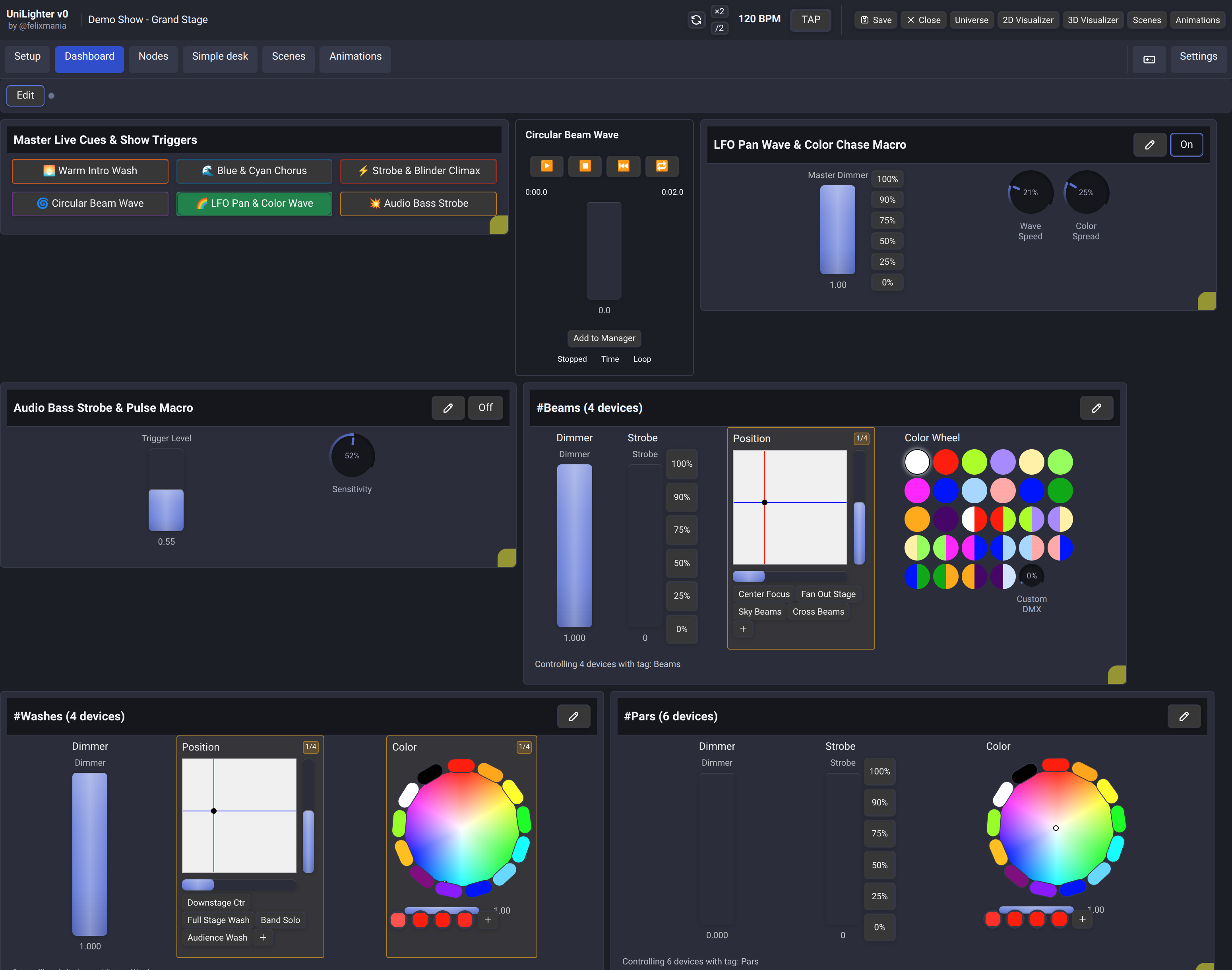
Dashboard MIDI, keyboard and OSC bindings become available when the project loads and keep working while you edit a Node Graph or use another console page. You do not need to visit Dashboard first. Close the project to release its Dashboard bindings.
While Dashboard is visible in Edit mode, Function Widget execution is blocked. If you switch to another console page, its bindings can run again. Returning to Dashboard restores the selected Edit mode and its execution guard.
🎛️ Architecture & Workspace Philosophy
Traditional lighting desks rely on rigid, fixed fader banks. Unilighter provides a dynamic grid designed around modern live performance workflows:
- Zero-Latency Live Busking: Instant feedback for cue launching, dimmer master overrides, and live color picking.
- Hierarchical Layout: Arrange master playback controls on top and fixture group mixing desks below.
- Multi-Device Real-Time Sync: Any modification made on the dashboard instantly propagates across all connected desktop and mobile remote consoles.
🧱 Modular Widget Ecosystem
The dashboard is built entirely from specialized widgets. Explore each widget manual below:
- 🔘 Function Widget: Launch scenes, animations, Node Graphs and Combo Functions with Toggle, Exclusive or Hold buttons; use Random selection and optional Cue List Shuffle.
- 🎚️ Device Control Widget: Tactile multi-parameter faders, 2D Pan/Tilt XY pads, and color wheels for Tags or single fixtures.
- 🎞️ Keyframe Animation Widget: Dedicated timeline transport controls (Play, Pause, Stop, Loop) and manual scrubbing.
- 🕸️ Node Graph Widget: Live macro dials and faders wired directly into background node logic.
- 🗂️ Group Container Widget: Collapsible, titled panels to organize complex stage layouts into logical zones.
🛠️ Dashboard Customization & Editing
In Edit mode, each card has a grip followed by movement arrows, Move to Group and Delete Widget.
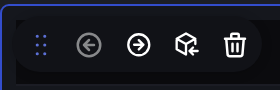
- Toggle Edit Mode: Click the Edit button in the top left corner of the dashboard.
- Add Widgets: Use the widget-creation actions in the toolbar to choose a widget type.
- Reorder: Drag the grip to the left of a card's movement arrows and release at the insertion line. Cards keep their automatic row layout. You can also use the arrows to move one position at a time.
- Resize: Drag the bottom-right handle of any widget card to adjust its dimensions.
- Save: Click Save in the console top bar to persist your layout to project storage.
Dragging changes the order only within the current list: the main Dashboard or one group. Use Move to Group to move a card into another group or back to the root. Press Escape or release outside the original list to cancel. Switching to Execute also cancels an unfinished drag.
On touch-capable devices, including laptops with a touch screen, the grip is hidden by default. Developers can enable the experimental Dashboard drag on touch devices flag under Settings → Developer. This setting is saved in the current browser; it does not change the project. When enabled, drag from the grip with a finger, pen or mouse; the rest of the page retains normal scrolling.
Insert a widget at a specific position
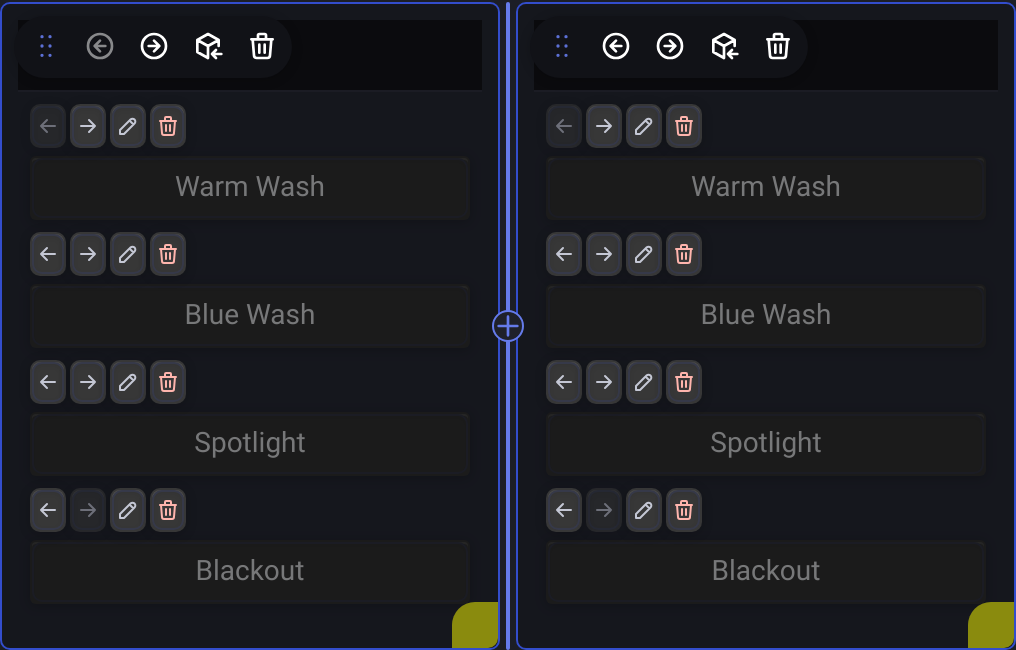
In Edit mode, move the mouse over the gap between two widgets. An insertion line with a + appears without changing the spacing or moving existing cards.
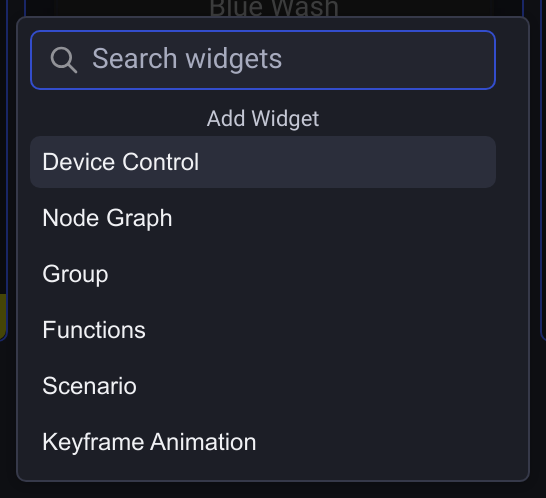
Click the line or + to open Add Widget. Choose a type, or use Search widgets and the arrow keys followed by Enter. Device Control, Node Graph and Keyframe Animation then ask you to select their existing target, just like the toolbar actions.
- Insert before the first widget, between widgets or after the last widget. For wrapped layouts, you can also use the gap between rows or columns.
- The same workflow works inside Group Container Widgets, including nested groups and both Row and Column layouts.
- The new widget is inserted at the chosen position; cards then reflow normally to accommodate it. Hovering and opening the menu leave the existing layout unchanged.
- Click outside the menu to cancel. Escape clears a search first and closes the menu when the search is empty. Cancelling the target picker creates nothing.
- If the project, target group or sibling order changes while choosing, or you leave Edit mode, the pending insertion is cancelled.
This shortcut uses mouse or pen hover. On touch screens, use the toolbar or the group's Add Widget action to append a widget. These actions also remain available when a list is empty. Save the project to keep the new order.
Dashboard widget scale
Open Settings → General → Global Settings and adjust Dashboard UI Scale to change the size of widgets and their controls independently from the rest of the console.

- Choose from 10% to 200%, in steps of 10%. Changes apply immediately in both Edit and Execute mode, including widgets inside groups.
- The initial value matches UI Scale. Whenever you change UI Scale, it also replaces Dashboard UI Scale with the same value. You can then adjust Dashboard UI Scale again without changing UI Scale.
- The Dashboard toolbar, application navigation and configuration dialogs keep the application UI Scale. The embedded demo also follows UI Scale, independently of Dashboard UI Scale.
- This preference is saved locally in your browser or app installation. It does not change saved widget dimensions, project files, Control Surfaces or the separate Remote Dashboard.
Control Surfaces
Click Surfaces in the Dashboard toolbar to build a touch view for cue buttons, dimmers, XY channels and colors. Map each input to an existing control through the Surface tab in Assign Mode; Try it hides the editor for local use.
Dashboard targets register automatically after the project loads, including while another console page is open. Surface input waits until those targets are ready. Surface values are input state; changes made directly on Dashboard or through MIDI do not feed back into the surface.
The editor is available in web, Unilighter Desktop and Unilighter Solo. Desktop can also share a single surface with guests over the local network, independently of full Remote Dashboard access. Read Control Surfaces for layout, bindings and sharing.
Groups and focused graph controls
Dashboard groups use the same widget-creation choices as the main dashboard and can contain Functions and other widget types. A Device Control widget inside a group can target a fixture tag. See Group Container.
In a Node Graph widget, choose which Value, XY Pad and Color controls to expose. Device Control settings can hide individual misc parameters. Independent touches operate separate controls on touch screens.
Combo Functions coordinate scenes, animations and graphs through a single Function Widget button. Create one directly in the widget or manage the reusable library under Scenes → Combo.