In traditional DMX consoles, color mixing is often treated as simple raw byte transmission: sliders send values from 0 to 255 directly to physical LED diodes. But on real concert stages and theater sets, this primitive approach breaks down. Different manufacturers use different LED binning, older fixtures suffer from phosphor decay, and mixing RGB with a dedicated White LED (RGBW) can wash out rich theatrical pastels.
Unilighter incorporates an advanced, perceptual Color Engine that decouples user interaction from physical diode channels, provides five mathematical RGBW translation strategies, and offers per-fixture and per-head hardware calibration, including batch edits for tagged groups.
🎨 Decoupled Perceptual Color Model
Rather than storing raw DMX channel numbers, Unilighter's internal color engine operates in normalized float HSV space (h: 0.0–1.0, s: 0.0–1.0, v: 0.0–1.0):
- Hue (\(H\)): Represents pure chromatic color on the 360° color wheel.
- Saturation (\(S\)): Represents color purity from pure white (\(0.0\)) to fully saturated chromatic color (\(1.0\)).
- Value (\(V\)): Represents the relative brightness level before master dimmer attenuation.
Because color is abstracted in HSV, you can adjust the hue of an entire stage wash without shifting its brightness, or crossfade color palettes across mismatched fixtures (e.g. 3-channel RGB pars and 4-channel RGBW moving heads) while maintaining identical visual saturation.
💡 Output Modes
Unilighter automatically adapts its output pipeline based on the fixture profile's configured mode:
rgb: Standard 3-channel additive mixing (\(R, G, B\)).rgbw: 4-channel additive mixing with a dedicated White emitter (\(R, G, B, W\)).drgb: Fixtures with a dedicated hardware master dimmer channel driving overall intensity before \(R, G, B\).drgbw: Master dimmer channel driving overall intensity before \(R, G, B, W\).
🔬 The 5 RGBW Translation Strategies
When lighting designers pick a pastel tone (such as pale lavender, warm peach, or soft mint), how should a fixture with both RGB diodes and a dedicated White diode mix the light? Unilighter provides five selectable strategies:
1. ignore (Pure RGB Mode)
The dedicated White channel is forced to 0. All colors, tints, and whites are synthesized exclusively by mixing the Red, Green, and Blue diodes.
- When to use: When matching colors with older 3-channel RGB fixtures where introducing an auxiliary white diode would look noticeably different in beam texture.
2. desaturate (Pure Hue + White Fill)
RGB diodes remain at 100% saturation for the selected hue, while the White diode is raised proportionally to \((1 - S) \times V\) to wash out the beam towards white.
- When to use: High-output concert washes where maximum lumen output is desired, and punchy saturated highlights must cut through smoke.
3. saturation (Linear Inverse Saturation)
The White diode is driven directly by inverse saturation \((1 - S)\), while RGB diodes scale along standard HSV value lines.
4. combined (Quadratic Smooth Transition)
Applies a non-linear quadratic smoothing curve (\(f = S^2\), effective saturation \(= f + S(1 - f)\)) to transition between desaturation and inverse saturation.
- When to use: Theatrical skin tones, soft amber washes, and delicate pastel transitions where linear curves create harsh color inflection points.
5. blend (Default & Recommended)
At \(S = 0\) (pure white), RGB diodes are completely extinguished and only the dedicated White LED fires. As saturation increases, Unilighter smoothly crossfades between the White diode and the RGB diodes.
- When to use: Architectural lighting, theater, and corporate keynotes. Emitting pure white strictly through the dedicated White diode maximizes diode lifespan, runs cooler, and delivers high-CRI (Color Rendering Index) white light without the multicolored fringe shadows characteristic of RGB-mixed white.
🛠️ Hardware Color Calibration (correction)
Even fixtures from the same brand often produce noticeably different whites if they were manufactured in different production batches or have accumulated varying operating hours.
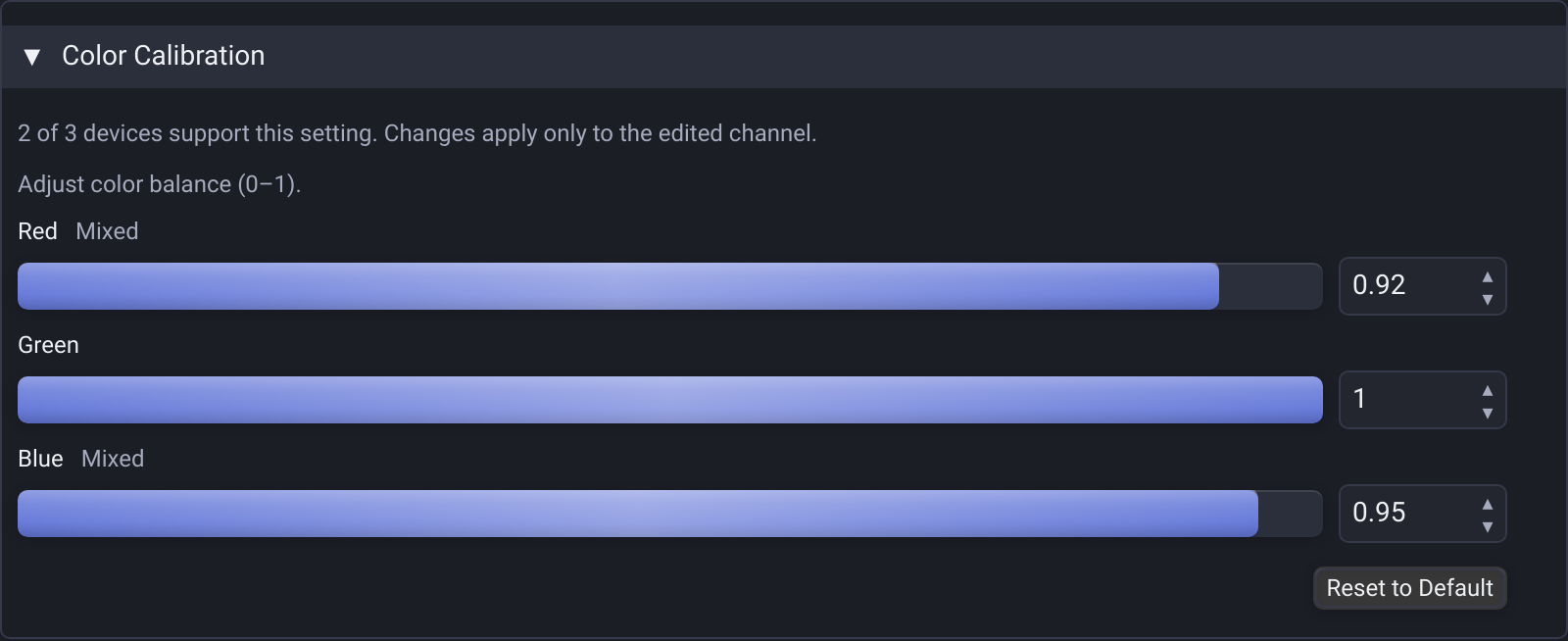
In the Device Detail View (/#/device/<id>), expanding the Color Calibration panel allows you to fine-tune individual diode multipliers (\(0.000–1.000\)) for each fixture and head:
- Aim at a Neutral Surface: Focus all fixtures onto a clean white stage wall or cyc.
- Set Pure White: Raise all fixtures to full intensity at \(S = 0\).
- Identify the Dominant Cast: If one fixture looks noticeably pinkish or cool blue compared to your reference light, locate its calibration card.
- Trim the Multiplier: Slightly pull down the offending slider (e.g. reduce Red from
1.0to0.92, or Blue from1.0to0.37) until the beam color temperature visually aligns with the rest of the rig. - Instant Reset: Click Reset to Default at any time to restore factory \(1.0\) uncalibrated unity.
Calibrate a tagged group
Select a tag on the device control page and expand Color Calibration. Sections cover every compatible head in the group and show how many fixtures support the setting. Mixed marks channels whose corrections differ; the displayed value comes from the first compatible fixture in tag order. Opening a section does not change any settings.
Changing Red, Green or Blue updates only that channel on compatible fixtures with the same head. Other color corrections and the active source color remain unchanged. Reset to Default restores all three multipliers to 1 on those compatible fixtures. Typed numbers apply on Enter or blur; faders and numeric arrow steps apply immediately.
RGBW Strategy appears for heads that have color control and a dedicated White channel. Choose a strategy to apply it to all compatible fixtures; fixtures without White are skipped. A mixed group shows Mixed until you choose a strategy. The new strategy affects current output immediately. Color corrections and strategies remain saved per fixture, and inspection mode disables edits.

For group movement alignment, see Position Calibration & Movement Limits.
🎡 Additive Electronic Mixing vs. Motorized Gel Wheels
For profile moving heads equipped with physical color wheels, Unilighter integrates motorized gel wheels into the same workflow via Motorized Gel Wheel Controls. Unilighter accurately displays gel swatch chips, half-color splits between adjacent slots, and continuous wheel spin speeds.
Read more in the Scenes & Color Calibration Guide and the UI Controls: Color Picker.
CMY fixture output
The color engine drives cyan, magenta and yellow channels as subtractive color mixing. Multi-head fixtures can control each CMY head independently, and configured Fine/Ultra/Uber bytes preserve high-resolution output. Imported white-temperature and wheel-color metadata are used when supported and present; inspect the physical data rather than assuming every imported profile supplies it.