While the Node Graphs canvas provides deep visual programming capabilities for audio-reactive lighting and procedural mathematics, operating a complex canvas of wires and sockets during a high-pressure live concert is impractical.
The Node Graph Widget (node-graph) bridges background procedural logic with the live performance surface. It exposes designated macro dials, faders, and enable switches from any background graph onto a compact, touch-friendly card on your Live Dashboard.
⚡ Real-Time Macro Controls
A Node Graph widget surfaces the key interactive parameters of your underlying graph:
1. Master Enable / Disable Toggle
A prominent switch in the widget header enables or disables the background procedural graph instantly:
- Active State: The graph continuously computes and streams DMX data to fixtures or virtual parameters at 40+ FPS.
- Deactivated State: The graph stops evaluating and cleanly releases parameter control, allowing background static Scenes or manual overrides to take over smoothly.
2. Master Amplitude Fader
Controls the overall output intensity or scaling multiplier of the graph:
- Scaled from
0.0to1.0(or0–100%). - Includes quick-jump percentage buttons (
100%,75%,50%,25%,0%) for rapid level changes during musical breaks.
3. Rotary Macro Knobs & Value Inputs
Any ValueNode placed on the graph canvas can be surfaced as an interactive rotary dial or slider:
- Threshold & Sensitivity: Dial in the exact audio gate threshold for kick drum flashes to adapt to varying venue sound levels.
- LFO Wave Speed & Spread: Modulate wave frequencies or spatial phase offsets across moving heads on the fly.
- Attack & Decay Times: Adjust how quickly procedural pulses trigger and fade out.
4. Dropdown and Buttons Option Controls
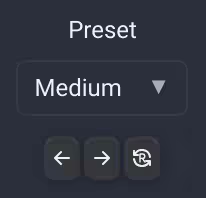
Value Nodes in Dropdown and Buttons modes show controls for previous, next and random choices below their control. In Dropdown mode these are arrow icons and a circular arrow containing R; hover over an icon to see its name.
- Prev and Next cycle through the configured list in order, wrapping at either end.
- Random selects a different option when possible. In Buttons mode, options with the same numerical value are excluded.
- With one option, Prev and Next select it and Random leaves it unchanged. An empty list leaves the value unchanged.
Use these controls to step through speed presets, offsets or other numerical choices without opening the graph editor.
🛠️ Practical Production Scenarios
1. Soundcheck Audio-Reactive Calibration
Sound levels change drastically between empty room soundchecks and a crowded concert hall. By placing audio threshold knobs on a Node Graph widget, the lighting operator can recalibrate frequency meter sensitivity and gate envelopes in seconds from the FOH desk without opening the wiring canvas.
2. Live Moving Head Ballyhoo Sizing
When running a procedural Lissajous curve or circular ballyhoo on stage moving heads, wire two macro knobs to the oscillator's X and Y scale multipliers. During intimate ballad songs, dial the knobs down to restrict motion to the band; during the energetic finale, open the dials wide to sweep the entire arena.
3. Color Spread Modulation
In generative rainbow chases, surface a Spread knob on the dashboard to compress the entire color spectrum into a single bar or stretch it across the entire stage rig.
🎮 Hardware MIDI Mapping
Map dials and faders, individual option buttons, and previous, next and random actions through Assign Mode. For a dropdown, the three assignment icons appear over the selector. These actions accept MIDI, keyboard, OSC and Surface inputs. Their assignments remain attached to the same node when switching between Dropdown and Buttons modes.
For a Color Picker, assign any built-in color button around the wheel or a saved swatch to recall that color directly. In Assign Mode, clicking a color button opens its assignment without applying the color. Built-in color buttons support MIDI, keyboard, OSC and Surface inputs, independently of saved swatches.
Read more in the Visual Node Graphs Guide and the UI Controls: Rotary Knob Manual.
Choose the controls shown
In widget settings choose which eligible Value, XY Pad and Color nodes to show. Value nodes can appear as faders, knobs, dropdowns or buttons according to their node settings. Disabled nodes are omitted. Hiding a control affects this widget's presentation; it does not disconnect the node from its graph.