Unilighter Mobile
Unilighter Mobile runs the console on Android with cached offline versions and native lighting connections. Install the APK, connect to the internet, and choose Download latest console on the update manager. The first download needs a client release that supports Mobile.
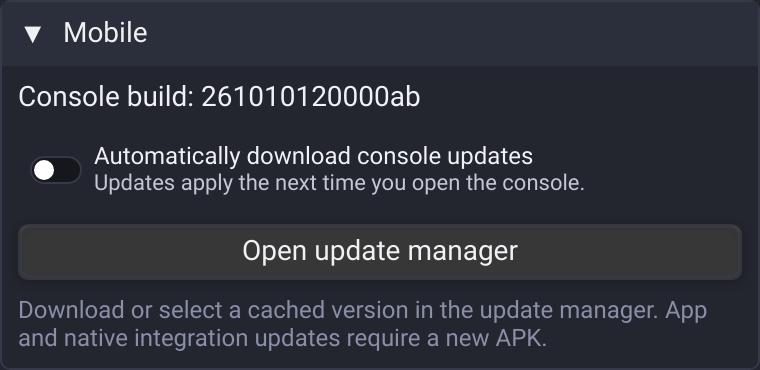
Console updates and recovery
Open Settings → Mobile → Open update manager to download or select a saved console. You can also long-press the launcher icon and choose Update and recovery if the console cannot start. A console that fails to become ready returns to the update manager after one minute.
Automatic updates download in the background and apply when you next open the console. They do not interrupt the running show. The app keeps the five newest cached versions, plus the running and selected versions. Use version opens that saved version; Remove deletes a version that is neither selected nor running.
Rolling back from a newer version to an older one keeps automatic updates enabled, but skips the rejected version until a still newer release appears. Console versions share the same project storage. Rolling back client code does not roll back project data: export a project before opening it with an older version that may not understand its newest features.
The console can update from the cloud. The app shell, native connections, permissions and recovery screen require an updated APK. Install upgrades over the existing app with the same signing key to retain local data.
Lighting and hardware
In Device Patch, connect an Art-Net or sACN output, or use a supported uDMX/FTDI interface through USB OTG. Allow the Android USB permission prompt and select the intended device if several are connected. Network outputs support an explicit IPv4 destination and interface; sACN can also use multicast.
Hardware MIDI inputs use Android's device access and the existing bindings workflow. Input remains one-way from the controller to the console. Microphone-driven nodes and the Fixture Editor camera still request Android capture permission. See Hardware Compatibility for interface limitations.
Project JSON import and export use the Android document picker. Cancellation returns to the console without replacing the open project. Google sign-in opens in the system browser and returns to the app.
Local remote control and Surfaces
- Connect the phone and guest browser to the same local network.
- Open Settings → Mobile → Remote control and enable Dashboard access. The default port is 3848.
- Open the displayed address or scan its QR code from the guest device.
- Compare the confirmation codes and choose Allow on the phone. Use Revoke access to remove a browser's permission.
For a smaller control view, open a Surface, choose Share → Publish Surface, and send its link. A Surface link grants access only to that Surface and does not enable the full Dashboard. Pause and revoke links from the same Share menu. Permissions and publication links stay on this phone across restarts; they do not travel with an exported project.
Guests must be able to reach the phone's local address. Networks with client isolation can prevent access. When the JavaScript engine stops responding, the app disconnects guests and discards stale commands; a reconnect requires a fresh state.
Leaving the app
Settings → Mobile → Background operation contains Picture-in-picture when leaving the app, Keep screen awake, and a shortcut to Android battery settings. PiP requires device support and Android 8 or later. Active connections use a foreground service with a Stop action in the notification that stops connections and returns to the update manager.
Background operation is best effort. Android or the phone manufacturer's power management can suspend the WebView or stop the process, especially when the screen is locked. During a JavaScript stall, native outputs retain the latest lighting values; animations do not advance while their JavaScript engine is stopped. Test PiP, screen locking and your actual hardware before relying on them during a show.
The first version targets Android 7 or later. iOS, MCP, Bluetooth DMX and Unilighter Solo output are not part of this version.