In traditional lighting desks, grouping fixtures requires building rigid submasters or hardcoded group numbers. If a fixture is swapped out during a tour or re-rigged on a different truss, operators have to hunt down and update every cue and submaster individually.
Unilighter replaces rigid submasters with a dynamic, non-destructive Fixture Tags architecture. Any fixture can carry multiple semantic tags simultaneously, bridging setup addressing, live dashboard control, timeline choreography, and procedural node logic into one flexible system.

🏷️ Multi-Dimensional Tag Taxonomy
Because fixtures are not limited to a single group, lighting designers can tag rigs across multiple operational dimensions:
| Tag Dimension | Example Tags | Primary Use Case |
|---|---|---|
| Physical Stage Zone | #FrontStage, #BackTruss, #FloorLeft, #AudienceBalcony |
Positioning, focus walking, spatial wave choreography. |
| Optical Fixture Type | #Beams, #Washes, #Strobes, #BlindBars |
Master dimmer control, synchronized strobe flashes. |
| Show Role / Cue Group | #BandSpecials, #KeyLight, #CrowdBlinders, #Worklights |
Quick busking triggers, emergency worklight isolation. |
To assign tags, navigate to Device Patch (/#/setup) and open the pencil button beside a fixture, or configure New device. Press + beside the selected tags to open the picker. Choose an available tag, or type a name and press Add or Enter. Use the × on a selected tag to remove it. Tags appear as colored chips next to fixture names throughout the entire console.
As you type, available tags are filtered by any matching part of their name, ignoring case and spaces around the search text. Choosing a suggestion adds only that tag and keeps your text in the field so you can select more matches. It does not create a tag from the unfinished text. Use the clear button on the right of the field to show all remaining choices. Pressing Add or Enter adds the typed name and clears the field after a successful addition.
Opening the picker and adding tags keep the device dialog at the same compact width. Selected tags and available choices wrap onto additional lines, including long names. Scroll vertically if needed to reach the remaining fields and actions. The patch list keeps its separate single-line, horizontally scrollable tag strips.
Tag names can include slashes, such as Front/Left. Click a tag chip in Device Patch, select it in the Device Control navigation bar, or use the edit button on a tag-targeted Device Control Widget to open controls for that exact tag. Slashes remain part of the name; they do not create subgroups.
Renaming and merging tags
Double-click a tag in the Device Control navigation bar to open Rename tag. Enter its new name and press Rename. The name changes throughout the current project: fixture membership, device ordering, scenes, step and keyframe animations, dashboard widgets, and nodes inside local and shared groups. Running effects keep their playback position. Double-clicking an individual fixture still renames that fixture.
Renaming preserves the activation order of active scenes and Device nodes, and the order of keyframe tracks. Newly included scene members follow each scene's most recent activation, including repeated launches. Fixtures that joined an ongoing transition keep their own fade progress. If groups merge while a keyframe animation is paused, newly included fixtures receive the values at its paused position, and the animation stays paused.
Keyframe animations keep the precedence of their existing control requests, including while paused. Renaming does not briefly release their output or replay intermediate values from overlapping tracks. Merging releases only parameters the animation no longer controls; other active sources keep their precedence.
After a fixture is repatched, renaming its tag or stopping a keyframe animation leaves its previous address untouched and preserves current manual controls in the saved project. If a merge keeps an empty parameter track from the target tag, the animation releases its previous request for that parameter, including requests inherited during repatching.
During a merge, color-wheel and gobo selections update immediately, including during a fade; continuous parameters keep their fade progress. Stopping a step animation immediately afterward releases its selections on newly included fixtures too. A beat animation paused before its first beat keeps waiting and does not produce output until it is resumed and a beat arrives.
Names are case-sensitive. Spaces around the new name are removed; an empty or unchanged name leaves the project unchanged. Slashes and other special characters remain part of the name. Numeric names such as 1 are supported, and keyframe track order is preserved when saving and reopening the project. Custom track names, widget titles and descriptions are preserved.
You can add more keyframe tracks after a rename, including tags named tag:1 alongside 1. Adding a tag or fixture track preserves existing tracks and their keyframes; newly added tracks open with their selected parameters visible.
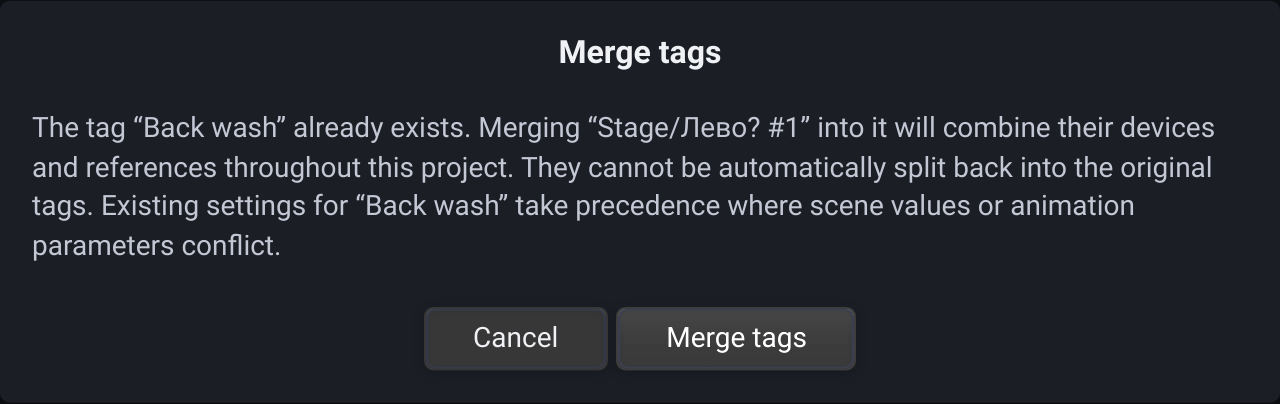
If the name already belongs to another tag, including one referenced by a scene or effect without any current fixtures, Merge tags asks for confirmation. Cancel leaves both groups unchanged. Confirming combines their fixtures and references; the original groups cannot be automatically split apart afterward.
The existing target tag takes precedence for conflicting scene parameters. In keyframe animations, its complete parameter track is retained, including keyframes and transitions; parameters missing from that track group are added from the renamed tag. Individual fixture values in scenes keep their normal precedence. Separate graph nodes and widgets remain separate and use the combined group.
Color-wheel settings merge one wheel at a time for each head. A target setting for the first wheel keeps its precedence while additional wheels configured only on the renamed tag are preserved, including older single-wheel settings.
The combined group keeps the target tag's device order, followed by devices found only in the renamed tag, in their previous order. A fixture belonging to both groups appears once.
⚡ Where Tags Power the Console
1. Device Control Widgets (Tag Mode)
Switching a Device Control widget to Tag Mode allows a single card to control dozens of fixtures simultaneously:
- Moving the Pan/Tilt XY pad steers the entire
#Beamsgroup in unison. - Selecting a color on the color wheel broadcasts normalized HSV values to all tagged wash fixtures, automatically handling mixed RGB, RGBW and CMY engines via the Color Engine. Indexed color-wheel presets and custom raw DMX wheel positions are also broadcast to every fixture in the tag.
2. Handling Inconsistent Values (Inconsistency Badge)
When multiple fixtures in a tag group have conflicting parameter values (for example, if some beams are pointed stage-left and others stage-right, or dimmers are at different levels):
- Unilighter highlights the parameter with a yellow Inconsistency Badge displaying the number of conflicting fixtures.
- Adjusting the fader or dial brings all fixtures smoothly into unison or trims them proportionally.
3. Procedural Automation in Node Graphs (DeviceNode)
 Setting Control Mode: Tag on a
 DeviceNode routes dynamic LFO wave generators, audio FFT kick pulses, or mathematical equations to an entire fixture array through a single node wire.
4. Sub-Emitter & Multi-Head Targeting
For pixel battons and ring-wash heads detailed in the Multi-Head Architecture Manual, tags address both global units and individual cells:
- Target
#PixelBarsto set color across all heads. - Target
#PixelBars.sharedto adjust physical tilt without touching colors. - Target
#PixelBars.h0to isolate the leading edge pixel across all bars.
🎪 The Touring & Rig Swap Advantage
The true power of semantic tags becomes evident during live tour maintenance:
If a moving head fails during an afternoon soundcheck, a technician can replace it with a spare unit, patch it to an open DMX address on any universe, and simply assign the #Beams tag.
Because Unilighter's scenes, animations, dashboard widgets, and node graphs target #Beams rather than a hardcoded DMX channel number, the replacement light is instantly integrated into the entire show file—without reprogramming a single cue or animation track.
Read more in the Device Patch Manual and the Control Priorities & Layering Guide.
Tags in scenes and node inputs
Scenes can store a tag template that follows live membership, with explicit fixture values taking precedence over the matching tag parameters. Device nodes targeting a tag expose supported misc channels. Movement can derive its sequence count from the connected tag.
Strobe mode selection is resolved by name per member and shows coverage counts, so mixed profiles can share a group without assuming identical profile-local mode IDs.