The Color Input Node (ColorNode) provides an interactive chromatic wheel interface directly on the node graph canvas, streaming standardized color signals to downstream fixtures and math processors.
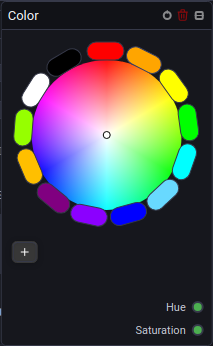
🎨 Color Architecture & Abstraction
Unilighter uses a universal internal color representation. When a Color signal is wired to a Device Node, the console automatically translates the coordinates to the physical fixture's native emitter configuration:
- RGB / RGBW / RGBAW-UV: Calculates optimal white and amber emitter blending.
- CMY Subtractive Mixing: Automatically inverts RGB signals into subtractive Cyan, Magenta, and Yellow flag positions.
- Indexed Color Wheels: Selects the closest matching physical gel filter on motorized color wheel fixtures.
🔌 Socket Outputs Reference
| Output Socket | Data Type | Range | Description |
|---|---|---|---|
| Color | Color |
Hex / RGB / HSL | Standardized color stream compatible with all color inputs across the graph. |
| R / G / B | Number |
0.0 – 1.0 |
Individual Red, Green, and Blue component intensity values. |
| H / S / L | Number |
0.0 – 1.0 |
Hue angle (0.0–1.0 mapped to 0–360°), Saturation, and Luminance channels. |
💡 Practical Stage Recipes
- Master Ambient Stage Tint: Wire
Color\( ightarrow\) Group Node \( ightarrow\) Device Node tagged#StageWashes. - Dynamic Hue Modulation: Use a Math Node to add an Oscillator output to the
Hsocket for continuous slow rainbow color drifting.