Console Interface & Screen Reference Manual
The Unilighter console is engineered to give lighting designers, DJs, and venue technicians complete control over their rigs—from quick live show busking to deep procedural automation and hardware patching.
For Free accounts, the top bar displays a DMX session timer. Physical output begins a shared 30-minute countdown; at 00:00 the console sends blackout and disconnects outputs while editing remains available. Close and reopen the project to start another session. See Free output sessions for the hardware and native-host details. Pro output has no session timer.
Layers is available in the top bar to all operators. Trace the sources controlling fixture properties and overridden requests, pause the displayed snapshot, release one property request, or deactivate a source function across the rig.
🖥️ Screen Reference & Visual Walkthrough
1. Live Dashboard
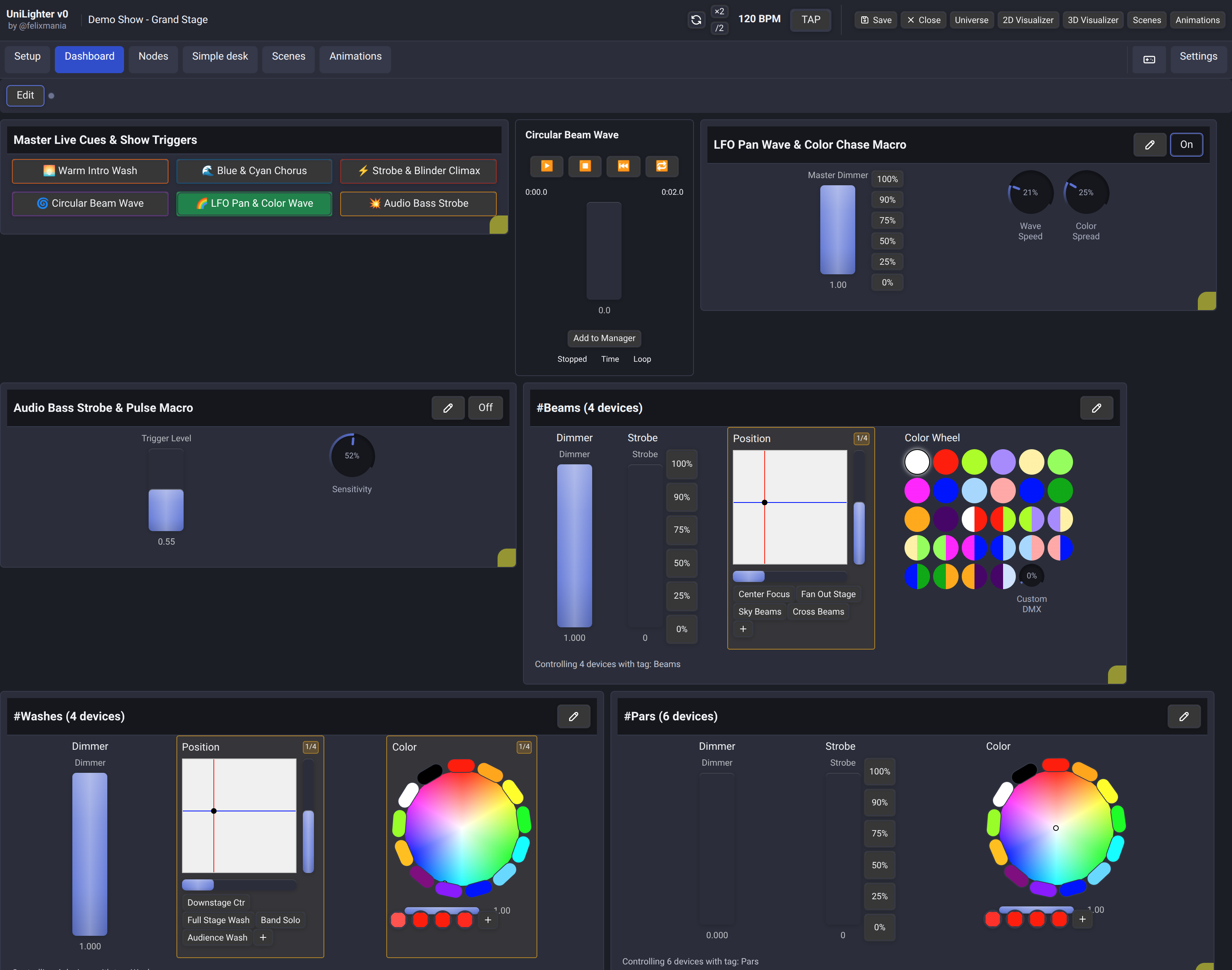
The Dashboard is your primary live control desk during shows and performances.
- Master Live Cues: Instant touch triggers for scenes, animations, and node graph macros via the Function Widget.
- Theatrical Sequences & Scripts: Switch to linear cue stacks or full screenplay text using Theater Cue Lists & Scenario Script Mode.
- Fixture Group Mixing: Tactile dimmer faders, 2D Pan/Tilt XY pads with position presets, and multi-segment color wheels via Device Control Widgets.
- Live BPM & Tap Tempo: Real-time audio BPM synchronization and tap tempo counter via Time Synchronization.
Control Surfaces
Choose Surfaces in the Dashboard toolbar to create an additional touch view of your existing controls. Add buttons, faders, knobs, XY pads, color pickers and labels, then connect their signals using Assign Mode. Try it opens local control without the editor.
The editor and local control work in web, Unilighter Desktop and Unilighter Solo. Dashboard targets activate automatically after the project loads, even while another console page is open. Guest sharing is currently Desktop-only over the local network, with a private link granting access to one surface. See the Control Surfaces guide.
2. Device Patch & Universe Setup
The Device Patch screen manages physical DMX universe routing and fixture address assignments.
- DMX Universes & Network Protocols: Route fixtures across physical USB interfaces (uDMX, FTDI), wireless Bluetooth (BLDMX), or high-density network DMX (Art-Net & sACN) detailed in the Hardware Compatibility Guide.
- Fixture Tags: Assign DMX start addresses, channel footprints, and custom group tags (
#Beams,#Washes,#Pars). - Multi-Head & Pixel Bars: Patch complex multi-cell battons and moving wash rings into unified single-container devices with automatic footprint calculation.
- Print Patch Sheet: Generate printer-friendly, high-contrast paperwork with 512-channel occupancy grids and rendered binary DIP switches for stagehands.
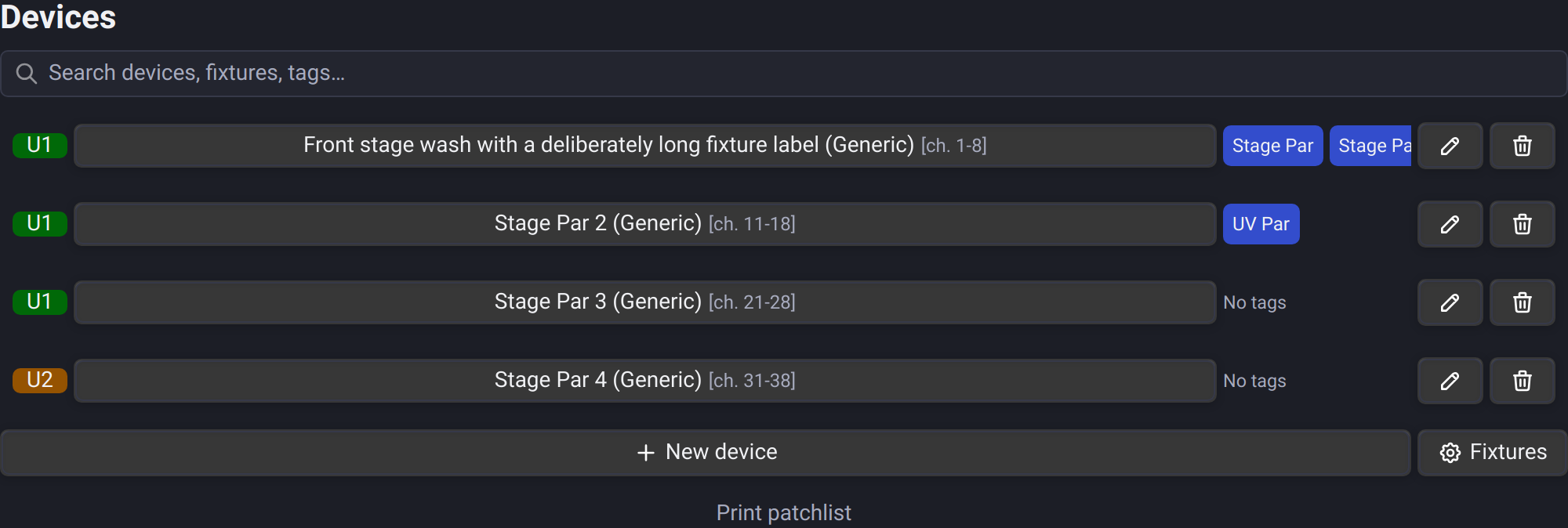
Fixture name buttons keep the same width across rows, including fixtures with no tags. The tag column adapts to typical tag sets across the project, leaving more room for names when long sets are uncommon and expanding slightly to fit sets that only need a little extra room. Search preserves the column widths. Names are centered unless tags occupy more than half the list width. Tags stay on one line and scroll horizontally; on narrow screens, their strip moves below the centered fixture name and actions.
3. Fixture Profile Editor
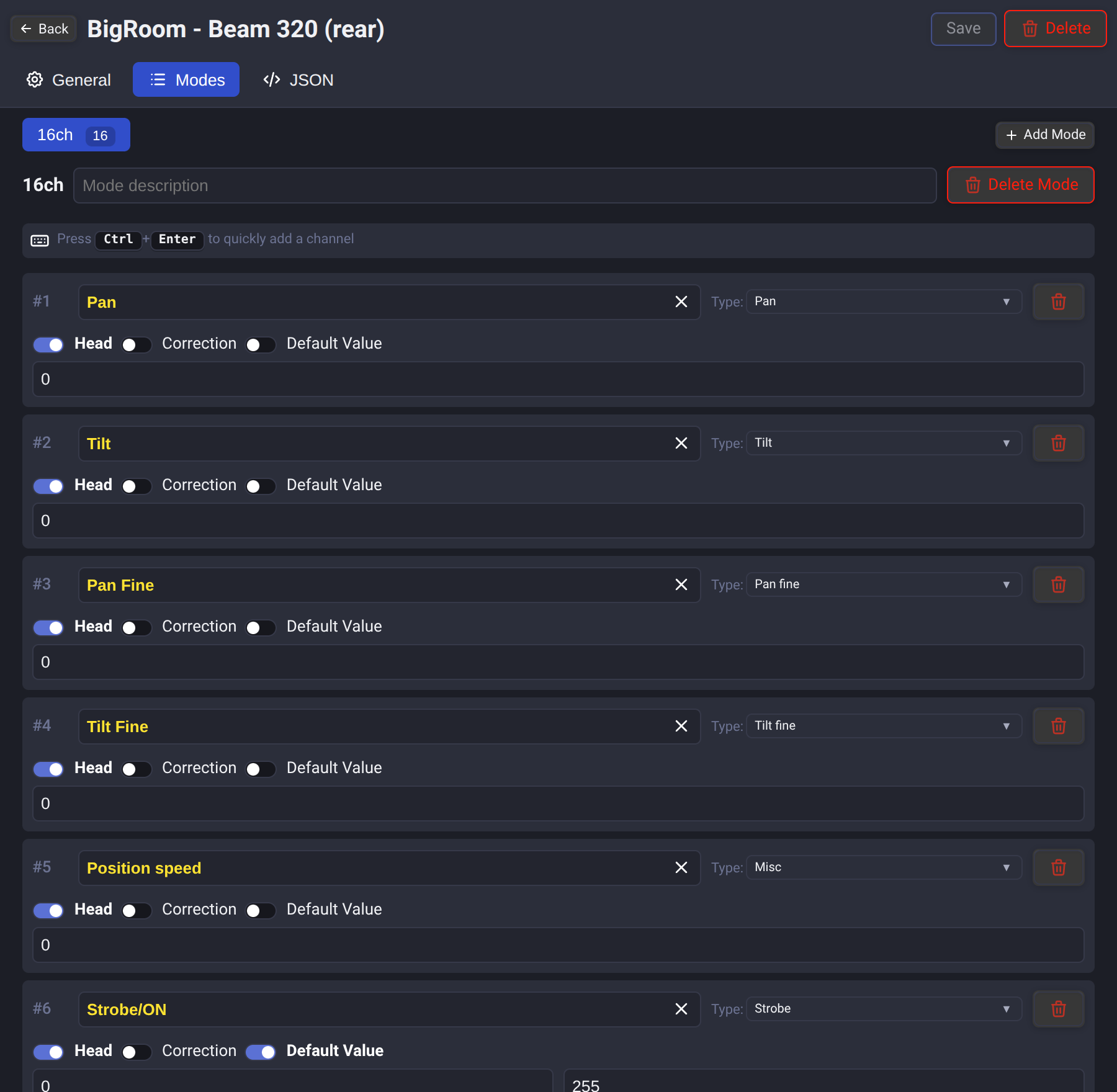
The Fixture Profile Editor lets you create or customize fixture definitions for any light head in your venue.
- Channel Configuration: Configure Pan, Tilt, Dimmer, Colors, Gobo wheels, Prism, and Strobe channels.
- High-Resolution Parameters: Add Fine, Ultra, and Uber bytes to any parameter, up to 32-bit resolution.
- Shared Channels: Describe fixtures that place several functions in different ranges of one DMX channel (stored as
aliasin profile JSON). - Color Wheel Gels: Set indexed color swatch definitions with exact HEX values and DMX thresholds.
- Operating Modes: Support for basic, extended, and multi-head LED bar modes.
4. Scenes & Static Looks
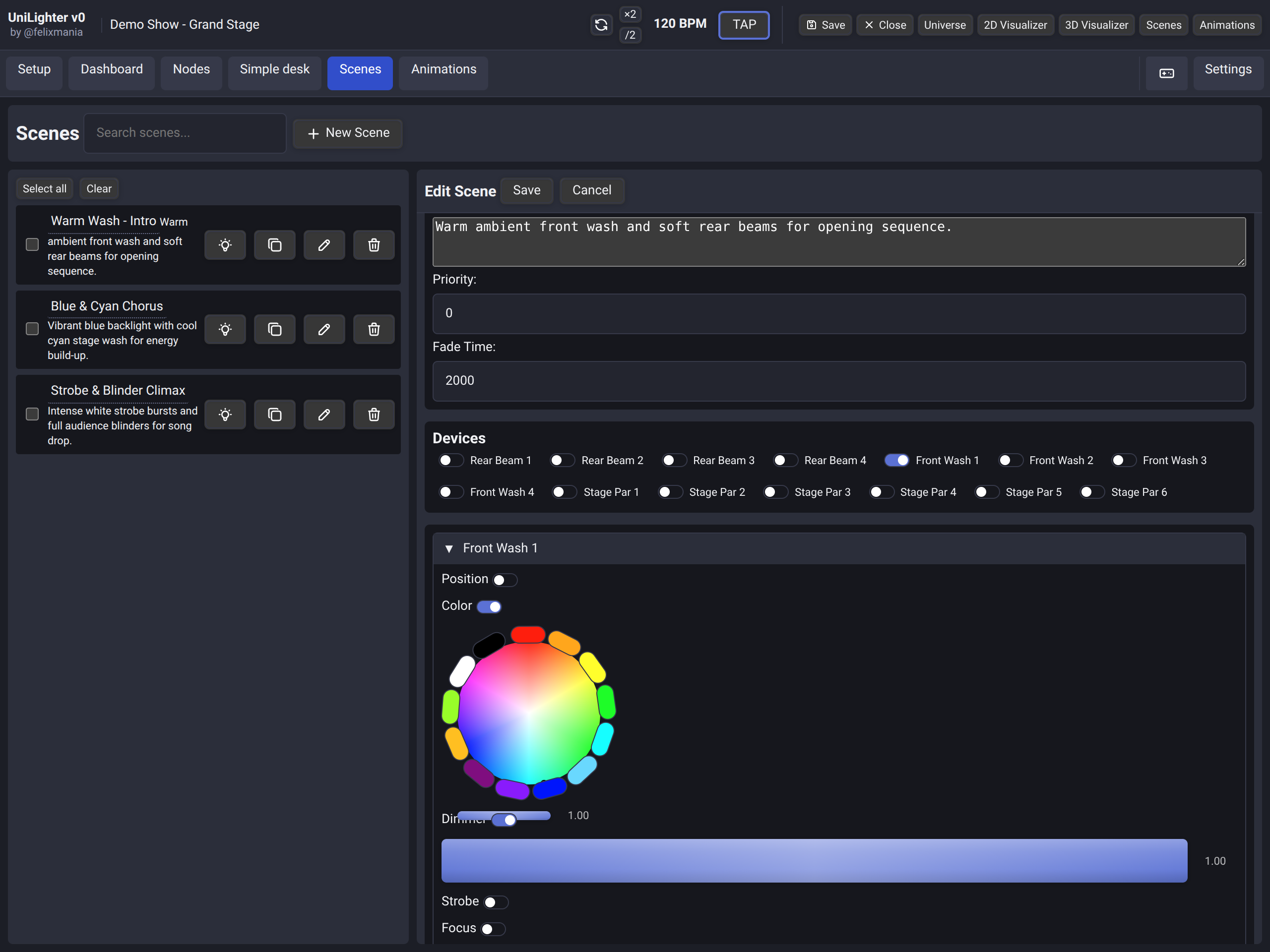
The Scenes screen is where you create static lighting cues, position presets, and color palettes.
- Universal Color Control: Integrated with the Color Engine for perceptual HSV mixing and mathematical RGBW translation strategies (
blend,combined,desaturate). - White Balance Calibration: Fine-tune individual diode multipliers (
0.000–1.000) per fixture head to match mismatched LED bins. - Fade Times: Set smooth fade-in and fade-out transition times between static scenes.
- Fast Parameter Selection: Carry the previous Dimmer, Color, Position, or Beam selection across consecutive fixtures and tags.
5. Animations & Dynamic Motion
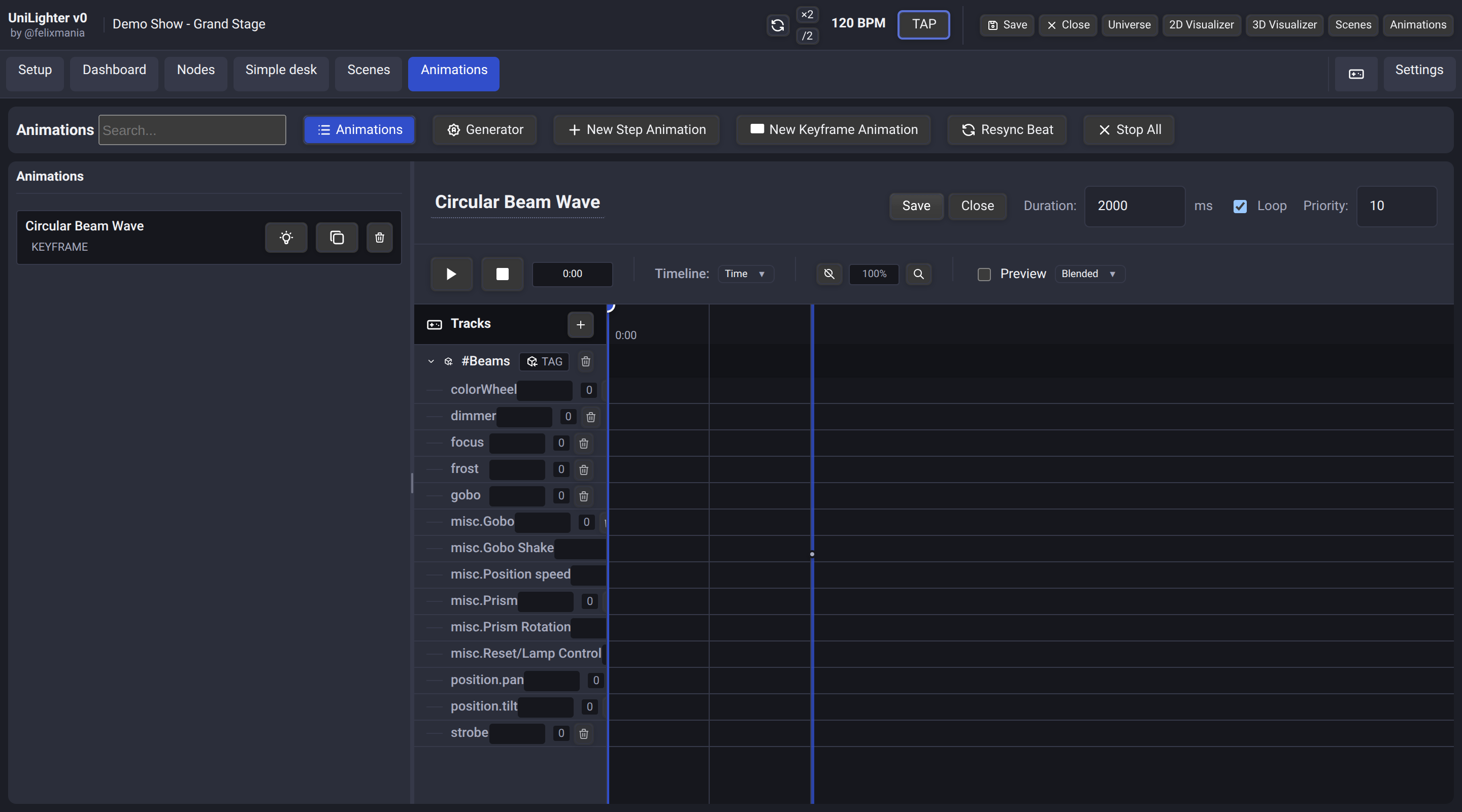
The Animations engine powers discrete rhythmic chases with Step Animations, smooth parametric motion with Keyframe Animations, and 2D spatial surface mapping with Choreography Animations.
- Triple Animation Paradigms: Build tempo-locked step chases, continuous multi-track keyframe curves, or 2D spatial emitter matrices.
- Keyframe Editing: Place keyframes for Dimmer, Color, Pan/Tilt, and custom channels with smooth easing curves.
- Spatial Wave Generators & Presets: Procedurally generate Odd/Even chases, directional sweeps, and circular ripples across 2D fixture arrays.
- BPM Synchronizer: Lock animation timing directly to music beat fractions (
1/1,1/2,1/4,1/8,1/16) via Time Synchronization.
6. Visual Node Graphs
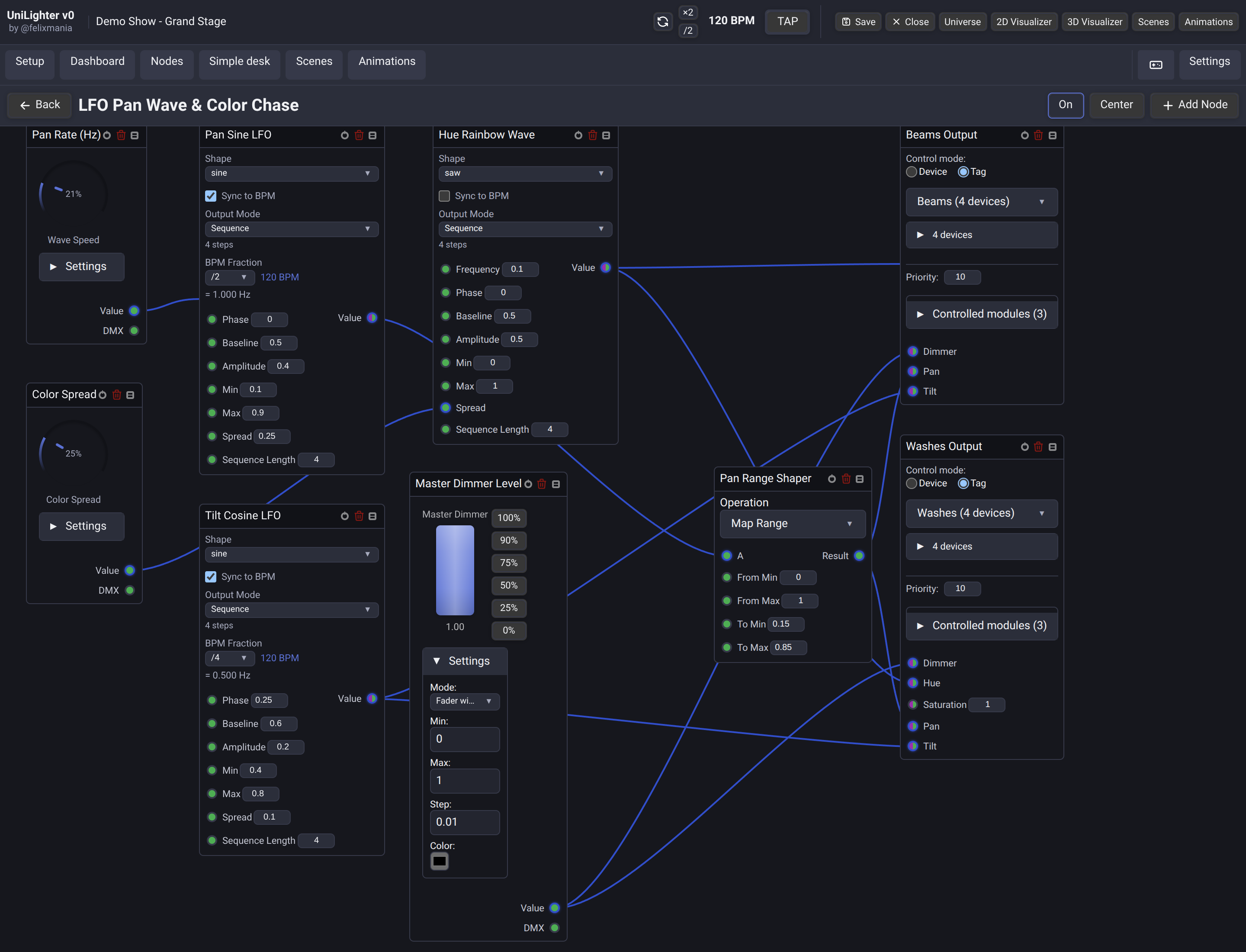
The Node Graphs screen offers visual node-based automation for procedural lighting control.
- Input Nodes: Audio FFT spectrum analyzers, manual macro knobs, and MIDI inputs.
- Clock & Rhythm: Autonomous musical beat tracking with BpmNode.
- Modular Encapsulation: Package complex node chains into reusable single-card blocks using Subgraphs & Functions.
- Logic & Math Nodes: Combine, multiply, invert, or map signals using visual wires.
- Output Routing: Route dynamic signals directly to fixture channels or group master dimmers.
- Canvas Organization: Wrap selected nodes in named Frames and route crowded cable paths through compact Reroute points.
- Fast Insertion: Search the node menu by typing and press
Enterto add the first result.
7. Simple Desk
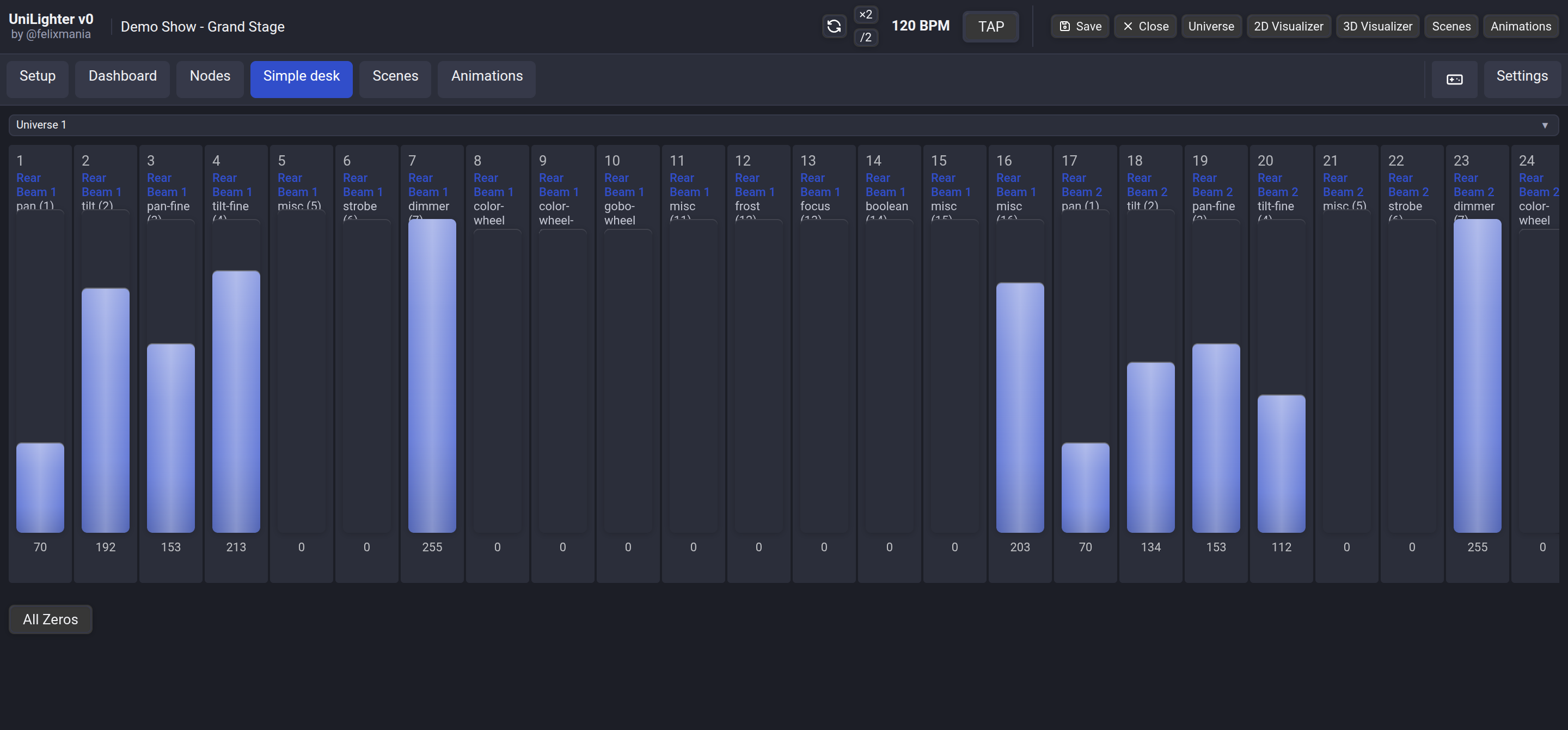
The Simple Desk provides a traditional, direct 512-channel physical fader view per universe.
- Raw Channel Access: Direct manual command over every single DMX byte, bypassing profiles, color calibration layers, and node graphs.
- Rig Diagnostic Workflows: Line testing before patch completion, isolating physical signal noise vs show programming bugs, and auxiliary worklight control.
- Blind Discovery ("Метод тыка"): Reverse-engineer mystery fixtures or generic lights lacking documentation by testing faders one by one.
- Universe-Level Override: Instant manual priority takeover with a single-click All Zeros release.
8. 2D & 3D Stage Visualizer
The built-in Stage Visualizer delivers real-time visual simulation of your lighting rig right inside the browser canvas, requiring zero external software licenses.
- 2D Top-Down Stage Plan: Drag-and-drop fixture positioning on a virtual stage canvas. Sets physical coordinates \((X, Y)\) used by Choreography Animations for spatial sweeps and ripples.
- 3D Real-Time Beam Simulator: Renders volumetric light cones, beam falloff, strobe flashing, pan/tilt physical motion tracking, and additive color mixing.
- Offline Pre-Programming: Complete visual feedback without physical DMX interfaces connected—design full shows on a laptop at home or in transit.
- Multi-Cell Pixel Bars: Visualizes individual sub-emitters on Multi-Head Fixtures with authentic physical spacing.
9. Remote Control
The Remote Control interface turns any mobile phone or tablet into an untethered wireless lighting desk.
- Local Network & WebRTC: Direct low-latency peer-to-peer data synchronization over local Wi-Fi.
- Stage Focus Walking: Adjust pan, tilt, focus, and dimmers while standing directly under fixtures on stage.
- Auxiliary Desks: Hand an isolated tablet with simple worklight buttons to a stage manager without granting full console access.
10. AI Automation & Model Context Protocol (MCP) (Pro)
Unilighter Desktop integrates an automated Model Context Protocol (MCP) server for AI-driven lighting design, and the web console offers the same tools to AI agents in the browser through WebMCP.
- Pro Plan & Desktop App: Built into Unilighter Desktop for Pro users, providing direct AI automation with external agents (Cursor, Claude Desktop, Antigravity) without requiring the cloud AI Add-on.
- One-Click Setup: Enable the local Streamable HTTP server in Settings (
⚙️) and copy connection credentials. - WebMCP in the Browser: For Pro users, the web console offers the tools automatically in browsers that support WebMCP. Without Pro, agents see a single help tool that explains how to unlock them. Turn WebMCP off in Settings → General.
11. Project Settings & Emergency Release
To send a saved show to another registered operator, open the show and use Settings → Project → Project sharing → Send project copy. Save your changes before sending. See Send a Project Copy for fixture handling and recipient requirements.
Project Settings contains show-wide controls for frame rate, remote access, diagnostics, and live output recovery.
- Clear all device controls releases manual Device Control overrides while leaving programmed functions available.
- Deactivate all functions stops every running Scene, Animation, and Node Graph at once. Use it as a quick recovery action when several functions are active or a hold-mode trigger was released unexpectedly.
Current workspace workflows
- Enable Show node port values in Settings → General → Global Settings to see live values in Node Graphs. It is off by default and may increase system load.
- Settings opens over the active workspace and provides sidebar navigation, keeping the project running while you adjust settings.
- In Settings → General → Global Settings, Dashboard UI Scale changes only Dashboard widgets. Changing the application UI Scale resets the Dashboard scale to match; changing the Dashboard scale leaves the rest of the interface unchanged. See Dashboard widget scale.
- Scenes, Animations, Node Graphs and projects have focused desktop search. Device search includes names, fixture, manufacturer and tags; Escape clears search.
- Animations open from a list on phones, with a back link and navigation-tab return.
- Simple Desk groups channels by patched device and distinguishes setting all values from releasing manual control.
- Visualizer edits the shared console scene in 2D/3D; Site Planner stores independent venue plans.
- Use Guided Tours for hands-on chapters and the Getting started checklist, Movement for Pan/Tilt effects, and Fixture Import for supported library sources.