The Oscillator Node (OscillatorNode) generates continuous, repeating mathematical periodic waveforms for procedural motion, dimmer chases, and color cycling.
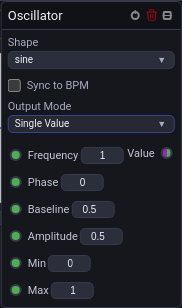
🌊 Waveforms & Timing Synchronization
Create with a selected waveform
In Add Node, search Oscillator to list all six waveforms, or search Sine, Saw, Square, Impulse, Triangle or Random directly. Click a result such as Random (Oscillator), or highlight it and press Enter, to create the oscillator with that waveform already selected.
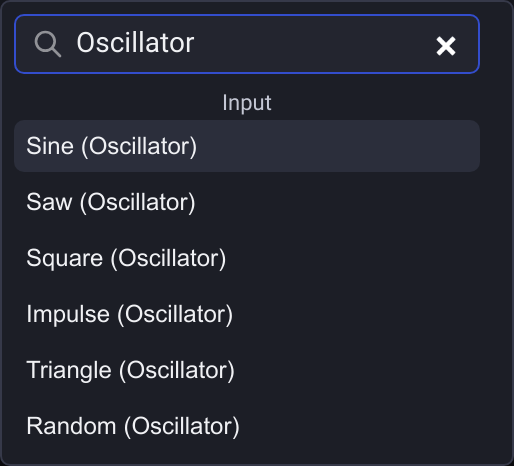
The compact Oscillator entry with an empty search still starts with Sine. Random (Oscillator) uses the usual periodic random behavior; enable Generate once on the node if you need a value held until the next graph start. You can change Shape afterward.
1. Available Waveforms
- Sine: Smooth, organic harmonic oscillation for ambient dimmers and slow head bobs.
- Sawtooth / Ramp: Linear sweep with instantaneous drop/rise for sequential chasers.
- Square: Abrupt on/off alternation for sharp strobes and blinder flashes.
- Triangle: Linear bi-directional sweep.
- Noise / Random: Procedural sample-and-hold random flicker.
- Impulse: Single narrow spike per cycle.
2. Synchronization Modes
- Hertz (Hz): Free-running frequency specified in cycles per second (
0.01 Hz – 50 Hz). - BPM Sync: Locks oscillation speed directly to the project's master audio tempo (
x16,x8,x4,x2,1/1,/2,/4,/8,/16).
🔀 Single Value vs Sequence Spread
- Single Value: Outputs one synchronized number to all fixtures simultaneously.
- Sequence Spread: Generates an array of phase-offset values across a configured
sequenceLength(e.g. 8 fixtures), creating sweeping wave chases down a truss line automatically.
🔌 Socket Outputs Reference
| Output Socket | Data Type | Range | Description |
|---|---|---|---|
| Value | Number |
0.0 – 1.0 |
Primary instantaneous oscillator amplitude. |
| Sequence | Array |
Array of Number |
Phase-distributed values for multi-fixture arrays. |
Random timing and sequence spread
The Random shape draws a new value once per completed cycle, so Frequency or BPM controls the update rate. In Sequence mode, Spread 0 redraws all fixture values independently. Spread 1 inserts a new value at the front and shifts previous values along the sequence. Intermediate settings mix independent redraws with following the previous fixture's earlier value.
Generate once per graph start
For a random value that stays fixed while the graph runs, choose Random and turn on Generate once. The switch is off by default, so existing graphs keep their periodic random behavior.
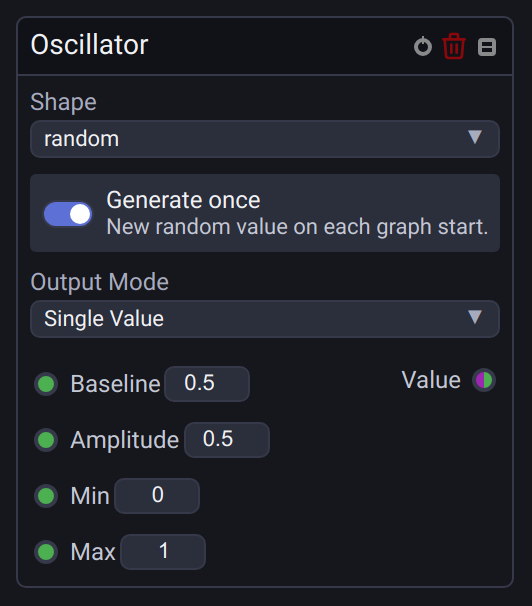
With Single Value output, the node draws one value when the graph starts and holds it until the next start. Stopping and starting the graph, or disabling and enabling it, draws again. This also works inside groups. As with Math.random(), a new draw can happen to produce the same value.
Frequency, Phase, and BPM timing controls are hidden while Generate once is on. Baseline, Amplitude, Min, and Max still shape and limit the held value. With the default settings, the result is between 0 and 1; for example, Baseline 0.25 and Amplitude 0.25 give a random value between 0 and 0.5.
With Sequence output, each element is drawn independently once and the complete sequence is held. Sequence Length sets the element count (0 uses 64); changing the count rebuilds the sequence. Spread is hidden because there are no repeated random steps in this mode. Turn Generate once off to restore periodic updates and the saved timing and Spread settings.
For complete coordinated Pan/Tilt paths, use the dedicated Movement node.