For one definition reused across several graphs with independent parameters, use Shared Subgraphs. A regular Group keeps its own local contents; choose Make Shared to turn it into a linked definition.
As lighting projects evolve from basic chasers into full-scale concert rigs, node graphs can easily turn into tangled webs of duplicate signal chains. If you need three independent sound-reactive strobe pulse lines, building three identical sets of audio bandpass filters, envelope followers, and math multipliers clutters the canvas and makes show maintenance difficult. Subgraphs (reusable function graphs) let you package entire node networks into neat, modular building blocks with custom inputs and outputs.
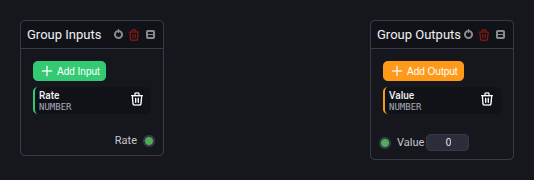
🧱 The Subgraph Interface Architecture
A reusable subgraph operates like a programming function: it receives parameters through its inputs, executes an internal graph, and streams results through its outputs.
1. Group Inputs Node (GroupInputsNode)
- The Entry Boundary: Represents the input parameters passed into your custom composite node.
- Declaring Custom Sockets: Click + Add Input to declare an exposed socket.
- Parameter Naming & Types: Assign a descriptive parameter name (e.g. Rate, Pulse Width, Base Color, Sensitivity, Sequence Offset) and select its data type:
Number: Scalar float or integer value.Sequence: Numeric array (number-array) up to 64 elements.Number or Sequence: Polymorphic socket accepting either a scalar or a sequence dynamically.Audio: FFT audio data.
- Default Fallbacks: Shared definitions provide editable numeric and sequence defaults in their port settings. Each linked instance can inherit these defaults or keep its own values.
Each group evaluation installs all mapped input values before forwarding one complete input snapshot. Adding extra group inputs does not multiply the samples recorded by a connected Delay in Updates mode.
2. Group Outputs Node (GroupOutputsNode)
- The Exit Boundary: Represents the calculated signals returning from your internal graph.
- Declaring Output Pins: Click + Add Output to declare the output pins your collapsed node will expose to exterior graphs (e.g. Strobe Pulse, Pan Angle, Tilt Angle, Chasing Pattern, Master Output). Supports
Number,Sequence,Number or Sequence, andAudio.
📦 Encapsulating & Reusing Graphs
Device Output nodes inside a Group inherit the Priority of the outermost graph, including through nested Groups. The Group editor shows that priority read-only with From main graph. Change it in the main graph's toolbar, or enable Custom priority on an individual Device node. Grouping nodes preserves their priority settings.
Opening a Group editor, saving the project, and reopening it preserves the link to the main graph. The Group node and its editor use the same internal graph, so changes to the main graph's priority also reach outputs in previously opened nested Groups.
- Clean Single-Card Abstraction: In exterior parent graphs, a subgraph appears as a compact, self-contained node card displaying only your named custom sockets.
- Encapsulated Scope: Internal math equations, intermediate delay lines, envelope followers, and routing nodes stay cleanly hidden inside the subgraph.
- Project Portability: Import ordinary graphs with Import from Project. Their required shared definitions travel with them as independent copies in the receiving project.
Reuse the interface across graphs
Create a definition under Node Graphs → Subgraphs, or select nodes in a graph and choose Create Shared Subgraph. Edit its input and output settings in the two interface nodes. Add instances through Add Node → Project Subgraphs.
For a complete movement example, instance parameters, live updates, fixture assignments and playback priorities, read Shared Subgraphs.
Read more in the Visual Node Graphs Guide.