Unilighter Help Center & Documentation
Welcome to the Unilighter Help Center! Here you will find comprehensive guides for setting up hardware, using console screens, building node graph automations, and operating live lighting shows.
📑 Featured Manuals
Send a Project Copy
Send a saved show to another registered operator by email, with the required fixture profiles included automatically.
🖥️ Unilighter Desktop Workstation
Standalone native workstation for Windows, macOS, and Linux featuring 100% offline independence, native Art-Net 4 & sACN network DMX streaming, built-in local MCP AI server, and instant version rollback with the Emergency Page (!!Ctrl+Shift+E!!). Includes dedicated manual on Desktop Update Management & Rollback.
📱 Unilighter Mobile
Run the console on Android with cached offline versions, native Art-Net/sACN and USB DMX, MIDI input, and local Dashboard and Surface hosting.
🔌 Hardware Compatibility & Connection Guide
Learn about supported USB DMX interfaces (uDMX vs. FTDI), Bluetooth DMX transmitters, mobile Android OTG emergency setups, and tactile MIDI controllers. Includes dedicated links to OS Drivers & Troubleshooting.
🏷️ Device Patch & Universe Setup Manual
Complete walkthrough of DMX universe routing, start address assignment, footprint calculation, collision prevention, multi-head LED bars, and fixture tag grouping.
⚡ Visual Node Graphs Hub
Deep dive into visual node-based automation: node graph concepts, real-time evaluation, socket data types, function registry, and dedicated guides for the available node types.
🎛️ Live Dashboard & Workspace Guide
Complete reference for customizable Dashboard widgets: Function Widget (Scenes, Keyframe Animations, Node Graph Functions in Buttons, Cue List, or Scenario modes), Node Graph Macro Widget, Device Control Widget, Keyframe Animation Widget, and Group Container Widget.
📱 Control Surfaces
Create touch views of your Dashboard with buttons, faders, knobs, XY pads, color pickers and labels. Connect inputs through Assign Mode & Bindings, try the layout locally, and share one surface with guests over a local server in Unilighter Desktop or Unilighter Mobile.
📖 Console Interface & Screen Reference Manual
Complete walkthrough of all Unilighter workspace views: Live Dashboard, Device Patch, Fixture Profile Editor, Scenes & Color Calibration, Timeline Animations, Visual Node Graphs, 2D/3D Stage Visualizer, Simple Desk, Site Planner, Remote Control, and the AI Show Assistant.
💡 Quick Tips for New Operators
- Starting a Rig Setup: Begin in Device Patch to connect your DMX interface and address your fixtures.
- Node Automation: Build reusable Node Graphs and toggle them live using the Function Widget on your Dashboard.
- Color Accuracy: Use Scenes \(\rightarrow\) White Balance Calibration to ensure LED fixtures from different manufacturers produce matching, uniform colors.
- Hands-On Control: Connect any USB or Bluetooth MIDI controller in Assign Mode & Bindings Manager for physical fader and button control.
- Reporting an issue: Open the floating Feedback button to describe a problem and review the automatically attached console screenshot. See Reporting an issue below.
- Desktop Reliability: Press
!!Ctrl+Shift+E!!(!!⌘⇧E!!on macOS) in Unilighter Desktop to access the Emergency Page for instant version rollbacks or offline show freezes.
🟦 Unilighter Solo
Early development guide for Solo: connecting to its Wi-Fi, opening the console, and understanding its start page and device-based project storage.
New workflow guides
- Position Calibration & Movement Limits
- Getting Started & Guided Tours
- Movement — Pan/Tilt Patterns
- Fixture Import and Reverse Engineering
- Strobe & Shutter
- 2D & 3D Console Visualizer
- Site Planner — independent venue plans
Reporting an issue
Open the floating Feedback button while the problem is visible. When available, a screenshot of the current console view is attached automatically without a screen-sharing permission prompt. The image keeps the current scroll position of panels and includes node-graph connections. Review its preview and use Remove screenshot if you do not want to include it. If you cancel and reopen the dialog later, the automatic screenshot is retaken from the current view.
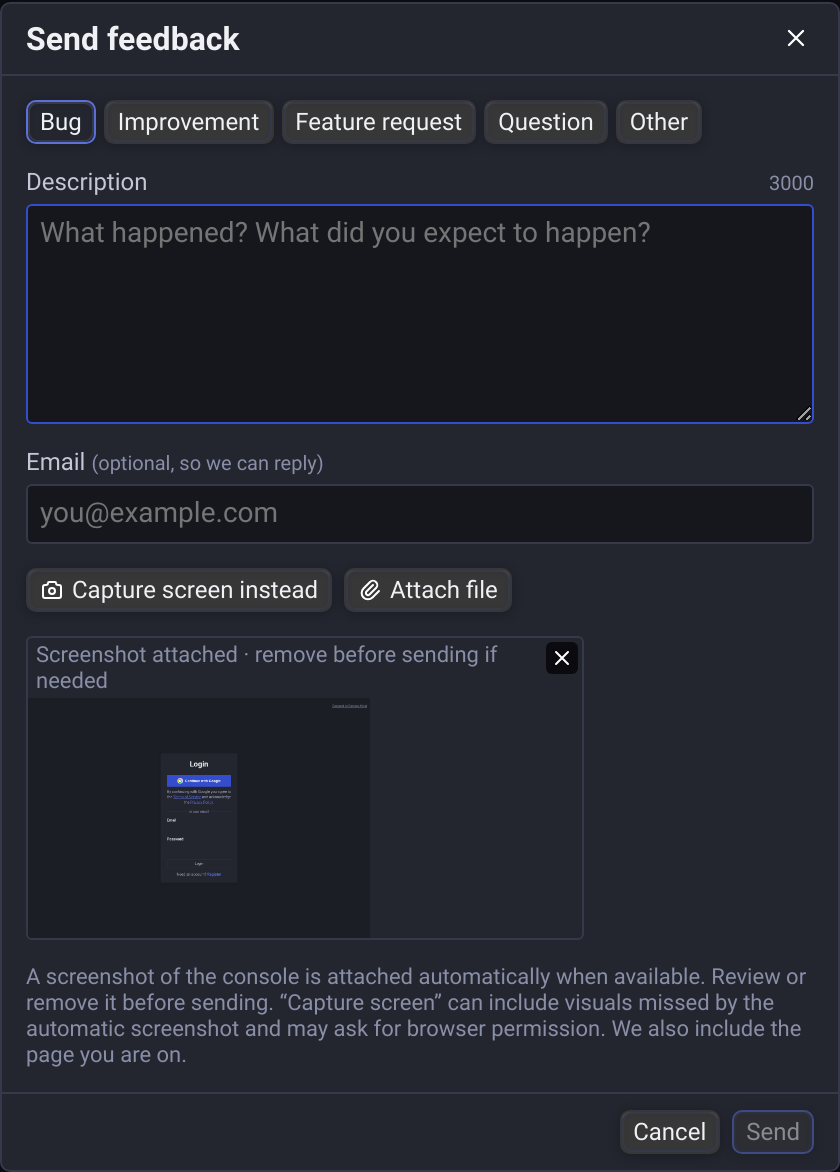
The automatic image excludes the Feedback dialog and text-entry fields, and never captures other tabs or applications. Some canvas, WebGL or external content may be missing. Use Capture screen or Capture screen instead for a browser-assisted replacement; your browser may ask you to select a screen, window or tab. You can still send the report if automatic capture is unavailable or takes more than eight seconds.
Screenshots are compressed automatically to keep uploads small while retaining readable text. No image-format settings are required.
Describe what happened and what you expected, attach any useful files, then press Send. If delivery fails, the message and files remain in the form for retry.