The 2D XY Pad is a spatial coordinate targeting interface designed for moving head Pan and Tilt positioning.
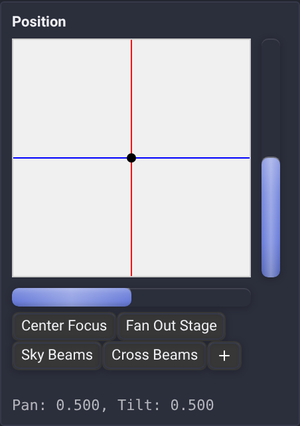
🕹️ Spatial Features & Controls
- Interactive Crosshairs & Target Reticle: Shows the logical group or fixture position. Individual Position Calibration settings determine the resulting fixture output; the visualizer follows that output.
- Pan & Tilt Sidebar Indicators: Dedicated horizontal and vertical progress bars on the bottom and right edges indicate individual axis values.
- Continuous Mouse Pointer Lock: When supported, a mouse drag locks the cursor for unbounded spatial steering. Touch dragging instead keeps each finger on its own control, even outside its bounds, without scrolling the page. Separate fingers can adjust separate controls simultaneously.
- Surgical Precision Mode (
Shift+ Drag): Drops sensitivity to 10% (SENSITIVITY_SHIFT = 0.1) for micro-positioning spotlights on soloists. - Fast Movement (
Ctrl+ Drag): Accelerates motion for rapid beam sweeps. - Position Presets: One-touch recall buttons (Center Focus, Fan Out Stage, Sky Beams, Cross Beams). Click
+to save the current coordinates under a custom preset name. - Axis Inversion & Alignment: Use independent Invert Pan and Invert Tilt settings in each fixture's Position Calibration panel to match its mounting. Offsets and movement limits apply consistently to group controls and other position sources.
Map physical joysticks or MIDI pads via Assign Mode. In Device Control and Node Graph widgets, click a saved position preset in Assign Mode to assign it to a MIDI control, keyboard shortcut, OSC signal or Surface button. Renaming the preset normally keeps its assignment; deleting it removes its assignment. Older duplicate presets can share an assignment; see Assign Mode for details.
Diagonal gestures adjust Pan and Tilt together. Both axes are updated in a single action, including when using a trackpad with Ctrl + scroll.