Fixture Profile Editor
The Fixture Profile Editor is Unilighter's dedicated workspace for building, customizing, and calibrating DMX fixture definitions. Whether patching a simple single-channel dimmer, an RGBW LED architectural bar, or an advanced multi-head moving beam fixture with motorized zoom and indexed gobo wheels, the editor gives lighting technicians complete control over channel mapping and behavioral metadata.
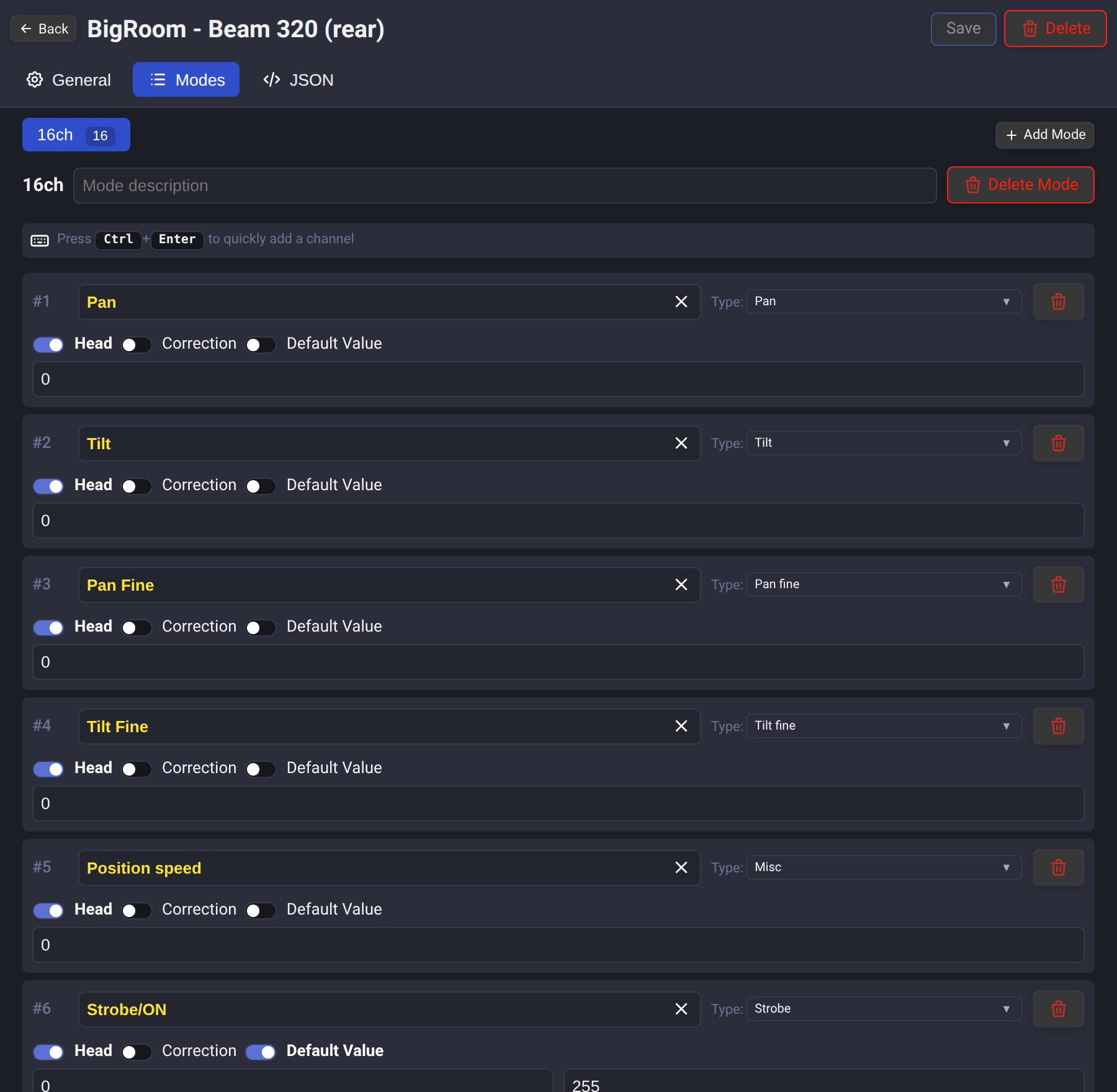
💡 Profile Architecture & Core Concepts
In Unilighter, a fixture profile acts as an intelligent translation layer. Rather than forcing you to memorize raw DMX channel numbers and arithmetic values during live shows, the profile abstracts hardware parameters into intuitive UI controls—universal color pickers, motorized color wheels, 2D Pan/Tilt positioning pads, tactile faders, rotary encoders (knobs), discrete strobe buttons, and visual gobo selectors.
1. Multi-Mode Definitions
Real-world lighting fixtures often feature selectable DMX personality modes (e.g., 4-Channel Basic, 16-Channel Standard, 24-Channel Extended, or Pixel Matrix).
- Independent Channel Lists: Define custom channel lists for each mode to match the fixture manual.
- Mode Descriptions: Annotate modes with recommended use cases (e.g., "Use Extended mode for full 16-bit Pan/Tilt precision and individual ring control").
- Active Mode Switching: Seamlessly toggle between modes while editing to cross-check channel footprints.
2. Multi-Head & Pixel Bar Topologies
For LED bars, dual-headed moving lights, and multi-emitter wash fixtures:
- Head Numbering (
0,1,2...): Assign individual emitter segments to discrete head indices. This allows Unilighter's color engines and spatial wave generators to address each head independently. - Shared Master Controls (
SHARED_HEAD): Channels without an explicit head assignment (such as Master Dimmer, Pan/Tilt base motors, or Global Strobe) are automatically treated as shared across all heads.
3. Generic Starting Profiles
For common fixtures, start with a built-in Generic PAR, Generic Hazer, Generic Moving Head, or Generic LED Bar profile and check its channel order against the fixture manual before patching. These profiles are starting points; real fixtures often use different channel layouts.
- Generic PAR includes
drgb,rgb,rgbw, andrgbamodes, alongside the existing3ch,4ch, anddefaultmodes. The Amber channel inrgbais controlled separately in Misc. - Generic Hazer offers
1chwith Volume and2chwith Volume and Fan. Both controls appear in Misc. The visualizer shows a fog-machine body; it does not simulate haze. - Generic Moving Head offers the original 14-channel
defaultlayout and a 12-channelmodernlayout with split wheel colors and a three-option Reset. Their Shutter/Strobe channel uses 0 for closed, 10–250 for strobe and 255 for open. Themodernmode omits Gobo Shake and Prism Rotation.
Existing saved local fixture libraries are not automatically replaced. New bundled profiles and modes are available in a new library or after clearing local fixture storage; clearing removes locally saved profiles, so preserve any custom profiles first.
4. Import fixture profiles
Use Import in the Fixture Library to browse supported catalogs or load files. See the Import guide for sources, conversion warnings and GDTF availability. An imported fixture can be updated from its source with Reimport in the editor header; see Reimport a fixture.
🎛️ Complete Channel Types Guide
Selecting the proper channel type ensures that Unilighter's automation engines, visualizers, and dashboard widgets interact correctly with your lighting hardware.
| Channel Type | Typical Function & Engine Integration |
|---|---|
dimmer |
Master or per-head luminous intensity (0–255). Directly mapped to tactile faders and blackout cues. |
red, green, blue, white, amber, uv |
Additive color channels. RGB and supported RGBW layouts use the color picker; Amber and UV remain separate Misc controls. |
pan, tilt |
8-bit primary coarse axis positioning (0–255). Directly linked to 2D XY pads and spatial choreography engines. |
pan-fine, tilt-fine |
Legacy names for 16-bit Pan/Tilt fine channels. New profiles can set Fine resolution on any matching parameter. |
focus, frost, zoom |
Motorized optical beam shaping controls. Rendered as dedicated rotary encoders (Knobs) or vertical faders. |
strobe |
Shutter frequency and pulse generator with latching and momentary override buttons. |
boolean |
Two-state toggle switches (0 or 255) for laser power relays, blackout shutters, or inversion switches. |
enum |
Discrete stepped operational states (e.g., Reset, Fan Speed, Macro Chases, Lamp Power). |
color-wheel |
Indexed rotating gel wheel with dedicated HEX color swatches (see Motorized Gel Wheel). |
color-wheel-fine |
Split-color position between adjacent physical wheel slots. It is not treated as a generic 16-bit Fine byte. |
gobo-wheel |
Rotating pattern wheel featuring integrated vector SVG pattern previews. |
gobo-shake |
Variable-speed gobo wobble/shake oscillation frequency. |
gobo-rotation |
Continuous 360° gobo rotation speed and direction (CW / CCW / Index mode). |
| Shared | Range-multiplexed channel where one physical DMX channel performs different functions in different value ranges. Existing profile data keeps the internal type name alias. |
misc |
Controllable auxiliary parameters exposed via rotary encoders (Knobs) in the Device Control view. |
unknown |
Placeholder or reserved channels that preserve channel footprint spacing without generating UI controls. |
🔍 Deep Dive: Complex & Stepped Channel Types
Modern moving heads frequently pack complex multi-functional mechanics into single DMX channels. Unilighter provides specialized editors for these sophisticated modes:
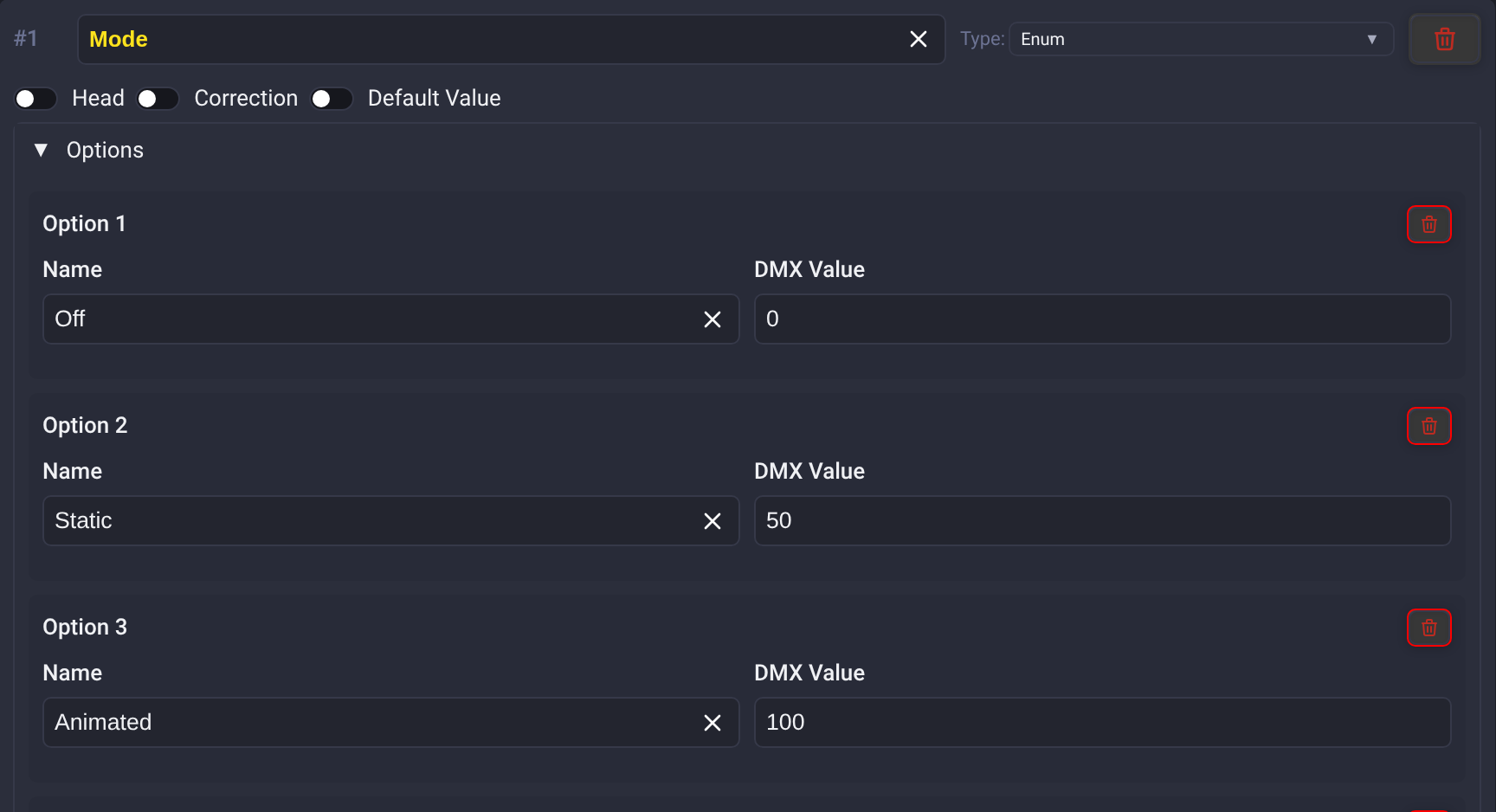
1. Stepped Enumerable Channels (enum)
Enumerable channels represent discrete fixture states rather than smooth gradients—such as fixture reset commands, cooling fan modes, internal automation macros, or lamp ignition states.
- Option Configuration: Each entry contains a human-readable Name and a target DMX Value.
- Adaptive Live Dashboard Presentation:
- If a channel has 5 or fewer options, Unilighter automatically renders them as instant, full-width touch buttons for fast busking triggers.
- If a channel has more than 5 options, it automatically compacts into a space-efficient dropdown selector to keep your workspace uncluttered.
2. Motorized Gel Color Wheels (color-wheel)
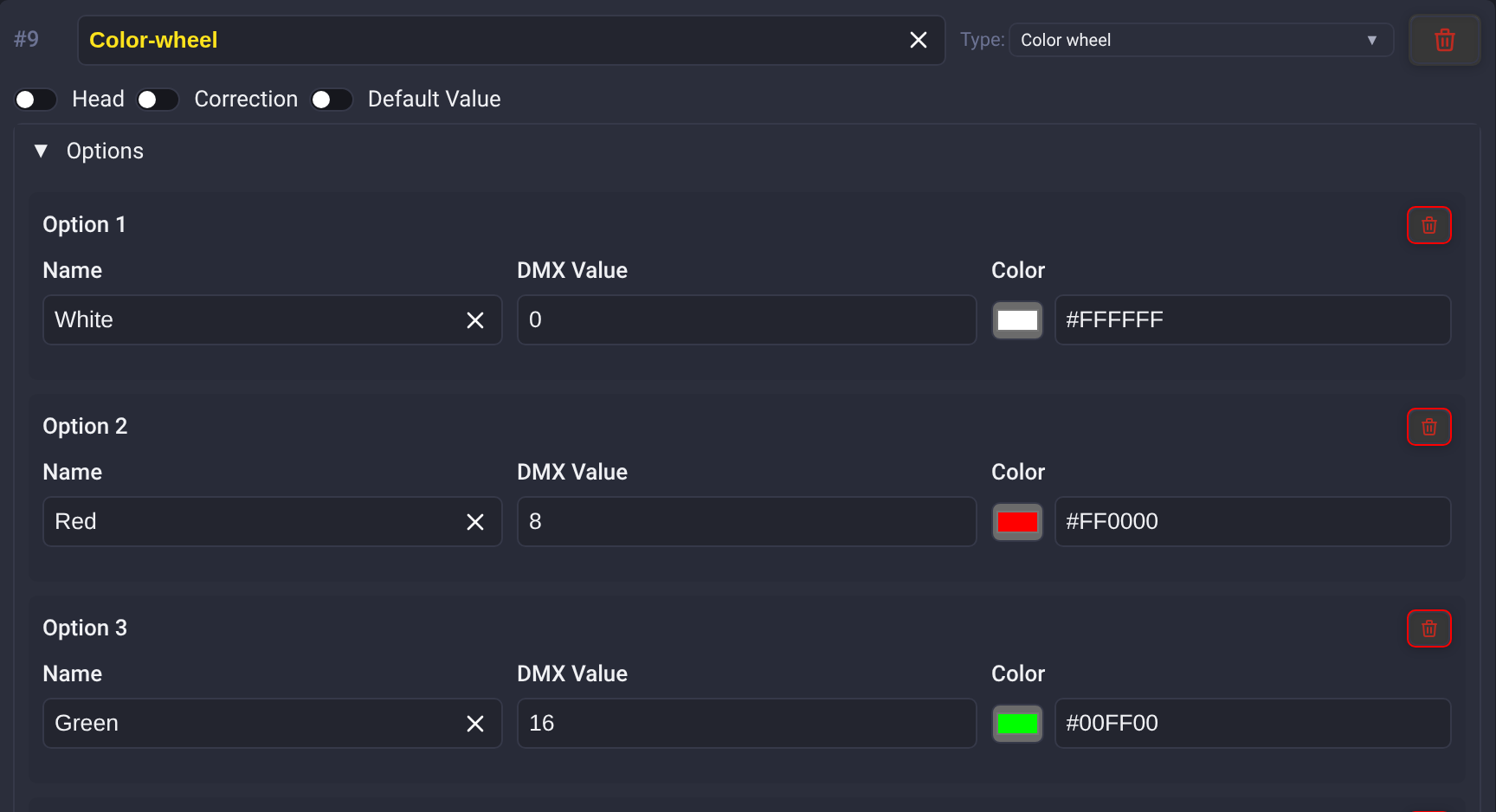
When fixtures utilize a physical rotating wheel loaded with optical color gels (dichroic filters) rather than or in addition to LED mixing:
- Exact Color Swatches: Each option supports both a target DMX trigger value and a specific HEX Color Swatch (e.g.,
#FF4500for Flame Orange or#00FFFFfor Electric Cyan). - Interactive UI Swatch Bar: In the Live Dashboard and Device Control views, these options are rendered as an intuitive interactive palette. Operators can jump to exact gel colors visually instead of guessing raw DMX numbers.
3. Gobo Wheels with Built-In Vector SVG Editor (gobo-wheel)
Gobo wheels project patterned light stencils onto the stage:
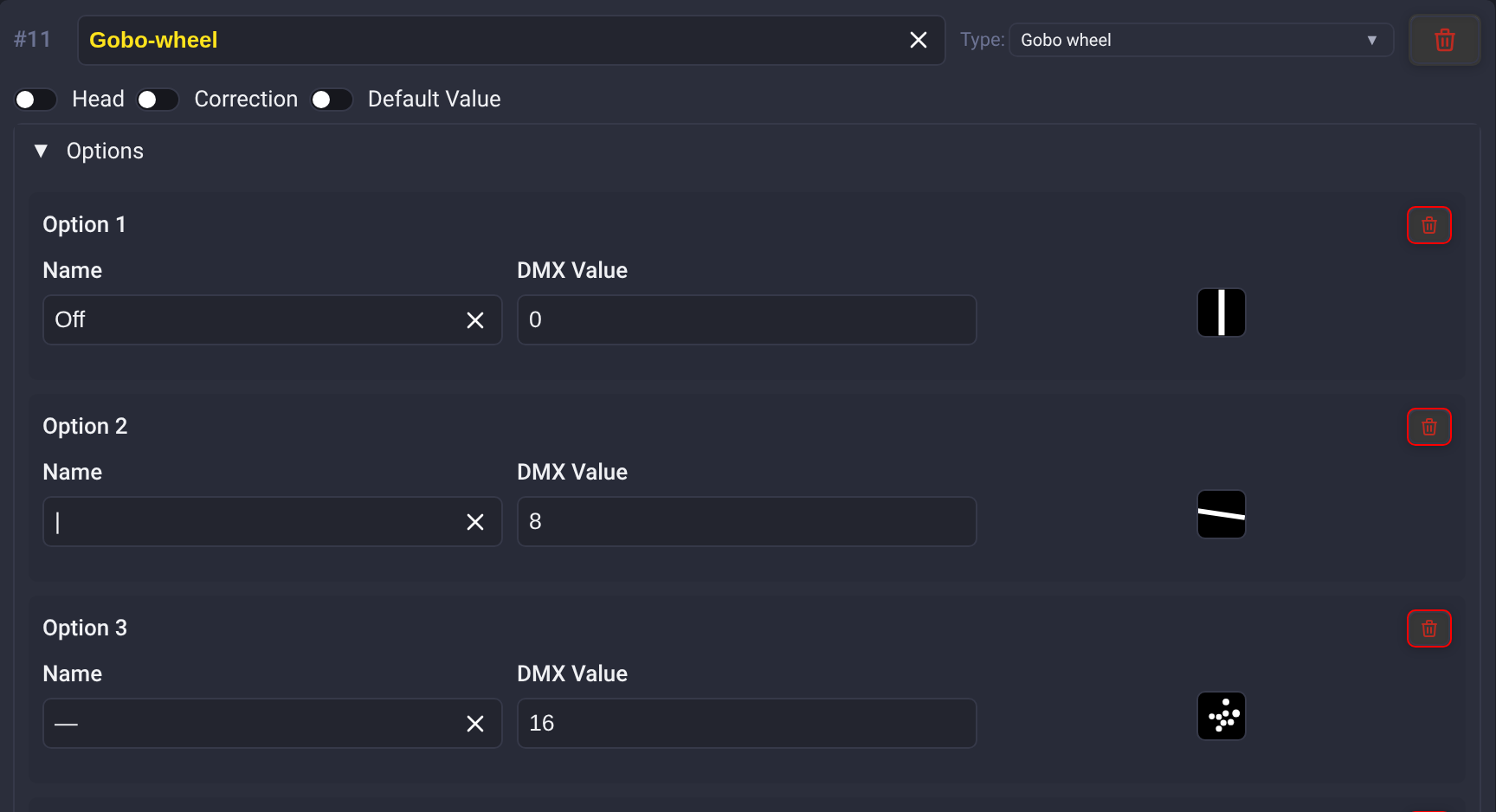
Use this type for custom pattern selectors as well as physical gobo wheels. In Device Control, the channel appears once under its own name (for example Shape) in Misc, with its named options and a knob for exact DMX values.
- Visual Pattern Thumbnails: In addition to DMX trigger values, each gobo slot supports custom vector pattern artwork.
- Integrated In-Browser SVG Editor: Clicking any gobo thumbnail opens Unilighter's built-in vector drawing modal. You can sketch custom gobo geometry, edit SVG markup, or tweak starbursts, breakup patterns, and geometric prisms directly within the application without needing third-party graphic software.
For color and gobo capture, Use Mobile Camera connects your phone by QR code. On the phone, use the live camera preview or tap Choose a photo to select an existing image from your photo library or files. Photo selection also works when camera access is unavailable or denied. For a gobo photo, adjust the framing, brightness and contrast, then tap Trace gobo and Use this pattern. For a color photo, tap Use this color to accept the sampled center color.
4. Range-Multiplexed Composite Channels (Shared)
Some fixtures multiplex fundamentally different functions onto a single channel (for example, DMX 0–15: Strobe Open, 16–128: Linear Strobe Rate, 129–190: Color Wheel Macro, 191–255: Random Strobe Pulse).
- A Shared channel lets you define distinct DMX value windows (
mintomax). Older profiles and raw JSON still use the internal type namealias; this is the same channel type, not a separate feature. - Each window can be assigned its own specialized sub-type (
strobe,color-wheel,misc), default value, and custom color swatch.
5. Fine, Ultra & Uber Resolution
Any fixture parameter can span up to four DMX channels. Add the next resolution from the coarse channel in one click:
- Coarse: 8-bit,
0–255. - Fine: 16-bit,
0–65,535. - Ultra: 24-bit,
0–16,777,215. - Uber: 32-bit,
0–4,294,967,295.
Use the same channel type, head, and base name for every byte. Unilighter links the channels and sends the most significant byte first. The order in the fixture mode remains the real DMX channel order, so it can also handle manuals that list Fine before Coarse or omit one of the usual bytes.
For continuous parameters such as Pan, Tilt, Dimmer, Zoom, or a custom misc control, the UI stays normalized while Unilighter distributes the value across all configured bytes. For enum and gobo-wheel, option values may use the full combined integer range. Color Wheel Fine is different: it continues to represent split colors between adjacent wheel slots, so color-wheel option values remain 0–255.
Tip
Most fixtures only need Fine resolution for Pan and Tilt. Add Ultra or Uber only when the fixture manual actually assigns those bytes; extra resolution channels do not create precision that the hardware does not support.
⚖️ Architectural Distinction: misc vs. unknown
Understanding when to choose misc versus unknown is crucial for maintaining clean, responsive live workspaces:
misc (Controllable Miscellaneous Parameters)
- Purpose: Real, functional auxiliary features on your fixture that do not map to standard primary modules (e.g., Pan/Tilt Vector Speed, Fog Emitter Output, Internal Program Speed, Hazer Fan RPM).
- UI Behavior: Generates an interactive rotary encoder (Knob) or numeric slider (Fader) in the Misc group of the Live Device Control widget.
- Automation Support: Can be modulated in Node Graphs via the
misc.<paramName>socket, sequenced with smooth easing in Keyframe Animations, and recorded into Scenes.
unknown (Reserved & Inactive Spacer Channels)
- Purpose: Unmapped, undocumented, or manufacturer-reserved DMX slots (e.g., "Reserved for future use", "No function", or channels you intentionally do not want operators touching during a show).
- UI Behavior: Generates no control elements on the live dashboard.
- Footprint Integrity: Ensures the fixture's start-to-end DMX channel count remains 100% accurate. Without
unknownspacers, subsequent channels (like Dimmer or Pan/Tilt) would shift to incorrect DMX addresses on the universe wire.
⚡ Power-User Speed Hacks & Workflow Shortcuts
The Fixture Profile Editor is engineered with high-efficiency keyboard and mouse gestures to drastically accelerate profile creation:
1. Drag-and-Release Channel Dropdown
When adding a new channel from the Add channel... dropdown:
- Click and hold the dropdown button, drag your cursor directly to the desired channel type (e.g.,
DimmerorPan), and release the mouse button. - The channel is created immediately, and focus instantly shifts to the channel name with the default text highlighted.
- You can begin typing your custom channel label right away—requiring zero redundant mouse clicks.
2. The Ctrl + Enter (or Cmd + Enter) Rapid Spawner
- In Modes View: Pressing Ctrl+Enter (or Cmd+Enter on macOS) instantly appends a new channel to the active mode. The name field is auto-focused with its text selected. Type your name, hit Ctrl+Enter again, and repeat to knock out dozens of channels in seconds.
- Inside Enums, Color Wheels & Gobos: When focused on any Enum option or Color/Gobo slot, pressing Ctrl+Enter appends the next option below it.
3. Smart DMX Step Delta Calculation
When building stepped enum lists (like color wheels or strobe ranges):
- Unilighter inspects the mathematical delta between your previous two options. If Option 1 is
DMX 0and Option 2 isDMX 8(a step of 8), pressing Ctrl+Enter automatically populates Option 3 withDMX 16, Option 4 withDMX 24, and so on. - The new option's name is highlighted and automatically scrolled into the center of your view, enabling fluid, mouse-free cataloging of 30+ preset wheels.
4. Per-Channel Calibration (Correction)
- Toggle the Correction button on color emitter channels (
red,green,blue). - Sets a fractional intensity multiplier (e.g.,
0.85) directly inside the fixture definition. - Global Baseline with Per-Device Overrides: The correction factors defined in the fixture profile serve as the automatic default baseline for all patched instances of this fixture model. When needed, operators can fine-tune or override these calibration multipliers on an individual physical unit level (in the Device View) to compensate for component aging, LED batch variances, or mismatched optical paths across specific fixtures.
- Corrects hardware-level color imbalances between different fixture models before signals ever reach live scenes or node graphs.
5. Safe Power-On Defaults (Default Value)
- Toggle the Default Value property only for channels requiring non-zero resting values.
- Channels without a configured default normally return to zero. Imported nonzero and high-resolution defaults are preserved. Configured Shutter controls have an open default, with explicit raw DMX state mappings when provided; see Strobe & Shutter.
- Define non-zero safe baselines where a raw
0would inadvertently block light or park moving heads in awkward mechanical limit positions—such asPan/Tilt Center = 128(centering heads straight into the venue), or neutral motorized zoom levels. - When a show project initializes or fixtures enter standby, channels automatically park at these designated levels.
6. Raw JSON Mode & Cloud Synchronization
JSONTab: Instantly view or edit the raw profile JSON structure with full schema validation. Perfect for duplicating complex channel blocks, copying definitions from external manuals, or backing up presets.- Cloud Library: Seamlessly sync local profiles to your Unilighter Cloud account, compare versions (
local-newervs.cloud-newer), and pull verified profiles created by other lighting operators across the community. - Refresh: In the Fixture Library toolbar, click Refresh to check for new cloud profiles and download missing profiles without reopening the console. Newer cloud copies also update automatically when the local copy still matches its last known cloud version; unsynced local edits are preserved. The button shows Refreshing… and stays disabled until synchronization finishes. If the cloud list cannot be refreshed, an error message appears and you can try again. Refresh requires a signed-in account and is unavailable in Solo.
- Upload: Profiles marked Local only or with newer local changes show Upload while you are signed in. A profile counts as uploaded only after the cloud accepts it; if the upload fails, an error message names the reason and the profile keeps its previous status. The bundled Generic PAR, Generic Hazer, Generic Moving Head, Generic LED Bar and Everything profiles have no Upload button. Profiles that were bundled in earlier versions upload like any other profile.

Library sources, mode names and physical settings
Import now opens a combined library for OFL, QLC+, DDF and D4, with supported local files. GDTF additionally requires a signed-in account and developer mode. See Import Fixture Profiles for source selection, previews, warnings and availability.
Rename a fixture mode with a double-click or its context menu. Imported physical settings are shown when the mode provides them; inspect dimensions, white temperature, movement ranges, geometry and separate light sources where available. Reversed analog channels have a direction setting, and releasing control restores precise DMX defaults, including high-resolution parameters.
Named channel ranges appear on faders and knobs, with the active range name on the fader. They describe the channel; operational Strobe/Shutter settings separately define light-gate endpoints, modes and effects. Cyan, magenta and yellow channels support CMY output, independent heads and high-resolution bytes.
For Strobe/Shutter channels, enable Shutter first. Simple shutter uses zero for closed, full scale for open and, without modes, the intermediate values for strobe speed. Enable the newly revealed Detailed shutter toggle to configure specific DMX states. Detailed shutter without modes is an opening/closing control only; switching Detailed off restores the simple mapping and keeps existing modes.
For an undocumented physical fixture, use the Reverse Engineering and Camera Capture guide.
Local library maintenance
Bulk removal of saved local fixture profiles is available only in Settings → Developer, while developer mode is enabled. It is no longer an action in Project settings. Clear local fixture storage requires confirmation and also clears the cached cloud library list. Profiles that have not been uploaded or exported can be lost permanently; export or upload them before using this maintenance action. Cancelling the confirmation keeps the stored profiles. This action is unavailable while inspecting a project.

Physical emitters in the visualizer
Use Emitter Layout, directly below 3D Model Preset, to arrange separate optical sources or combine logical Heads into independently colored segments of one optic. Profile defaults, mode overrides and selected-device overrides use the same model. This changes visualization while preserving the DMX map and existing programming.