Lesson 4.4: Core Node Library & Real-World Effect Recipes
Warning
⚠️ Draft Lesson: This lesson is currently a working draft and is undergoing practical review. Technical labs, workflows, and diagrams may be expanded and refined in upcoming revisions.
In visual dataflow programming, individual nodes are like modular electronic circuit components: alone, a single resistor or capacitor accomplishes little, but wired together in intelligent configurations, they can produce synthesizers, radio receivers, or laser controllers.
Unilighter includes a carefully curated library of specialized nodes divided into three functional categories: Inputs (capturing audio, timing, and tactile controls), Processes (mathematical transformations, sequence manipulation, delay lines, and logic), and Outputs (translating data into physical DMX channels).
In this lesson, we dissect the core node toolkit, master audio-reactive tempo detection with the dedicated BpmNode, explore subgraph encapsulation, and walk through three battle-tested recipes for live stage lighting.
1. The Core Node Toolkit
Unilighter provides 15 core nodes designed specifically for high-speed stage lighting execution:
| Category | Node Name | Primary Role |
|---|---|---|
| Input | AudioNode |
Captures live system microphone or line-in audio; generates real-time multi-band FFT spectrum arrays. |
| Input | ColorNode |
Canvas-based full-spectrum color wheel; outputs standardized color tuples to downstream fixtures. |
| Input | ValueNode |
Configurable on-canvas slider, rotary knob, dropdown list, or toggle button bank for manual tuning. |
| Input | XYNode |
2D coordinate crosshair pad; outputs horizontal (X) and vertical (Y) coordinates for motor aiming. |
| Input | OscillatorNode |
Periodic waveform generator (Sine, Triangle, Sawtooth, Square, Impulse, Noise); syncs to Hz or BPM fractions. |
| Input | SharedValuesNode |
Reads global project variables across multiple graphs, supporting numbers, sequences, and audio. |
| Process | MathNode |
Arithmetic (Add, Multiply), scaling (Map Range, Clamp), logic (Min, Max), or custom JavaScript equations; supports numeric-polymorphic sequence vectorization and broadcasting. |
| Process | SequenceNode |
Generates, resizes, and structurally transforms numeric sequences (up to 64 values); offers linear interpolation, cyclic resizing, and deterministic shuffle. |
| Process | DelayNode |
Stateful numeric delay line; captures temporal history and emits trailing multi-tap sequences for tagged fixtures. |
| Process | GateNode |
Dynamic envelope filter for scalars and sequences; opens when signals cross a threshold, maintaining independent per-element decay states. |
| Process | RouterNode |
Directs a single input signal into one of several output paths; supports polymorphic Number or Sequence routing. |
| Process | FrequencyMeterNode |
Isolates a precise frequency band (e.g. \(40\,\text{Hz} - 100\,\text{Hz}\)) and outputs its real-time RMS amplitude. |
| Process | GroupNode |
Distributes a scalar or color signal across multiple fixtures with phase delays, offsets, and spatial fan spreads. |
| Process | BpmNode |
Analyzes audio transients to detect musical tempo; outputs BPM values, frequency fractions, and beat pulses. |
| Output | DeviceNode |
Maps signals directly to the raw DMX parameters of an individual luminaire or semantic tag group. |
| Output | DeviceControlNode |
High-level macro node; triggers stored scenes, overrides master intensities, or takes over strobe rates. |
2. Audio Tempo Synchronization: The BpmNode
Many visual applications attempt to make lights react to music simply by plugging an audio volume meter into a fixture dimmer. The result is almost always a chaotic, vibrating strobe flicker that gives audience members headaches.
Musically pleasing automation requires tempo tracking: detecting the true underlying beat of the music and generating clean, rhythmic pulses.
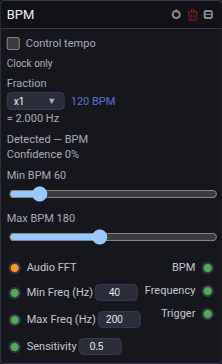
In Unilighter, this is handled by the dedicated BpmNode:
2.1 Transient Spectral Flux Tracking
Rather than looking at simple audio loudness, the BpmNode analyzes spectral flux—sudden energy surges across specific frequency bins.
- By setting
Min Freqto \(40\,\text{Hz}\) andMax Freqto \(200\,\text{Hz}\), the node listens exclusively to the acoustic punch of kick drums and electronic bass transients, completely ignoring vocals, keyboards, and cymbals. - It tracks the Inter-Onset Interval (IOI) median to determine the exact tempo (e.g. \(128.0\,\text{BPM}\)).
2.2 Phase-Preserving Master Clock Steering
When the Control tempo switch is enabled, the BpmNode takes ownership of Unilighter's central master clock:
- It calls
changeBpmPreservePhase, smoothly accelerating or decelerating the master timeline without causing running chases or keyframe animations to skip beats or jump phases. - If the DJ slowly speeds up from \(124\,\text{BPM}\) to \(128\,\text{BPM}\), every pulse, step sequence, and chase across the entire console accelerates in lockstep.
- If an operator manually taps the physical TAP button in the console header or sends a MIDI tempo override, the console safely revokes the node's control lock so human commands always take precedence:

3. Subgraphs & Reusable Function Containers
As your node graphs expand to manage multi-fixture chases, audio filters, and color generators, canvases can quickly become cluttered with dozens of crisscrossing wires (known in the industry as "spaghetti wiring").
To maintain clarity, Unilighter provides Subgraphs:
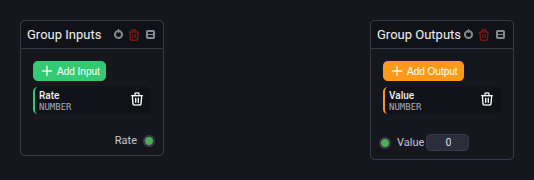
How Subgraph Encapsulation Works:
- Internal Logic: You build a complex network—for example, a three-oscillator wave generator with frequency filters and map nodes.
- Interface Nodes:
GroupInputsNode: Declares exterior input sockets (e.g.Speed,Intensity Scale,Base Color,Sequence) with default fallbacks.GroupOutputsNode: Declares exterior output pins streaming processed data back to the parent canvas.
- Collapsed Simplicity: In the main show graph, the entire twenty-node network collapses into a single neat card with a few clean input and output pins. You can duplicate this macro across multiple projects with zero clutter.
4. Three Battle-Tested Node Recipes
Here are three practical, production-ready node configurations for live concert busking:
Recipe 1: Kick-Reactive Sub-Bass Strobe Burst
[ Audio Input ] ──(Spectrum)──> [ Frequency Meter ] ──(RMS)──> [ Gate Node ] ──> [ Device Node: Strobes ]
                                (Filter: 40-90 Hz)             (Thresh: 0.65)    (Dimmer / Strobe)
                                                               (Attack: 5ms)
(Release: 120ms)- The Challenge: You want white strobes or blinders to punch on heavy kick drum hits, but you don't want them flickering erratically on basslines or vocals.
- The Solution: Route the audio spectrum into a
FrequencyMeterNodetuned to \(40 - 90\,\text{Hz}\). Feed the RMS amplitude into aGateNode. Set the threshold so only the loudest \(30\%\) of kicks trigger the gate. Add \(120\,\text{ms}\) of release time to give each burst a punchy, optical pop rather than a digital jitter.
Recipe 2: The Lissajous Dual-Sine Moving Head Braid
[ Oscillator 1 (Sine 0.12 Hz) ] ──> [ Math: Map Range (-1..1 to 30..70) ] ──> Pan  ──┐
                                                                                       ├──> [ Device: Spots ]
[ Oscillator 2 (Sine 0.24 Hz) ] ──> [ Math: Map Range (-1..1 to 20..60) ] ──> Tilt ──┘- The Challenge: Moving heads tracing circular patterns look robotic and repetitive after a few minutes.
- The Solution: Drive
Panwith a slow sine wave (\(0.12\,\text{Hz}\)) and driveTiltwith a sine wave running at exactly twice the frequency (\(0.24\,\text{Hz}\)). This mathematical ratio forms a Lissajous figure-8 trajectory. The moving heads continuously trace a graceful, sweeping infinity loop across the stage without ever jerking the stepper motors.
Recipe 3: Tempo-Locked Color Wheel Hop
[ BpmNode ] ──(Beat Trigger)──> [ Counter / Logic ] ──(Index)──> [ Color Palette ] ──> [ Device: Washes ]
(128 BPM) (Amber / Cyan / Magenta)- The Challenge: Cycling colors on every single quarter-note beat can feel frantic and induce visual fatigue.
- The Solution: Use a frequency divider on the
BpmNodeto emit a pulse once every \(8\) beats (two bars). Route the pulse into a color selector that steps through a harmonious 2-color palette. The stage maintains a stable, grounded mood while staying locked in perfect rhythmic sync with the DJ.
5. Hands-On Lab: Building a Kick-Reactive Strobe in Unilighter
Follow these steps to construct Recipe 1 on your canvas:
Step 1: Open Node Canvas
- In Unilighter, go to Node Graphs (
/#/nodes). - Click Add Graph and name it
Audio Kick Strobe.
Step 2: Wire the Audio Analyzer
- Add an Input → Audio (
AudioNode). - Add a Process → Frequency Meter (
FrequencyMeterNode). - Connect the
Spectrumoutput socket of the Audio node to theSpectruminput socket of the Frequency Meter. - On the Frequency Meter card, set
Min Freqto45 HzandMax Freqto95 Hz.
Step 3: Add Dynamic Envelope Filtering
- Add a Process → Gate (
GateNode). - Connect the
Valueoutput of the Frequency Meter to theSignalinput of the Gate. - Configure the Gate settings:
Threshold:0.70(only triggers on peak kick transients).Attack:5 ms(instant instantaneous strike).Release:100 ms(smooth, clean optical decay).
Step 4: Route to Fixtures
- Add an Output → Device (
DeviceNode). - Select your strobe fixtures or tag
#strobes. - Connect the
Outputsocket of the Gate to theDimmersocket of the Device node. - Turn on the graph master switch and play music through your audio input.
- Notice how the strobes fire with punchy, crisp precision on kick drum beats while remaining dark through quiet vocal passages.
📝 Self-Assessment Quiz
Test your comprehension of core nodes and generative lighting configurations:
- Scenario A: An operator connects an audio input directly to the dimmer channel of four wash lights. When a dance track plays, the lights vibrate with an unpleasant, rapid jitter that looks like an electrical fault. What processing node should be placed between the audio analyzer and the fixture dimmer to turn this into a clean, punchy musical pulse?
- A) An active 120-ohm transmission line terminator plug connected across Pins 2 and 3.
- B) A
GateNodeconfigured with a selective threshold and a calibrated release time (e.g. 100 ms) to eliminate low-level jitter and shape clean optical decays. - C) An inverted binary DIP switch to force the RS-485 transceiver into half-duplex mode.
- D) A physical step-down electrical transformer to drop the fixture operating voltage from 230V to 110V.
Correct Answer: B Why this is correct: A
GateNodeacts as a dynamic envelope filter. It ignores quiet background noise below its threshold and applies smooth attack and release envelopes to transients, transforming harsh digital flutter into clean, punchy visual pulses. Why other options are incorrect: Cable terminators (A) absorb electrical reflections on DMX cables; half-duplex RS-485 (C) is standard DMX physical wiring; and transformers (D) alter AC power supply voltage, which would damage fixtures rather than fix software signals.
- Scenario B: How does Unilighter's
BpmNodesafely adapt the console's master clock speed when an electronic DJ gradually accelerates a musical track from 122 BPM to 128 BPM during a live set?- A) It instantly wipes all running cue memories and forces the operator to reload the show file from disk.
- B) It calls
changeBpmPreservePhase, smoothly adjusting the clock frequency without causing running step sequences or keyframe timelines to skip beats or jump phase angles. - C) It triggers a physical DMX break pulse that resets the mechanical stepper motors on all moving fixtures.
- D) It drops the RS-485 baud rate to 122 kbit/s to match the audio tempo in hertz.
Correct Answer: B Why this is correct:
BpmNodeuses phase-preserving tempo adjustments (changeBpmPreservePhase), ensuring that running animations scale their speed smoothly without jarring visual jumps or phase restarts. Why other options are incorrect: The node does not wipe cue memory (A); DMX break pulses reset packet framing, not motor calibration (C); and DMX baud rate is fixed by hardware standards at 250 kbit/s (D).
- Scenario C: What is the primary purpose of using
GroupInputsNodeandGroupOutputsNodeto build Subgraphs in large, complex Unilighter projects?- A) To increase the electrical power rating of the computer’s USB ports for external DMX dongles.
- B) To encapsulate complex multi-node networks into clean, modular containers, exposing only essential macro parameter pins and eliminating visual canvas clutter.
- C) To bypass the DMX512 ceiling of 512 channels per universe without adding network nodes.
- D) To translate English node labels into hexadecimal binary machine code for legacy theatrical dimmers.
Correct Answer: B Why this is correct: Subgraphs provide software encapsulation: complex math, LFOs, and routing networks are tucked inside a neat black box, exposing only the high-level inputs and outputs needed on the main canvas. Why other options are incorrect: Subgraphs are software architectural constructs, having no effect on USB port electrical wattage (A), DMX universe channel limits (C), or hexadecimal translation (D).