Lesson 3.2: Fixture Tags: The Evolution Beyond Rigid Groups
Warning
⚠️ Draft Lesson: This lesson is currently a working draft and is undergoing practical review. Technical labs, workflows, and diagrams may be expanded and refined in upcoming revisions.
On small lighting rigs with six static fixtures, an operator can easily remember every fixture number by heart. But as soon as a production expands to twenty, fifty, or two hundred automated luminaires, selecting fixtures by typing individual keypad numbers (1 THRU 12 AT 80 ENTER) becomes a major bottleneck during rehearsals.
To solve this, traditional lighting consoles introduced Groups: numbered storage registers that bundle fixtures together (e.g., Group 1 = Front Washes, Group 2 = Backline Beams).
However, traditional console groups have a fundamental flaw: they are rigid, one-dimensional, and brittle.
In this lesson, we examine why rigid grouping systems break down on modern stages, explore Unilighter’s multi-dimensional Fixture Tag Architecture, and learn how semantic tags eliminate reprogramming headaches during live shows and touring rig swaps.
1. The Grouping Bottleneck on Traditional Consoles
In traditional theatrical and concert desks, grouping works like numbered file folders:
Traditional Desk: Rigid One-Dimensional Grouping
├── Group 1: All Spots
├── Group 2: All Washes
├── Group 3: Back Truss Fixtures
├── Group 4: Back Truss Spots
├── Group 5: Back Truss Spots Lighting the Drummer
└── Group 6: Floor Fixtures Lighting the Drummer
Notice what happens as the show develops:
- Combinatorial Explosion: You end up creating dozens of overlapping groups to account for different physical combinations (position, fixture type, performer focus).
- Mental Fatigue: The operator must remember that Group 37 controls the upstage left floor beam while Group 42 controls the downstage right spot.
- Brittle Tour Maintenance: If an overhead moving head dies three hours before showtime and is replaced by a spare patched to a different universe and channel, the technician must manually hunt down every numbered group and cue that referenced the old fixture ID.
2. Unilighter's Semantic Tag Architecture
Unilighter replaces rigid numbered groups with Multi-Dimensional Fixture Tags. Instead of forcing fixtures into a single rigid folder, you attach lightweight, descriptive labels (tags) directly to each fixture in the Device Patch (/#/setup).
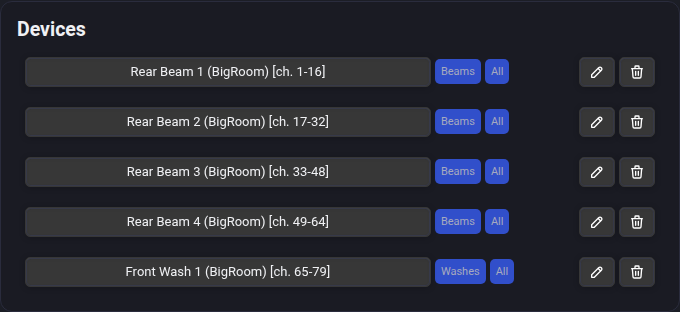
Any fixture can carry multiple tags simultaneously across independent operational dimensions:
| Tag Dimension | Purpose | Typical Stage Examples |
|---|---|---|
| Physical Stage Zone | Where is the fixture physically mounted in the room? | #front-truss, #backline, #floor-wings, #balcony-rail, #stage-left |
| Optical Fixture Type | What kind of optical beam engine does it possess? | #spots, #washes, #beams, #pixel-bars, #strobes, #blinders |
| Performer / Stage Focus | What scenic zone or artist does the fixture illuminate? | #lead-vocal, #drum-riser, #keyboards, #podium, #audience |
Multi-Tag Intersection & Filtering
Because tags are orthogonal, you do not need to create dedicated groups for every conceivable sub-combination. You simply query the tags you need:
- Need all fixtures on the back truss? Select
#backline. - Need all motorized spots on the rig? Select
#spots. - Need only the spots located on the back truss? Filter by
#backlineAND#spots.
The console instantly targets the exact intersection of fixtures without requiring pre-programmed sub-groups.
3. Tag Device Control & The Inconsistency Badge
When you add a Device Control Widget to your Live Dashboard and switch its mode to Tag Mode, the widget represents the collective state of every fixture sharing that tag.
+-------------------------------------------------------------+
| Device Control: [#backline-washes]                          |
|                                                             |
|  [Dimmer Slider: 75%]                                       |
|                                                             |
|  [Pan / Tilt XY Pad]       [Color Wheel: Amber 3200K]       |
|                                                             |
|  ⚠️ Tilt Inconsistency Badge: [2 / 8 differing]             |
+-------------------------------------------------------------+
Resolving Inconsistent States Gracefully
In a real show, fixtures within a tag group do not always share identical parameters. For example:
- Eight wash lights on the back truss may all share the
#backline-washestag and be colored deep blue. - However, four of them may be tilted downstage toward the band, while the other four are tilted up toward the ceiling drapery.
In primitive software, touching a master group slider either ignores the conflicting fixtures or abruptly snaps them to identical values, ruining your focus angles.
Unilighter handles this through an Inconsistency Badge:
- When parameters within a tag group differ, a subtle yellow warning badge appears on the control indicating how many fixtures deviate from the group primary.
- If you adjust the control slightly, Unilighter applies a relative offset, preserving the angular relationships between fixtures.
- If you want to force all fixtures into strict alignment, clicking the badge or entering an explicit value snaps all tagged units into unison.
4. Multi-Head Fixtures & Head Union Architecture
Modern rigs frequently include fixtures with multiple controllable emitters—such as an LED batten with eight RGB pixels, or a moving head with a central spot beam and an outer pixel ring.
When you tag an array of multi-head fixtures with #pixel-bars, how does the console handle channel control?
+-------------------------------------------------------------------------+
| Multi-Head Tag Resolution: `#pixel-bars`                                |
|                                                                         |
|  [Physical Fixture A: 4-Cell Bar]  [Physical Fixture B: 4-Cell Bar]     |
|   ├── Shared: Pan / Tilt / Strobe   ├── Shared: Pan / Tilt / Strobe     |
|   ├── Head 0: RGB Cell 0            ├── Head 0: RGB Cell 0              |
|   ├── Head 1: RGB Cell 1            ├── Head 1: RGB Cell 1              |
|   ├── Head 2: RGB Cell 2            ├── Head 2: RGB Cell 2              |
|   └── Head 3: RGB Cell 3            └── Head 3: RGB Cell 3              |
|                                                                         |
|  Unilighter Unified Tag Target:                                         |
|  - Tag Master Dimmer -> controls Shared Dimmer across A and B           |
|  - Tag Head Target (.h0) -> targets Cell 0 on both A and B in parallel  |
+-------------------------------------------------------------------------+
Unilighter’s tag engine performs an automated head union:
- The tag control identifies all unique modules present across the tagged group (
Shared,H0,H1, etc.). - Writing a color value to
#pixel-barsbroadcasts to every cell across all tagged fixtures. - Adjusting a shared physical attribute (like motor tilt on a motorized batten) addresses the
Sharedhead without perturbing individual cell color balances.
5. Spatial Tag Ordering (tagOrders)
When running automated color chases, wave sweeps, or dimming ripples across a line of twelve fixtures, the order in which fixtures react is paramount.
If the fixtures were patched out of physical order (for example, if cable routing resulted in the DMX addresses being ordered \(1, 3, 2, 5, 4, 6\)), a simple sequential chase will jump erratically back and forth across the stage instead of flowing smoothly from stage left to stage right.
In Unilighter, each tag maintains an independent Spatial Tag Order (tagOrders):
- In the Tag setup dialog, you can arrange fixtures into their true physical order (e.g. Stage Left to Stage Right, Center-Outward, or Downstage to Upstage).
- Animations, chasers, and procedural Node Graph wave generators read this spatial sequence directly, ensuring that spatial waves travel across the room in perfect physical continuity regardless of the underlying DMX addresses.
6. The Touring Advantage: Zero-Recode Fixture Replacement
The ultimate test of a console’s grouping architecture occurs when equipment breaks under real-world touring conditions.
The Traditional Nightmare
On a legacy desk with hardcoded fixture numbers:
- Moving Head #14 on the back truss dies during soundcheck.
- You replace it with a spare unit, but because of venue DMX limits, you must patch it to an open address on Universe 3 as Fixture #89.
- You now have to open every cue, scene, palette, and group in your show file to replace Fixture #14 with Fixture #89. If your show has 150 cues, you are in for an exhausting afternoon.
The Unilighter Workflow
In Unilighter:
- Patch the replacement fixture to the open DMX address on Universe 3.
- In the Device Patch screen, assign the tags
#backlineand#spotsto the new fixture. - Remove the tags from the broken fixture (or delete it from the patch).
- Done. Every scene, dashboard widget, keyframe track, and node graph in your show file immediately controls the replacement fixture. Not a single cue needs to be edited or re-recorded.
7. Hands-On Lab: Tagging and Controlling a Stage Rig
Follow these steps to configure multi-dimensional tags in Unilighter:
Step 1: Open Device Patch
- Navigate to Device Patch (
/#/setup). - Ensure you have at least four fixtures patched (e.g., two moving spots and two wash lights).
Step 2: Assign Multi-Dimensional Tags
- Select the first moving spot (hung on the rear pipe over stage left).
- In the Tags field, type
backlineand press Enter. Then typespotsand press Enter. Finally, typestage-leftand press Enter. - Select the second moving spot (hung on the rear pipe over stage right).
- Assign the tags
backline,spots, andstage-right. - Select the two front wash fixtures and assign the tags
front-washandwashes.
Step 3: Test Tag-Based Live Control
- Go to the Live Dashboard (
/#/dashboard). - Click Add Widget and select Device Control Widget.
- In the widget header settings, switch the mode from Single Device to Tag Mode.
- Select the tag
spots. - Notice that the Pan/Tilt crosshairs and Dimmer slider now control both moving spots simultaneously.
- Pull the dimmer slider to \(80\%\): both moving heads immediately illuminate in unison.
📝 Self-Assessment Quiz
Test your comprehension of fixture tagging and grouping mechanics:
- Scenario A: A touring lighting technician replaces a defective wash light on the front truss with a spare luminaire. The spare is patched to Universe 2 at DMX address 120. Using Unilighter, what is the correct and fastest procedure to integrate the new light into all existing cues, widgets, and color chases?
- A) Open every scene in the Scenes Manager and manually re-record the new DMX address into each cue.
- B) Re-flash the console firmware using a USB drive to force the DMX interface into automatic RDM discovery mode.
- C) Assign the tag
#front-washto the new fixture in Device Patch; all cues and widgets targeting that tag will instantly control it. - D) Solder a 120-ohm resistor between Pins 2 and 3 of the new fixture's DMX input to duplicate the old fixture's digital ID.
Correct Answer: C Why this is correct: Unilighter’s architecture abstracts control through semantic tags rather than hardcoded DMX addresses. Assigning the relevant tag to the newly patched fixture immediately links it to all scenes, widgets, and animation tracks targeting that tag. Why other options are incorrect: Manually editing every scene (A) is the outdated legacy workflow that tags eliminate; Unilighter does not use RDM discovery (B); and a 120-ohm resistor (D) is a physical transmission line terminator, not an addressing or identification device.
- Scenario B: A lighting director sets up a Device Control widget for the tag
#backline-spots. When looking at the widget on the Live Dashboard, the Tilt control displays a yellow Inconsistency Badge reading2 / 6. What does this indicate?- A) Two of the six moving spots have blown stepper motors and are failing to respond to DMX signal.
- B) Two of the six moving spots have a different stored tilt position than the representative group value.
- C) Two DMX channels are colliding on the RS-485 serial bus and causing electrical signal jitter.
- D) Two of the fixtures have their binary DIP switch 10 set to sound-active standalone mode.
Correct Answer: B Why this is correct: The Inconsistency Badge warns the operator that fixtures within a tagged group hold conflicting parameter values (in this case, four fixtures share one tilt angle, while two are angled differently). Why other options are incorrect: The badge indicates software parameter disparity, not physical hardware motor burnout (A); electrical DMX collisions do not report fixture counts to software widgets (C); and DIP switch standalone modes prevent DMX reception but are not detected as parameter variance (D).
- Scenario C: Why does Unilighter store independent spatial tag order lists (
tagOrders) rather than simply executing chases based on sequential DMX start addresses?- A) Because DMX512 transmission timings strictly require odd-numbered addresses to fire before even-numbered addresses.
- B) Because physical truss cabling and universe routing often result in fixtures being addressed out of physical left-to-right sequence.
- C) Because Art-Net and sACN network packets can only route data across IP subnets in alphabetical order.
- D) Because inverse-square optical calculations only function when fixtures are grouped in powers of two.
Correct Answer: B Why this is correct: In real-world stage production, cable paths and universe boundaries frequently mean that physical stage order does not match sequential DMX start addresses.
tagOrdersallows the operator to define true physical geometry (e.g. Stage Left to Stage Right) so that wave effects travel smoothly across the room. Why other options are incorrect: DMX frames transmit slots 1 through 512 strictly sequentially without odd/even bias (A); network protocols transmit IP packets without regard to fixture naming (C); and inverse-square laws govern optical photometrics, not software array ordering (D).