Lesson 7.6: Network DMX: Multi-Universe Art-Net 4 & sACN (E1.31)
Warning
⚠️ Draft Lesson: This lesson is currently a working draft and is undergoing practical review. Technical labs, workflows, and diagrams may be expanded and refined in upcoming revisions.
In modern lighting rigs, a single DMX512 universe (512 channels) is consumed almost immediately. A single high-end pixel bar or moving wash with individual LED pixel control can require 60 to 120 DMX channels. A medium-sized stage with 20 moving lights and 10 pixel bars easily requires 8 to 16 universes.
Running 16 separate 5-pin XLR cables across 100 meters from Front-of-House (FOH) to the stage is heavy, expensive, and prone to mechanical damage. Network DMX solves this by packaging dozens or hundreds of DMX universes into standard Ethernet packets transmitted down a single lightweight Cat5e or Cat6 network cable.
1. Network DMX Architecture
Instead of analog XLR snakes, a modern production uses standard IT networking hardware:
[ Unilighter Console / Laptop ]
         │
         │ Single Cat6 Ethernet Cable (Carrying Universes 1 - 32)
         ▼
[ Gigabit Network Switch (with IGMP Snooping) ]
         │
         ├───> [ Ethernet Node 1 (Stage Left) ]   ──> DMX Out 1..4 (Truss Left)
         ├───> [ Ethernet Node 2 (Stage Right) ]  ──> DMX Out 5..8 (Truss Right)
└───> [ Direct RJ45 Pixel Fixtures ] ──> Native Art-Net / sACN- Ethernet-to-DMX Node: A compact hardware gateway that listens on the network, extracts specific DMX universes, and converts them into physical XLR-5 / XLR-3 DMX outputs.
- Direct-Network Fixtures: Advanced media servers, video walls, and high-density LED strips receive Ethernet directly via RJ45 or etherCON jacks.
2. Art-Net 4 Protocol Mechanics
Developed by Artistic Licence, Art-Net is the most widely adopted Ethernet lighting protocol in the world. Art-Net encapsulates raw DMX frames inside standard UDP packets:
- Transport: UDP Port
6454(0x1936). - Addressing Hierarchy:
- Net (\(0 - 127\)): Groups of 16 Sub-Nets.
- Sub-Net (\(0 - 15\)): Groups of 16 Universes.
- Universe (\(0 - 15\)): The individual 512-channel stream.
- Total address space: \(128 \times 16 \times 16 = \mathbf{32,768\,\text{Universes}}\)!
Port-Address = (Net << 8) | (Sub-Net << 4) | (Universe)Unicast vs. Broadcast
- Broadcast Mode: The console sends every universe packet to the network broadcast address (e.g.,
192.168.1.255). Every device on the network receives every packet. On large rigs (>10 universes), broadcast floods the network, saturating Wi-Fi routers and low-powered microcontrollers. - Unicast Mode (Industry Standard): The console uses ArtPoll to discover the exact IP addresses of connected nodes and sends universe packets directly to the specific node responsible for that universe. Unilighter supports targeted unicast transmission to keep network bandwidth minimal.
3. Streaming ACN (sACN / ANSI E1.31)
Standardized by ESTA and ANSI, sACN (Streaming Architecture for Control Networks) was engineered specifically for large-scale enterprise entertainment systems, offering several major advantages over basic Art-Net:
- Transport: UDP Port
5568. - Native IP Multicast Addressing:
- Each universe is assigned its own unique multicast IP address: \($\text{Multicast IP} = 239.255.\text{Universe}_{\text{HighByte}}.\text{Universe}_{\text{LowByte}}\)$
- Universe 1:
239.255.0.1 - Universe 2:
239.255.0.2 - Universe 25:
239.255.0.25 - Nodes only subscribe to the multicast groups they actually output. With IGMP Snooping enabled on your network switch, the switch hardware forwards universe packets only to the exact physical port where that node is plugged in!
Built-in Priority & Seamless Redundancy (0–200)
sACN packets contain a Priority Byte (\(0 - 200\), default \(100\)):
Primary Console (sACN Priority 150) ──┐
                                      ├──> [ Ethernet Node ] ──> Out to Lights
Backup Console  (sACN Priority 100) ──┘
The node outputs data from the console with the highest priority. If the primary console crashes or its network cable is severed, the node instantly and seamlessly falls back to the backup console—with zero external hardware changeover switches required.
Frame Synchronization (Universe Sync)
When driving 30 universes of LED pixel tape across a large stage, network packets for Universe 1 may arrive a few milliseconds before Universe 30, causing visible horizontal "tearing" during rapid strobes.
sACN solves this with Universe Synchronization Packets:
- The console streams universes 1 through 30 with a "hold" flag.
- The nodes buffer the data in memory.
- The console transmits a single lightweight Sync Packet.
- All nodes output their DMX frames simultaneously at the exact same microsecond!
4. Summary: Art-Net vs. sACN Comparison
| Feature | Art-Net 4 | sACN (ANSI E1.31) |
|---|---|---|
| Standardization | Artistic Licence Specification | Official ANSI / ESTA Standard |
| Addressing Method | Unicast (directed IP) or Broadcast | Multicast (239.255.x.y) or Unicast |
| Switch Requirement | Standard unmanaged switch | Managed switch with IGMP Snooping |
| Redundancy Handling | Requires manual takeover or merger | Built-in per-universe Priority (\(0 - 200\)) |
| Frame Sync | Supported via ArtSync | Standardized via E1.31 Universe Sync |
| Best Used For | General club/stage rigs, direct pixel fixtures | Massive concert tours, theater, critical redundancy |
5. Unilighter Network Output Configuration
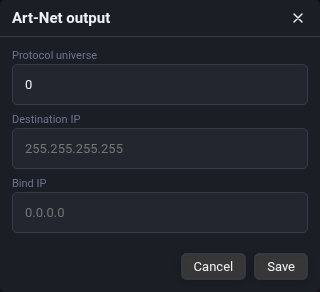
In Unilighter Desktop, multi-universe Art-Net 4 and sACN (E1.31) streaming engines run natively:
- No third-party driver daemons or background utilities are required.
- You can route Universe 1 to a local USB DMX dongle while streaming Universes 2 through 16 over sACN across the stage Ethernet network.
📝 Self-Assessment Quiz
Test your understanding of Network DMX protocols, addressing architectures, and multicast routing:
- Scenario A: An entertainment systems engineer configures an sACN (E1.31) lighting network controlling 24 universes across an arena. By standard convention, what destination IP address will the console use when transmitting packets for Universe 9?
- A)
192.168.1.9 - B)
239.255.0.9 - C)
255.255.255.255 - D)
127.0.0.9
- A)
Correct Answer: B Why this is correct: Under ANSI E1.31, sACN multicast IP addresses are standardized as \(239.255.\text{Universe}_{\text{HighByte}}.\text{Universe}_{\text{LowByte}}\). For Universe 9 (\(0 \times 256 + 9\)), the high byte is
0and the low byte is9, giving239.255.0.9. Why other options are incorrect:192.168.1.9(A) is a private unicast address;255.255.255.255(C) is global broadcast; and127.0.0.9(D) is local loopback.
- Scenario B: How does the sACN (E1.31) protocol achieve seamless, instant console backup failover without requiring a physical A/B cable switch or mechanical relays?
- A) By reversing the polarity of the Ethernet network cable's Pin 1 and Pin 2.
- B) Through the native per-universe Priority field (\(0 - 200\)): the primary console streams at Priority 150 and the backup at Priority 100. Breakout nodes output data only from the highest priority source; if the primary console crashes and stops transmitting, nodes automatically switch to the backup stream after a standard loss-of-signal timeout.
- C) By dropping Ethernet speed from 1 Gbps to 10 Mbps during primary console failure.
- D) By sending an emergency MIDI Timecode SysEx burst to the venue circuit breaker.
Correct Answer: B Why this is correct: sACN includes a built-in per-packet Priority field (\(0 - 200\), default 100). Receiving nodes listen to all incoming streams but output the data from the highest active priority. If the primary console fails, the absence of high-priority packets causes the node to seamlessly output the lower-priority backup stream with zero manual intervention. Why other options are incorrect: Flipping cable polarities breaks Ethernet communication (A); changing link speed does not manage backup streams (C); and MIDI timecode does not govern sACN network arbitration (D).
- Scenario C: An operator sets up an Art-Net 4 network and inadvertently configures the lighting console to broadcast 30 universes of high-density pixel data across the venue’s unmanaged office network switch. What operational problem will immediately occur?
- A) The RS-485 balanced line voltage will rise to 230V AC, melting the pixel fixtures.
- B) The unmanaged switch floods thousands of UDP broadcast packets per second out of every port, overwhelming venue Wi-Fi access points, saturating connected computer CPUs, and causing low-powered Ethernet DMX nodes to drop frames or crash.
- C) The optical color temperature of all stage LED wash lights shifts to 5600K daylight.
- D) All DMX start codes automatically change from
0x00to0xFF.
Correct Answer: B Why this is correct: Broadcast transmission sends every packet to all ports. In high-universe rigs, thousands of packets per second flood the entire network, overwhelming Wi-Fi access points and choking node microcontrollers. Professional networks use unicast Art-Net or multicast sACN with IGMP Snooping on managed switches to route packets only where needed. Why other options are incorrect: Ethernet carries low-voltage digital data and cannot raise voltages to 230V (A); packet flooding does not alter LED optical phosphor chemistry (C); and DMX start codes are payload data unaffected by switch forwarding (D).