Lesson 5.1: Managing 50+ Universes at Stadium Scale
Warning
⚠️ Draft Lesson: This lesson is currently a working draft and is undergoing practical review. Technical labs, workflows, and diagrams may be expanded and refined in upcoming revisions.
On a club stage or intimate theater production, managing one to four DMX universes (\(512\) to \(2,048\) channels) is straightforward. A single USB DMX interface or a small Ethernet node can drive the entire rig with standard 5-pin XLR cables.
When a production scales to an arena, stadium concert tour, or television spectacle (such as the Eurovision Song Contest or Olympic Opening Ceremonies), the hardware landscape changes completely. These productions deploy between 50 and 200+ DMX universes (\(25,000\) to \(100,000+\) parameters), driving hundreds of high-output automated fixtures and thousands of individual LED pixel cells across massive staging architectures.
At this scale, running discrete copper XLR cables from Front of House (FOH) to the stage is physically impossible. Control must transition entirely to high-density optical and Ethernet network backbones.
In this lesson, we examine the network infrastructure required to transport 50+ universes, compare sACN and Art-Net 4 streaming protocols, solve the visual artifact of multi-universe tearing, and configure high-density network output inside Unilighter Desktop.
1. The Physics and Logistics Bottleneck of Copper DMX
Why does copper DMX512 fail when scaling to stadium environments?
- Cable Weight and Physical Bulk: Fifty 5-pin XLR lines spanning 100 meters from Front of House to the stage would require 5,000 meters of heavy copper cable, weighing several hundred kilograms and requiring massive cable ramps that create safety hazards for stadium crowds.
- The 100-Meter Transmission Limit: In large stadiums, cable runs from FOH to the backstage distribution racks routinely exceed \(120 - 150\,\text{meters}\). Copper Ethernet (Cat6a) is limited to \(100\,\text{meters}\), and long RS-485 runs begin suffering signal degradation and pulse jitter.
- Logistical Rigging Time: Patching and testing fifty physical copper lines overhead across trusses takes hours of manual labor during load-in.
The modern stadium solution is simple: all data travels from FOH to the stage over a single tactical fiber-optic cable, where it is split into localized DMX segments by distributed network nodes.
+-------------------------------------------------------------------------+
|                  STADIUM-SCALE NETWORK TOPOLOGY                         |
+-------------------------------------------------------------------------+
|                                                                         |
|  [FOH Console: Unilighter Desktop]                                      |
|    │                                                                    |
|    ▼ (Gigabit Ethernet)                                                 |
|  [Primary Managed Switch: Luminex / Cisco]                              |
|    │                                                                    |
|    ▼ (Tactical Fiber Optic Cable: Neutrik opticalCON, 150m+)            |
|  [Stage Backbone Managed Switch]                                        |
|    ├── (Cat6a Ring) ──> [Catwalk Switch] ──> [8-Port sACN Node] ──> DMX |
|    ├── (Cat6a Ring) ──> [Overhead Truss] ──> [8-Port sACN Node] ──> DMX |
|    └── (Cat6a Ring) ──> [Floor Racks]    ──> [8-Port sACN Node] ──> DMX |
+-------------------------------------------------------------------------+
2. Network DMX Protocols: sACN (ANSI E1.31) vs. Art-Net 4
When streaming dozens of universes across an IP network, lighting consoles use one of two dominant protocols:
| Feature | Streaming ACN (sACN / ANSI E1.31) | Art-Net 4 |
|---|---|---|
| Standardization | Official ANSI / ESTA international standard. | Developed by Artistic Licence (industry de facto). |
| Addressing Model | Native Multicast IP: Universe \(N\) maps to 239.255.x.y. |
Unicast or Broadcast. |
| Network Efficiency | Extremely efficient when combined with IGMP Snooping. | Broadcast can easily overwhelm unmanaged switches. |
| Priority Handling | Native per-packet priority (\(0 - 200\)) for seamless console backup failover. | Priority handling added in later Art-Net revisions. |
| Universe Synchronization | Native Sync Packets (E1.31-2016) eliminate image tearing. | Supports ArtSync packets. |
| Recommended Scope | Stadium-scale production standard; preferred for high-density pixel rigs. | Excellent for small-to-mid setups and media server integration. |
The Vital Role of IGMP Snooping
In a stadium rig streaming 80 universes, the console broadcasts roughly 3,500 network packets every second.
- On a cheap, unmanaged network switch, multicast traffic is treated like broadcast: the switch floods every single packet out of every single port. Small microcontrollers inside 4-port DMX nodes quickly choke on this packet flood and crash.
- In professional touring, production engineers use managed gigabit switches (such as Luminex GigaCore, Cisco Catalyst, or Netgear AV Line) with IGMP Snooping (Internet Group Management Protocol) enabled.
- With IGMP snooping, an 8-port node on the back truss that only needs Universes 1 through 8 tells the switch: "Only send me traffic for multicast addresses
239.255.0.1through239.255.0.8." The switch filters out the other 72 universes, keeping node CPUs running cool and responsive.
3. The Tearing Problem: Why Universe Synchronization Matters
On stadium productions featuring vast arrays of LED battens, video pixel tubes, or moving head matrices, a subtle visual glitch known as image tearing can occur:
Imagine a fast horizontal white strobe sweep traveling across a 30-meter-wide wall composed of 40 LED bars mapped across 20 distinct DMX universes:
- Because network packets travel asynchronously, Universe 12 might arrive at its breakout node \(3\,\text{milliseconds}\) before Universe 13.
- If the breakout nodes immediately stream their incoming packets out to physical DMX lines, the LED bars on Universe 12 will illuminate one frame ahead of Universe 13.
- To the human eye and high-speed broadcast television cameras, the crisp straight line of the strobe sweep appears visibly broken, staggered, or torn horizontally.
Unsynchronized Frame Delivery (Visible Tearing):
Universe 1:  [■■■■■■■■■■]  (Delivered @ 0.0ms)
Universe 2:  [■■■■■■■■■■]  (Delivered @ 0.4ms)
Universe 3:        [■■■■■■■■■■]  (Delayed by 3.2ms -> TEARING ARTIFACT!)
Universe 4:  [■■■■■■■■■■]  (Delivered @ 0.8ms)
The Solution: sACN Universe Synchronization (E1.31-2016)
To eliminate tearing, Unilighter and professional sACN nodes use Universe Synchronization:
- The console streams universe data packets to nodes, but marks them with a
Synchronization Address. - Breakout nodes receive the data and hold it in an internal buffer without immediately outputting it to the fixtures.
- Once the console has transmitted all 50+ universes for that frame tick, it broadcasts a single, tiny Sync Packet.
- The moment the sync packet arrives, every node across the entire stadium flushes its buffered channels simultaneously to copper DMX lines.
- All 25,000+ parameters update at the exact same physical microsecond, completely eliminating visual tearing across broadcast cameras.
4. Configuring Network Output in Unilighter Desktop
In Unilighter Desktop, configuring multi-universe network routing is handled directly through the Network Output Settings dialog:
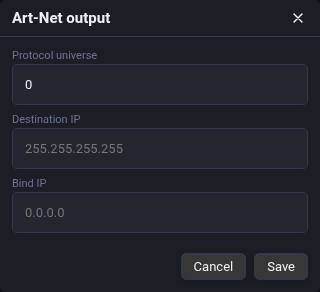
Configuration Steps:
- Network Interface Binding: Select the dedicated physical network adapter connected to your lighting network (e.g.
eth0or your 10-Gigabit optical fiber adapter). Never route sACN over general venue Wi-Fi. - Protocol Selection: Toggle between sACN (E1.31) and Art-Net 4. For stadium deployments, select sACN.
- Transmission Mode: Choose Multicast (standard for sACN networks with managed switches) or specify Unicast destination IPs if communicating directly with dedicated media servers.
- Universe Routing Table: Map Unilighter internal universe numbers (\(1, 2, 3...\)) to external network universe IDs.
Once configured, Unilighter's native C++ engine streams packets directly onto the fiber backbone with zero browser sandbox latency.
5. Hierarchical Patching Architecture at Scale
Managing 500+ fixtures in a single flat list is impossible during rehearsals. Stadium touring files use Zone-Based Universe Allocation and strict Tag Taxonomies:
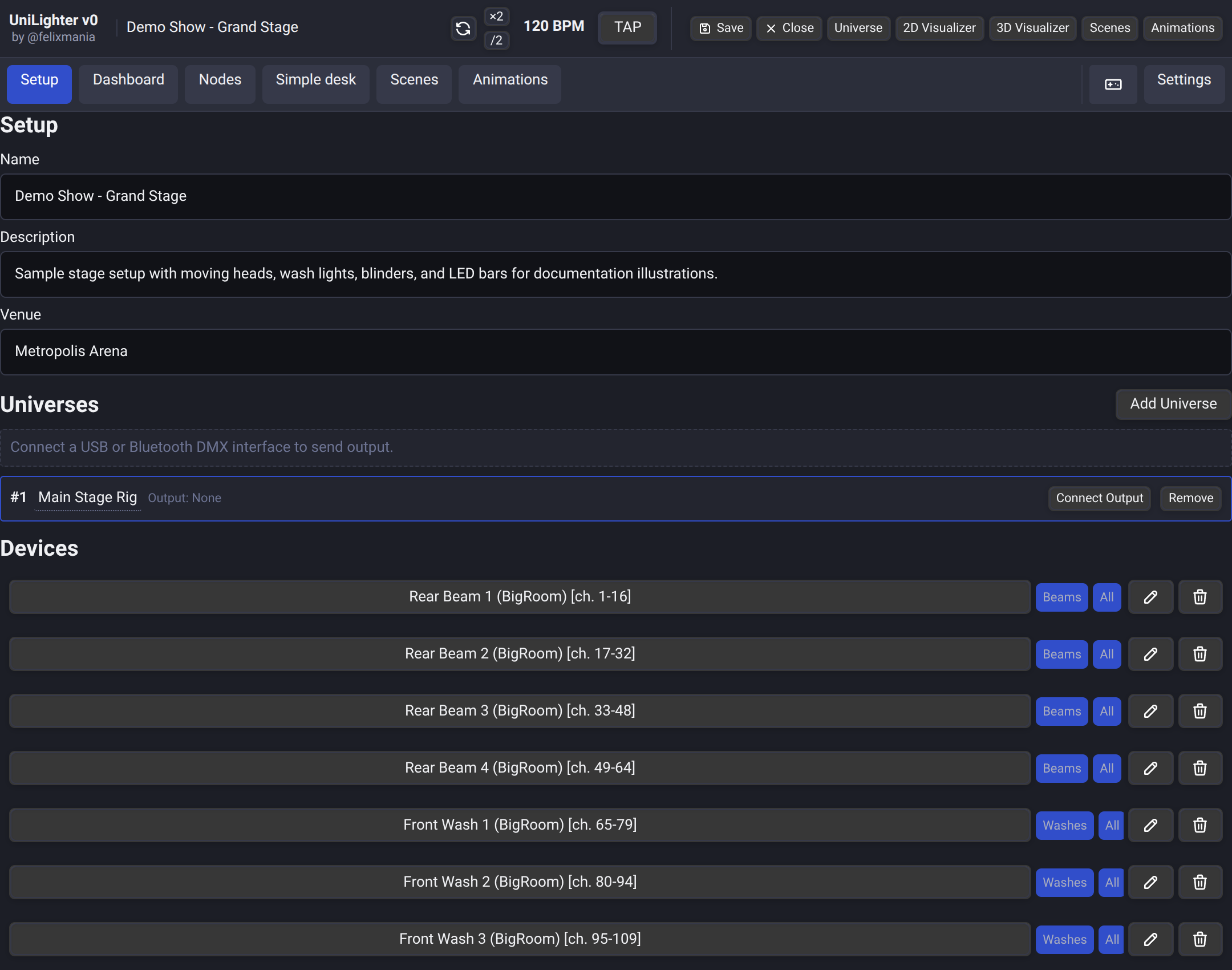
Recommended Stadium Universe Zoning:
Universe Allocation Matrix:
├── Universes 01 – 10: Overhead Backline Truss (Automated Spots & Beams)
├── Universes 11 – 20: Midstage & Overhead Washes
├── Universes 21 – 30: Front-of-House Truss (Key Lights, Specials & Audience Blinders)
├── Universes 31 – 40: Stage Floor & Wing Beams
└── Universes 41 – 60+: High-Density LED Batten Matrix & Pixel Strobe Arrays
Semantic Tagging for Stadium Control:
In Unilighter’s Device Patch (/#/setup), attach structured multi-dimensional tags to every unit:
#truss-overhead,#truss-mid,#floor-wings#spots,#beams,#pixel-bars,#blinders#zone-stadium-left,#zone-stadium-right
This allows you to target 200 beams on the overhead truss in one click with #truss-overhead AND #beams, regardless of which of the ten universes they are patched across.
6. Hands-On Lab: Configuring a Multi-Universe Network in Unilighter
Follow this practical procedure to configure and verify high-density network streaming:
Step 1: Open Network Output Settings
- In Unilighter Desktop, click the Settings gear icon in the top header.
- Select Network Output Settings.
Step 2: Bind the Network Adapter
- In the Network Interface dropdown, select your active Gigabit Ethernet or Fiber adapter (e.g.
10.0.0.100or192.168.1.100). - Verify that your computer and your Ethernet DMX nodes share the same subnet mask (
255.255.255.0or255.255.0.0).
Step 3: Enable sACN Multicast Streaming
- Enable the master Network Output toggle switch.
- Select protocol sACN (E1.31).
- Set transmission mode to Multicast.
- Enable Universe Synchronization.
- Set priority to 100 (default primary console priority).
Step 4: Verify Multi-Universe Output
- Navigate to Device Patch (
/#/setup). - Patch fixtures across Universes 1, 2, 3, and 4.
- Open Simple Desk (
/#/simple-desk). - Select Universe 2 and raise Fader 1 to \(100\%\): observe the activity LED on your physical Ethernet-to-DMX node flash green, confirming packets are streaming flawlessly across the IP network.
📝 Self-Assessment Quiz
Test your understanding of stadium-scale network topologies and multi-universe protocols:
- Scenario A: During an arena concert broadcast on live television, a rapid horizontal color sweep passes across a 40-universe pixel wall. The television director notes that the graphic sweep appears jagged and broken horizontally, with some columns updating a fraction of a second ahead of others. What network protocol feature must be enabled in the lighting console to eliminate this visual tearing?
- A) 10-position binary DIP switch addressing on Universe 1.
- B) sACN Universe Synchronization (E1.31), which commands all nodes across all universes to buffer data and flush output simultaneously upon receiving a master sync packet.
- C) An active 120-ohm passive transmission line resistor plugged into the console’s USB port.
- D) Lowering the console's Ethernet network adapter speed from 1 Gigabit to 10 Megabits half-duplex.
Correct Answer: B Why this is correct: Without universe synchronization, packets for different universes arrive with slight network latency jitter, causing adjacent fixtures to update on different refresh frames. sACN Universe Synchronization holds all buffers until all universes have arrived, guaranteeing simultaneous frame output. Why other options are incorrect: Binary DIP switches (A) set fixture start channels; 120-ohm resistors (C) are RS-485 line terminators, not network devices; and throttling network speed to 10 Mbps (D) would cause severe packet loss.
- Scenario B: Why do professional touring network engineers insist on using managed network switches with IGMP Snooping enabled when distributing 50+ sACN universes across a stadium?
- A) Because unmanaged switches treat multicast sACN packets like broadcast, flooding thousands of packets every second to every connected node and overwhelming their microcontrollers.
- B) Because sACN packets contain high-voltage electrical pulses that melt plastic jacks on unmanaged consumer switches.
- C) Because IGMP Snooping automatically calculates the inverse-square photometric throw distance for all moving heads on the truss.
- D) Because ESTA standards require all touring network switches to be painted yellow for fire marshal compliance.
Correct Answer: A Why this is correct: Without IGMP Snooping, multicast packets are broadcast indiscriminately to all ports. In a 50+ universe network streaming thousands of packets per second, small 4-port nodes crash from packet flooding. IGMP Snooping ensures nodes receive only the specific universes they are listening to. Why other options are incorrect: Network cables carry low-voltage digital Ethernet signals without damaging ports (B); IGMP snooping is an IP network routing mechanism, not a photometric calculator (C); and equipment paint colors have zero technical bearing on network integrity (D).
- Scenario C: Why is fiber-optic cabling (such as Neutrik opticalCON tactical fiber) standard for connecting Front-of-House to stage racks in stadium venues?
- A) Because copper DMX cables cannot carry warm tungsten color temperatures beyond 3200 Kelvin.
- B) Because copper Ethernet cables are physically limited to 100 meters, whereas stadium cable runs often exceed 150 meters, and a single lightweight fiber strand can carry hundreds of universes without electrical ground loops.
- C) Because fiber-optic glass strands reflect ultraviolet light onto performers to act as stage backlight.
- D) Because DMX512 standards prohibit sending RS-485 signals through copper wiring whenever audience capacity exceeds 5,000 people.
Correct Answer: B Why this is correct: Copper Ethernet (Cat6a) is strictly limited to 100 meters, and bundling dozens of heavy copper XLR cables across stadium floors is logistically impossible. Tactical fiber easily spans hundreds of meters with zero signal loss, immune to electromagnetic interference and ground hum. Why other options are incorrect: DMX cables carry digital data, having no bearing on optical color temperature (A); fiber strands are encased in opaque protective rubber and do not illuminate stages (C); and DMX512 standardizes electrical signaling regardless of audience count (D).