Lesson 4.2: Cognitive Offloading: Let Software Handle the Background Chores
Warning
⚠️ Draft Lesson: This lesson is currently a working draft and is undergoing practical review. Technical labs, workflows, and diagrams may be expanded and refined in upcoming revisions.
In high-pressure live environments—such as a festival mainstage, an electronic dance club, or an arena rock concert—the visual atmosphere changes continuously for three to six hours without a pause.
If a lighting operator must manually wiggle joystick axes to keep moving heads in motion, manually tap color change buttons every eight bars, and simultaneously ride dimmer faders, the human brain quickly hits an insurmountable cognitive wall.
In psychology and ergonomics, the strategy to overcome this bottleneck is called cognitive offloading: delegating repetitive, predictable physical chores to an automated system so human attention can focus entirely on high-level creative decisions.
In this lesson, we establish the core philosophy of live show automation, separate background chores from foreground artistic choices, and explore how Unilighter's visual architecture transforms you from a frantic button-masher into a relaxed, expressive visual conductor.
1. The Human Bandwidth Limit in Live Show Control
The human working memory can actively process only a small handful of independent variables simultaneously (Miller’s Law: roughly \(7 \pm 2\) discrete chunks).
Consider what an operator on a 40-fixture automated rig must manage during an energetic DJ set:
- Pan & Tilt: 8 moving head spot coordinates on the back truss, 4 floor beams.
- Dimmer Channels: Front key wash, backline spots, side fills, strobe battens, audience blinders.
- Color Parameters: Hue and saturation for three separate fixture groups.
- Beam Shape & Optics: Motorized zoom angles, rotating gobo carousels, prisms.
- Rhythm: Synchronizing bumps and flashes to musical downbeats.
Attempting to control all of these variables manually with ten physical fingers is mathematically impossible. When operators attempt it, they experience cognitive collapse:
- The moving heads freeze in static awkward positions because the operator is busy changing colors.
- The color scheme remains stuck in blue for forty minutes because the operator is focused on riding motor sweeps.
- The operator misses the biggest drop of the night because both hands were tied up adjusting beam zoom levels.
The solution is not more faders or faster hands; the solution is architectural division of labor.
2. The Great Divide: Background Chores vs. Foreground Choices
To build a sustainable live workflow, we divide every lighting parameter on stage into two distinct operational classes:
+-------------------------------------------------------------------------+
|                  THE COGNITIVE DIVISION OF LABOR                        |
+-------------------------------------------------------------------------+
|                                                                         |
|  🤖 BACKGROUND CHORES (Automate via Node Graphs & LFOs)                 |
|  - Continuous organic motion (pan/tilt figure-8 sweeps, circular orbits)|
|  - Ambient color breathing (slow hue drift, subtle saturation shifts)   |
|  - Rhythmic pulse synchronization (kick-reactive dimmers, beat ripples) |
|  - Multi-cell pixel chasing (cascading wave offsets across LED bars)    |
|                                                                         |
|                                                                         |
|  🎛️ FOREGROUND CHOICES (Retain 100% Manual Human Control)             |
|  - Master Stage Energy (Grand master intensity, zone blackout cuts)     |
|  - Macro Color Palettes (Instant shift: e.g. Warm Amber -> Cold Cyan)   |
|  - Emotional Drops & Accents (Audience blinders, white strobe bursts)   |
|  - Soloist Focus (Snapping a follow-spot special to the lead performer) |
+-------------------------------------------------------------------------+
2.1 What to Automate (The Background Chores)
Background tasks are continuous, cyclic, and mathematically deterministic:
- Spatial Trajectories: Moving heads rarely need manual joystick steering during a dance set. A smooth Lissajous curve or sine-wave orbit generated by an oscillator looks fluid, natural, and never jerks.
- Ambient Color Cycling: Having lights gently breathe between complementary shades (e.g. drifting between deep indigo and violet) creates depth without requiring manual slider adjustments.
- Rhythmic Beat Reactivity: Triggering a subtle intensity dip or pulse on every kick drum is a mechanical task that audio FFT frequency nodes can execute with millisecond accuracy.
2.2 What to Keep Manual (The Foreground Choices)
Foreground decisions require human artistic judgment, musical anticipation, and emotional empathy:
- Total Stage Intensity: Deciding when to plunge the room into near-total darkness during a vocal breakdown requires reading the room's emotional energy.
- High-Impact Color Shifts: Deciding that the entire stage should flip from deep monochrome red to piercing ice-blue on the second drop is a creative statement.
- Momentary Blinder Bursts: Hitting the audience with high-intensity warm white blinders on Beat 1 of the chorus must be felt and timed by a human performer.
3. The Unilighter Live Busking Cockpit
When background chores are handled by Unilighter's automated engines, your Live Dashboard becomes clean, spacious, and low-stress:
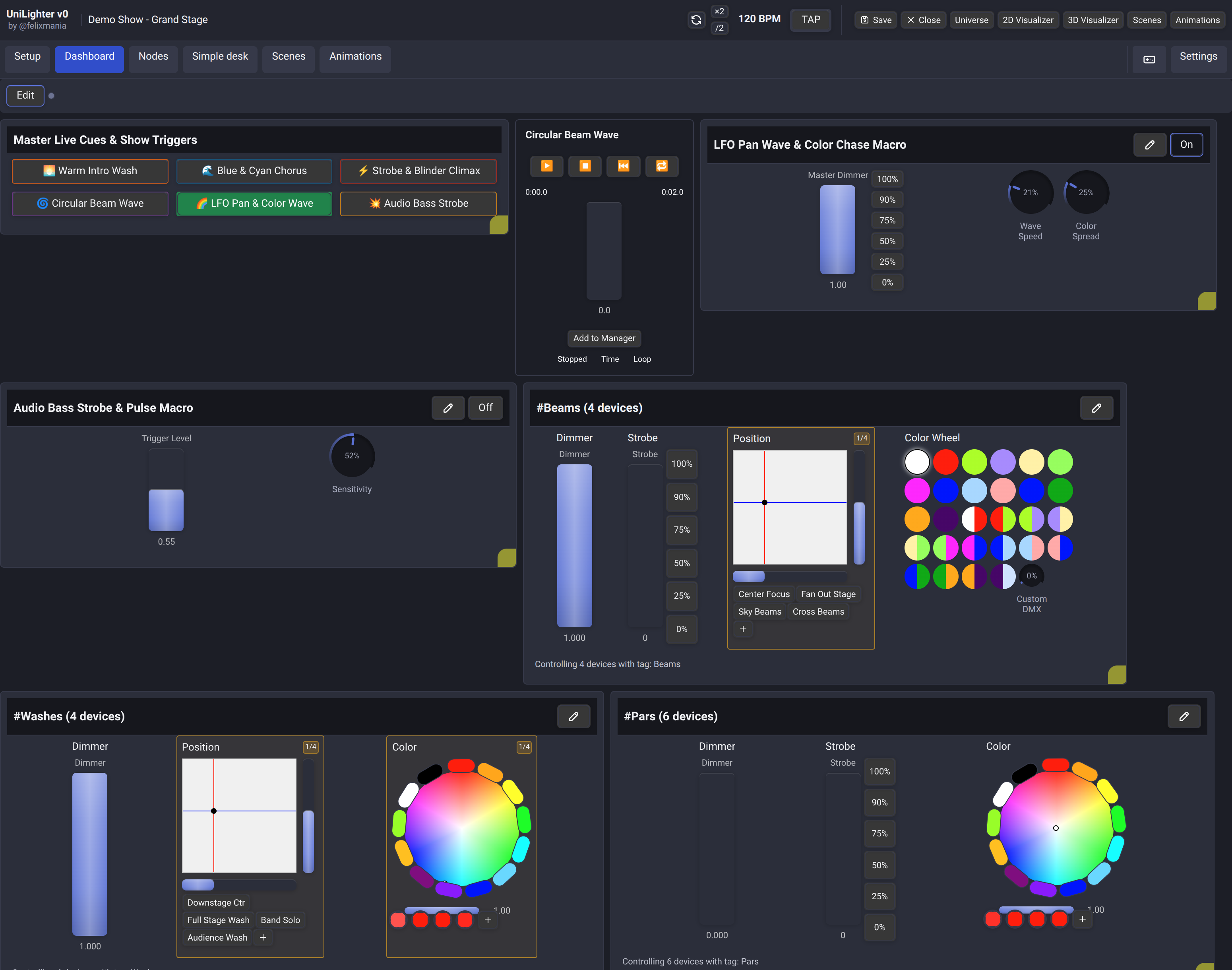
In this cockpit layout:
- Background Generators Run Continuously: Node graphs and LFO oscillators quietly calculate motor positions and color gradients in the background.
- High-Level Macro Faders: Instead of forty channel sliders, the operator looks at three or four high-level group masters:
#backline-intensity,#front-wash,#blinder-accent. - Instant Palette Triggers: Clean buttons allow one-touch palette swaps that instantly re-theme the entire stage.
- Physical Tactile Freedom: The operator’s hands are rested, poised over a physical MIDI controller, ready to punch blinder hits and ride master energy as the music demands.
4. Priority Layering: The Secret to Non-Destructive Override
How do automated background generators and live manual controls coexist without fighting each other?
In primitive consoles, moving a physical slider permanently overwrites the automated chase. To restore the automated motion, the operator must manually re-engage the generator or reload a preset.
In Unilighter, this problem is solved through Numerical Priority Arbitration:
- Background Node Graphs output parameter streams at baseline priority (
Priority: 0or5). - Live Dashboard Faders & Knobs output at manual operator priority (
Priority: 100). - Momentary Flash / Blinder Buttons output at override priority (
Priority: 20–50or higher).
DMX Channel Arbitration:
[Background Node Graph (Priority: 5)]  ──> Output: Pan = 142 (Continuous Sine)
                                                 │
[Manual Fader Override (Priority: 100)] ──> Output: Pan = 210 (Operator grabs control)
                                                 │
                                                 ▼
                                        WINNER: Pan = 210 (Manual wins!)
When you release the manual control or let go of the bump button, the manual override deactivates. The channel immediately and seamlessly falls back to the underlying background node stream. You never have to "restart" the automation; it was running beneath your fingers the entire time.
5. Hands-On Lab: Designing a Division of Labor
Follow this practical architectural exercise to plan an automated busking setup in Unilighter:
Step 1: Inventory Your Stage Fixtures
Assume a standard mid-sized club stage with:
- 6 Moving Head Spots on the rear overhead truss (
#backline-spots). - 4 RGBW Wash Bars mounted vertically on stage wings (
#side-bars). - 2 Audience 2-Lite Blinders mounted over the front rail (
#blinders).
Step 2: Define Background Automation Roles
Open a notepad and declare what the software will handle:
#backline-spots: Automated slow sine-wave tilt sweep (\(0.1\,\text{Hz}\)) with an oscillating pan fan.#side-bars: Automated cascading color chase synced to master BPM clock subdivisions (\(1/4\) note).- Parameter status: Both groups run in the background with zero manual touch required during standard grooves.
Step 3: Define Foreground Manual Controls
Declare the high-level controls you will place on your Live Dashboard:
- Fader 1: Master Intensity for
#backline-spots(allows dimming during verses). - Fader 2: Master Intensity for
#side-bars. - Button Pad 1: Momentary Flash for
#blinders(for musical drops and snare hits). - Color Selector Widget: Global color palette (Warm Tungsten / Indigo / Acid Green).
By establishing this clear separation before touching a single wire or cue, you ensure that your live busking workflow remains calm, responsive, and fatigue-free.
📝 Self-Assessment Quiz
Test your comprehension of cognitive offloading and live performance automation:
- Scenario A: During an energetic three-hour club set, an operator notices that their hands feel fatigued, their moving heads remain pointed in the same static direction for long periods, and they repeatedly miss triggering blinder accents on musical drops. What architectural flaw in their console setup is the primary cause of this problem?
- A) The DMX512 universe cabling exceeds the physical RS-485 transmission limit of 32 unit loads.
- B) The operator has failed to offload repetitive background chores (such as continuous movement and ambient color breathing) to automated engines, causing cognitive overload.
- C) The lighting console’s power supply is delivering insufficient amperage to the physical fader potentiometers.
- D) The luminaires have their internal binary DIP switch 10 set to sound-active mode, which rejects external DMX commands.
Correct Answer: B Why this is correct: When an operator attempts to manage low-level cyclic tasks (like pan/tilt movement and continuous color updates) manually alongside high-level show dynamics, human working memory becomes exhausted, leading to tunnel vision and missed cues. Why other options are incorrect: RS-485 transceiver load limits (A) cause electrical signal reflections and jitter, not operator fatigue; fader potentiometers consume microwatts of control current and do not cause human exhaustion (C); and DIP switch sound-active settings (D) disable DMX control but do not explain manual workflow overload.
- Scenario B: In Unilighter's priority architecture, what happens when an operator touches a physical manual fader controlling a moving head that is simultaneously receiving a continuous sine-wave position signal from a background Node Graph?
- A) The console triggers an emergency channel collision warning and blackouts all fixtures on that universe.
- B) The Node Graph's process loop crashes and permanently deletes the oscillator wire connections.
- C) The manual fader (operating at priority 100) seamlessly overrides the Node Graph (operating at baseline priority), and control smoothly reverts to the Node Graph as soon as the manual control is released.
- D) The console averages the mathematical sum of the manual fader and the Node Graph, dividing the result by two.
Correct Answer: C Why this is correct: Unilighter’s numerical priority engine evaluates the highest priority signal on every channel. Manual control (Priority 100) takes precedence over background automation (Priority 0–15). When released, the channel automatically falls back to the running background stream without state loss. Why other options are incorrect: Unilighter does not trigger blackout errors on multi-source control (A); node connections are persisted and do not crash on overrides (B); and priority arbitration uses highest-value arbitration, not mathematical averaging (D).
- Scenario C: Which of the following operational tasks is best suited to remain under direct human manual control rather than being fully delegated to background automation?
- A) Calculating a smooth 60-second continuous Lissajous figure-8 trajectory for overhead moving heads.
- B) Triggering explosive audience blinder accents and choosing when to plunge the stage into a dramatic blackout during a breakdown.
- C) Modulating a slow cyclic hue shift between deep blue and turquoise on background wash lights.
- D) Emitting a steady 128 BPM pulse clock synchronized to fractional musical subdivisions.
Correct Answer: B Why this is correct: Emotional timing—such as hitting peak blinder bursts on drops and knowing when to use negative space during breakdowns—requires human artistic judgment, musical empathy, and crowd reading that cannot be reduced to static mathematical loops. Why other options are incorrect: Lissajous motion curves (A), cyclic hue shifts (C), and steady BPM clock subdivisions (D) are cyclic, deterministic tasks ideally suited for automated LFO and BPM nodes.