# Grand Master & Blackout
The **Grand Master** scales the intensity of the whole rig from one fader. **Blackout** takes every fixture to dark instantly. Use them on a stop, between songs, or whenever the stage must go dark without stopping the show.
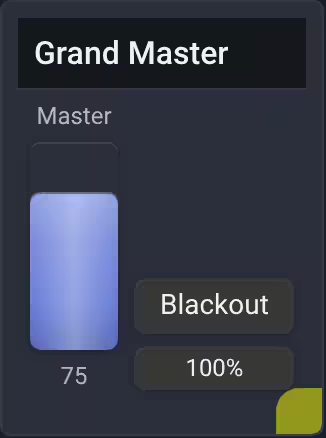 Each project has one Grand Master. Every Grand Master widget, the top-bar button and connected remote dashboards control the same level and Blackout.
## Add the widget
In Edit mode, add a **Grand Master** widget from the widget menu of the [Dashboard](https://unilighter.cc/info/for-ai/docs/dashboard.md) or of a [Group Container](https://unilighter.cc/info/for-ai/docs/dashboard/widget-group.md). The widget has no settings.
- **Master** fader: sets the Grand Master level from 0 to 100.
- **Blackout**: turns Blackout on or off. It is independent of the fader, so turning it off returns the stage to the current level.
- **100%**: returns the level to full. It does not turn off Blackout, so a reset never lights the stage by itself. It is unavailable while the level is already 100.
All three controls accept MIDI, keyboard and OSC bindings in Assign Mode, like other Dashboard controls. See [Bindings](https://unilighter.cc/info/for-ai/docs/bindings.md).
## Use the top-bar button
The top bar shows the Grand Master next to the BPM controls, on every console page:
| Button | Meaning |
| :--- | :--- |
| GM 100% | Full level. |
| Amber GM 60% | The level is reduced. The percent shows 100 or 0 only at exactly full or zero. |
| Flashing amber GM 0% | The level is at zero. With reduced motion enabled in the operating system, the button stays filled instead of flashing. |
| Red Blackout | Blackout is on. |
Click the button to open a panel with the same fader, Blackout and 100% controls. Press Escape, click outside the panel or use its close button to dismiss it.
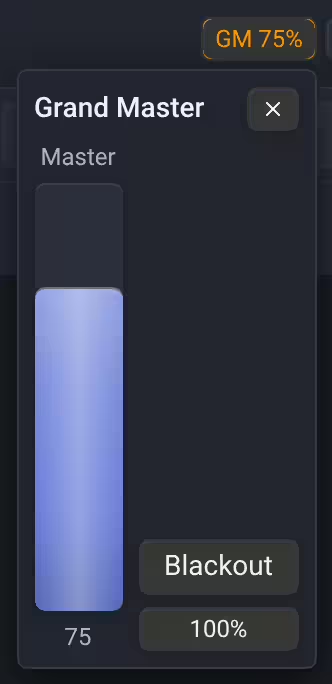 The panel has no bindings. Assign hardware controls on a Grand Master widget.
## What the Grand Master affects
- Only intensity. Positions, colors, gobos and running scenes, animations and node graphs continue unchanged, so lifting Blackout brings back the current look in place.
- Each fixture is dimmed once: through its physical dimmer channel (a shared master dimmer when the fixture has one), or through its color brightness when it has no dimmer channel. Amber and UV channels are dimmed too on fixtures without a dimmer channel.
- Blackout is instant.
- Recorded scenes and the [Layers](https://unilighter.cc/info/for-ai/docs/priorities/layers.md) inspector show the values before the Grand Master. Recording a scene at 50% does not halve its levels.
- The 2D and 3D visualizers show the dimmed output.
- [Dark preparation](https://unilighter.cc/info/for-ai/docs/animations/dark-prep.md) does not treat a lit fixture as dark while the Grand Master or Blackout hides it, so fixtures do not visibly move back when you lift Blackout.
The Grand Master does **not** affect [Simple Desk](https://unilighter.cc/info/for-ai/docs/simple-desk.md) channel overrides. To force every channel of the universe to zero, use Simple Desk All Zeros.
## Save and remote control
The level and Blackout are saved with the project and restored when you open it, including an active Blackout. A new project starts at 100% without Blackout.
[Remote dashboards](https://unilighter.cc/info/for-ai/docs/remote-control.md) show Grand Master widgets with the same fader, Blackout and 100% controls.
## Limitations
- Fixtures with only a white channel and no RGB, and fixtures with only a color wheel or shutter and no dimmer channel, are not dimmed.
- Absolute MIDI faders have no pickup: moving a non-motorized fader sets the Grand Master to the fader position immediately.